Customer Journey Map Playbook
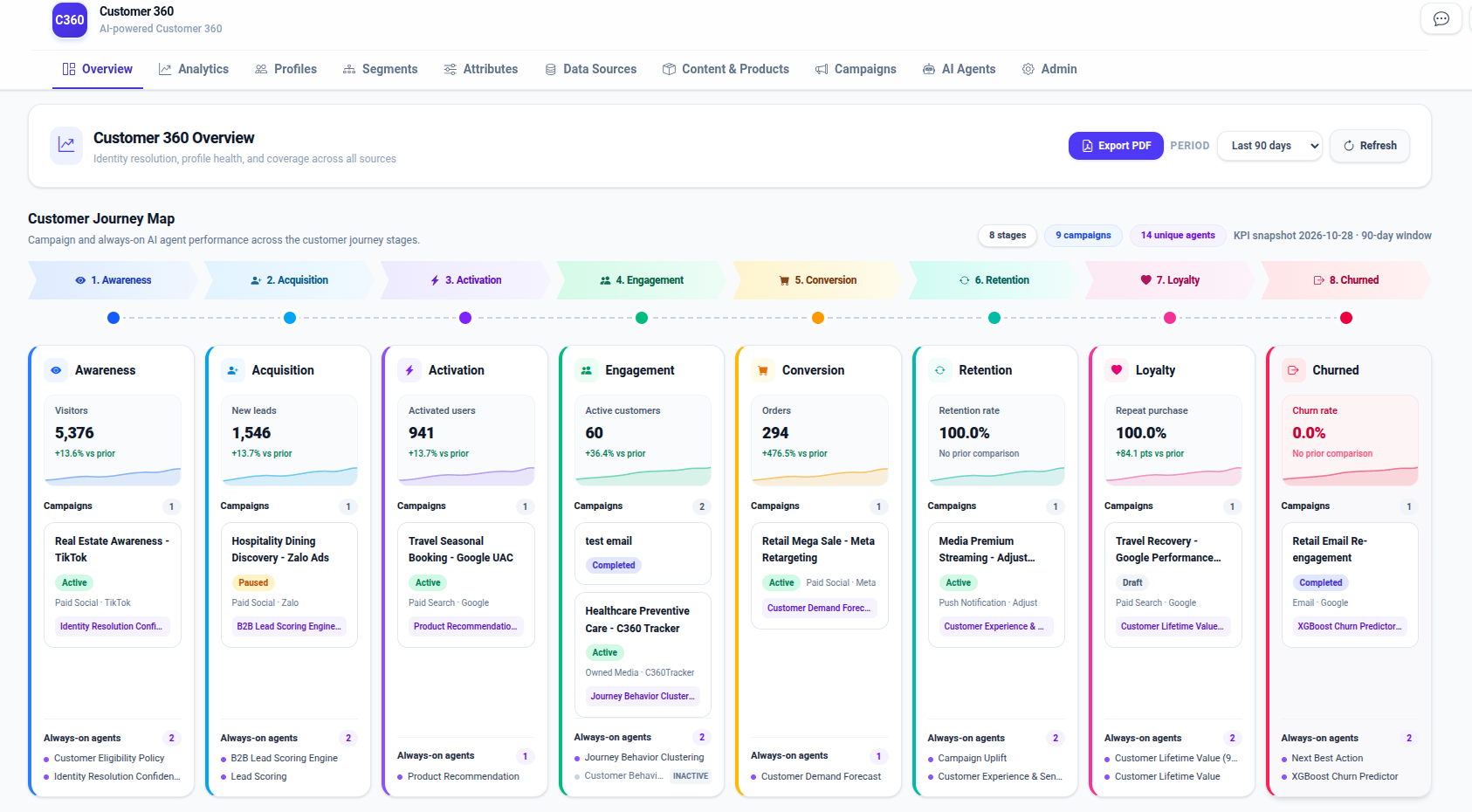
The Customer Journey Map is the tenant-scoped marketing, product, and revenue operations playbook and analytics report in LEO CDP. It tracks how customer profiles progress through eight canonical lifecycle stages, uniting behavioral tracking, Customer Identity Resolution (CIR), Audience Builder segments, approval-gated campaign workflows, and AI agents in a single operational view. Each stage combines:
- a primary KPI and supporting stage KPIs with period-over-period comparisons;
- marketing campaigns targeted at the stage (
crm_campaign.journey_stage); - campaign-to-agent assignments (
plan,decide,optimizeincrm_campaign_agent); and - always-on AI agents configured for continuous scoring and optimization (
cdp_ai_agents.journey_stage).
The report is rendered on the Overview Dashboard
(overview-dashboard.html
and overview-view.js)
and exposed through GET /reporting/journey
(reporting_api.py)
backed by reporting_respository.py
and customer360.vw_journey_stage_report.
Table of Contents
- The Eight Journey Stages & KPI Catalog Reference
- Source of Truth & Schema Contracts
- End-to-End Processing Pipeline & UI Behavior
- Stage-by-Stage Processing Logic
- Operational Playbook: Step-by-Step Setup Guide
- How to Test Locally
- Troubleshooting
- Operational & Tenant-Safety Rules
- End-to-End Industry Use Cases
- Use Case 1: E-Commerce (B2C) — Web Visitor to Repeat Buyer
- Use Case 2: Education & EdTech (B2C) — Course Explorer to Enrolled Graduate
- Use Case 3: Affiliate & Partner Marketing (B2B2C) — Publisher Referral to Settled Conversion
- Use Case 4: Enterprise SaaS (B2B) — LEO CDP Dogfooding & Adoption Journey
- Cross-Use-Case Verification Checklist & SQL
1. The Eight Journey Stages & KPI Catalog Reference
Stages are ordered and rendered consistently across the database, DAO, API, seeding pipeline, and frontend UI:
| # | Stage (journey_stage) | Label | Meaning | Primary KPI (metric_code) | Supporting KPI (metric_code) | Default Stage AI Agent (agent_code) | Typical Next Action |
|---|---|---|---|---|---|---|---|
| 1 | awareness | Awareness | A person has been reached or observed but has not yet shown a qualified acquisition signal. | visitors (count, higher is better) | awareness_conversion (percent) | eligibility_policy / data_quality_cir_confidence | Build reach, capture consent, and create a recognizable first touch. |
| 2 | acquisition | Acquisition | A visitor has become an identifiable lead or supplied a qualified acquisition signal. | new_leads (count, higher is better) | acquisition_conversion (percent) | lead_scoring / b2b_lead_scoring_rules | Qualify and nurture the lead with relevant proof and offers. |
| 3 | activation | Activation | The person has completed an initial product, app, account, or onboarding milestone. | activated_users (count, higher is better) | activation_conversion (percent) | product_recommendation | Guide the person to the first meaningful value moment. |
| 4 | engagement | Engagement | The person is actively using the product or interacting across one or more channels. | active_customers (count, higher is better) | purchase_frequency (ratio) | journey_behavior_clustering / behavior_anomaly_detector | Increase useful engagement and reduce friction. |
| 5 | conversion | Conversion | The person has completed a target commercial action, such as an order, booking, or subscription. | orders (count, higher is better) | conversion_rate (percent) | customer_demand_forecast | Improve conversion quality, basket size, and repeat intent. |
| 6 | retention | Retention | A converted customer remains active over a comparison period. | retention_rate (percent, higher is better) | churn_risk_rate (percent, lower is better) | campaign_uplift / cx_sentiment_llm_v1 | Protect the relationship and intervene when churn risk rises. |
| 7 | loyalty | Loyalty | A retained customer repeatedly purchases, advocates, or demonstrates durable high value. | repeat_purchase_rate (percent, higher is better) | referral_rate (percent) | clv_prediction / clv_regression_v1 | Reward loyalty, referrals, and premium-tier behavior. |
| 8 | churned | Churned | A customer has stopped engaging or purchasing in the current window compared with the prior window. | churn_rate (percent, lower is better) | winback_rate (percent, higher is better) | next_best_action / churn_prediction_v2 | Trigger re-engagement, win-back, or suppression-safe recovery journeys. |
Note:
churnedis a canonical journey stage, distinct from the predictivechurn_risk_tiercolumn (low,medium,high,critical) oncdp_master_profiles. A customer can havechurn_risk_tier = 'high'while still inretention;churnedrepresents customers who have lapsed and are tracked by the Churned stage and win-back programs.
Complete 19-Metric Catalog (customer360.cdp_journey_metric)
Every KPI in the Customer Journey Map is defined in customer360.cdp_journey_metric
and snapped daily into customer360.cdp_journey_metric_daily:
metric_code | journey_stage | Label | unit | source | is_primary | higher_is_better | Windows (window_days) | Computation Contract |
|---|---|---|---|---|---|---|---|---|
visitors | awareness | Visitors | count | event_lake | TRUE | TRUE | 1, 7, 30, 90 | Distinct visitor identities observed in event lake within [report_date - W + 1, report_date]. |
awareness_conversion | awareness | Conversion to next | percent | event_lake | FALSE | TRUE | 1, 7, 30, 90 | 100.0 * new_leads / NULLIF(visitors, 0) in the trailing window. |
new_leads | acquisition | New leads | count | event_lake | TRUE | TRUE | 1, 7, 30, 90 | Distinct profiles/identities reaching acquisition in the trailing window. |
acquisition_conversion | acquisition | Conversion to next | percent | event_lake | FALSE | TRUE | 1, 7, 30, 90 | 100.0 * activated_users / NULLIF(new_leads, 0) in the trailing window. |
activated_users | activation | Activated users | count | event_lake | TRUE | TRUE | 1, 7, 30, 90 | Distinct profiles completing an onboarding/activation event in the trailing window. |
activation_conversion | activation | Conversion to next | percent | event_lake | FALSE | TRUE | 1, 7, 30, 90 | 100.0 * active_customers / NULLIF(activated_users, 0) in the trailing window. |
active_customers | engagement | Active customers | count | transaction | TRUE | TRUE | 1, 7, 30, 90 | Distinct master_profile_id with valid transactions in crm_transactions during window W. |
purchase_frequency | engagement | Purchase frequency | ratio | transaction | FALSE | TRUE | 1, 7, 30, 90 | ROUND(buyer_orders / NULLIF(active_customers, 0), 4) in window W. |
orders | conversion | Orders | count | transaction | TRUE | TRUE | 1, 7, 30, 90 | Count of crm_transactions in window W excluding rule->'exclude_status' (cancelled, failed, refunded). |
conversion_rate | conversion | Conversion rate | percent | event_lake | FALSE | TRUE | 1, 7, 30, 90 | Percentage of visitors/active evaluators completing a conversion in window W. |
retention_rate | retention | Retention rate | percent | transaction | TRUE | TRUE | 7, 30, 90 (w >= 7) | 100.0 * retained_buyers / NULLIF(previous_buyers, 0) comparing current window W to prior window W. |
churn_risk_rate | retention | Churn risk | percent | profile | FALSE | FALSE | 1 (point-in-time) | 100.0 * COUNT(*) FILTER (WHERE churn_probability >= 0.7) / NULLIF(COUNT(*), 0) on active profiles (status_code = 1). |
repeat_purchase_rate | loyalty | Repeat purchase | percent | transaction | TRUE | TRUE | 30, 90 (w >= 30) | 100.0 * COUNT(*) FILTER (WHERE orders >= 2) / NULLIF(active_customers, 0) in window W. |
referral_rate | loyalty | Referral rate | percent | event_lake | FALSE | TRUE | 1, 7, 30, 90 | Share of active customers generating referral events in window W. |
churn_rate | churned | Churn rate | percent | transaction | TRUE | FALSE | 7, 30, 90 (w >= 7) | 100.0 * (previous_buyers - retained_buyers) / NULLIF(previous_buyers, 0) (100 - retention_rate). |
winback_rate | churned | Win-back rate | percent | event_lake | FALSE | TRUE | 1, 7, 30, 90 | Percentage of previously lapsed/churned profiles re-engaging or converting in window W. |
campaign_spend | NULL (all stages) | Campaign spend | currency | campaign | FALSE | FALSE | 1, 7, 30, 90 | Sum of crm_campaign_performance_daily.spend grouped by (journey_stage, currency) and dim_type IN ('all', 'campaign', 'agent'). |
campaign_conversions | NULL (all stages) | Campaign conversions | count | campaign | FALSE | TRUE | 1, 7, 30, 90 | Sum of crm_campaign_performance_daily.conversions grouped by (journey_stage, currency) and dim_type. |
campaign_revenue | NULL (all stages) | Campaign revenue | currency | campaign | FALSE | TRUE | 1, 7, 30, 90 | Sum of crm_campaign_performance_daily.revenue_estimated grouped by (journey_stage, currency) and dim_type. |
2. Source of Truth & Schema Contracts
The canonical 8-stage vocabulary is defined in
journey.py:
awareness | acquisition | activation | engagement | conversion | retention | loyalty | churnedThe database enforces this exact vocabulary via CHECK constraints across:
customer360.cdp_master_profiles.lifecycle_stagecustomer360.crm_campaign.journey_stagecustomer360.cdp_ai_agents.journey_stagecustomer360.cdp_journey_metric.journey_stagecustomer360.cdp_journey_metric_daily.journey_stage
Schema and migration files:
database-schema.sql— canonical schema definition.- Legacy upgrade, step 017 — adds
journey_stageto campaigns and AI agents, createscrm_campaign_agent, normalizes profilelifecycle_stagevalues across tenants under RLS, and seedsLIFECYCLE_BEHAVIOR_*_BASEpersona scoring baselines. - Legacy upgrade, step 018 — creates
cdp_journey_metric,cdp_journey_metric_domain,cdp_journey_metric_daily,refresh_journey_metrics_pg(p_tenant, p_date), andvw_journey_stage_report.
3. End-to-End Processing Pipeline & UI Behavior
flowchart TD
    RAW[Raw source touches] --> CIR[Customer Identity Resolution]
    CIR --> PROFILE[cdp_master_profiles]
    PROFILE --> ENRICH[Profile enrichment and scoring]
    ENRICH --> STAGE[8-stage lifecycle_stage]

    CAMPAIGN[Campaign editor] --> CAMPAIGN_ROW[crm_campaign.journey_stage]
    OBJECTIVE[Campaign objective] --> INFER[Objective-to-stage inference]
    INFER --> CAMPAIGN_ROW

    AGENT[Always-on agent editor] --> AGENT_ROW[cdp_ai_agents.journey_stage]
    CAMPAIGN_ROW --> ASSIGN[crm_campaign_agent]
    AGENT_ROW --> ASSIGN

    PROFILE --> TX[crm_transactions]
    PROFILE --> EVENTS[Event lake]
    CAMPAIGN_ROW --> PERF[Campaign performance]
    TX --> REFRESH[refresh_journey_metrics_pg]
    EVENTS --> EVENT_METRICS[Event-lake metric writer]
    PERF --> REFRESH
    REFRESH --> DAILY[cdp_journey_metric_daily]
    EVENT_METRICS --> DAILY
    DAILY --> VIEW[vw_journey_stage_report]
    VIEW --> REPO[ReportingRepository]
    CAMPAIGN_ROW --> REPO
    ASSIGN --> REPO
    AGENT_ROW --> REPO
    REPO --> API[GET /reporting/journey]
    API --> DASH[Overview Dashboard Customer Journey Map]
1. Identity resolution
Raw Adjust, OneSignal, Web Tracking, and other source records are loaded into
cdp_raw_profiles_stage. The CIR process consolidates matching raw records
into tenant-scoped cdp_master_profiles rows and records the links in
cdp_profile_links.
The journey map uses the resolved master profile as its customer-level identity. It does not infer a cross-tenant profile from an unscoped query.
2. Profile enrichment and stage assignment
The demo seeder enriches each resolved profile with:
lifecycle_stage;last_activity_at;customer_since;- engagement and churn scores;
- lead conversion probability;
- historical and predictive CLV; and
- stage-aware segmentation tags and attributes.
For deterministic local testing, the full demo seeder distributes profiles across all eight stages. Production pipelines may assign stages from business rules or models, but the stored value must be one of the eight allowed values.
3. Campaign targeting
Campaigns can store an explicit crm_campaign.journey_stage. If a campaign
does not yet have an explicit stage, the DAO infers one from its objective
using infer_journey_stage_from_objective():
| Objective examples | Resolved stage |
|---|---|
Awareness, Brand awareness | Awareness |
Leads, Lead generation, Acquisition | Acquisition |
App Install, Activation, Onboarding | Activation |
Visit store, Engagement | Engagement |
Conversions, Conversion, Sales | Conversion |
Retention | Retention |
Loyalty, Referral | Loyalty |
Win-back, Winback, Re-engagement, Churn | Churned |
The campaign editor is the preferred place to set the stage explicitly. Objective inference is a compatibility fallback, not a replacement for explicit campaign configuration.
4. Campaign and AI-agent association
crm_campaign_agent links a campaign to one or more registered AI agents.
Each link has:
role:plan,decide, oroptimize;autonomy:suggestorapprove;- optional pinned instruction version;
- guardrails; and
- active status.
The report shows these assignments on the campaign card for the matching
stage. It separately shows always-on agents from cdp_ai_agents where
journey_stage matches the stage. An active agent with no stage can be
treated as cross-stage by the reporting repository.
5. KPI catalog and snapshots
cdp_journey_metric is the global metric catalog. It defines the label, unit,
source, primary flag, directionality, and applicable business models.
cdp_journey_metric_daily stores tenant-scoped values for:
- report date;
- trailing window (
1,7,30, or90days); - business model (
B2B,B2C, orB2B2C); - optional domain;
- journey stage;
- metric;
- dimension (
all,channel,campaign,segment, oragent); and - currency for campaign-derived metrics.
The PostgreSQL function
customer360.refresh_journey_metrics_pg(tenant_id, report_date) calculates
transaction, profile, and campaign metrics. Event-lake metrics such as
visitors, leads, activated users, conversion rate, referrals, and win-back
rate are written by the event-lake analytics process using the same snapshot
contract.
The report compares the current snapshot with the snapshot ending one window earlier:
- count, ratio, currency: relative percentage change when a prior value is available;
- percent: point change (
current - previous); higher_is_better = falseis used for metrics such as churn rate so the UI can interpret direction correctly.
6. API and dashboard rendering
The API endpoint is:
GET /reporting/journey?days=90&window=30The authenticated tenant is authoritative. A supplied tenant_id query
parameter cannot override the tenant from the request authentication context
(mismatches return 403 Forbidden; invalid window values outside 1, 7, 30, 90
return 422 Unprocessable Entity).
In overview-view.js,
journeyWindow(days) maps the Overview Dashboard’s period selector
(#overview-period-select) to the window query parameter:
Overview Period (days) | Journey window (window_days) | PostgreSQL Metrics Computed |
|---|---|---|
days <= 3 | 1 (1-day trailing window) | orders, active_customers, purchase_frequency, churn_risk_rate, campaign_* |
days <= 7 | 7 (7-day trailing window) | Above (except churn_risk_rate) + retention_rate, churn_rate |
days <= 30 | 30 (30-day trailing window) | All 7-day metrics + repeat_purchase_rate |
days > 30 (default 90) | 90 (90-day trailing window) | All 30-day metrics over a 90-day comparison window |
The response always contains the eight ordered stage objects, even when a
stage has no current snapshot. In that case reporting_respository.py
uses cdp_journey_metric (or DEFAULT_STAGE_PRIMARY_METRICS in
journey.py)
to provide the primary KPI metadata with value = null, allowing the
frontend to render "Not available" and "KPI snapshot not available"
rather than silently omitting the stage. When some (but not all) stages have
KPI snapshots (0 < stagesWithKpis < 8), the UI displays the amber banner
#journey-report-snapshot-notice.
The Overview Dashboard renders:
- Header summary pills:
#journey-report-stage-count(8 stages),#journey-report-campaign-count(<N> campaigns),#journey-report-agent-count(<M> unique agents), and#journey-report-meta(KPI snapshot <YYYY-MM-DD> · <W>-day window); - Interactive 8-stage chevron track (
#journey-report-track): clicking any chevron ([data-journey-stage-link]) smoothly scrolls to and focuses the stage card (#journey-stage-<stage>); - Primary KPI box & sparkline: formatted value (
%, ratio0.00,currency, or integer), period-over-period delta (+X.X% vs prioror+X.X pts vs prior, colored emerald whenhigher_is_better ? change >= 0 : change <= 0), and stage SVG sparkline; - Campaign cards: up to 2 visible cards per stage (with a
Show N more campaignstoggle), displaying the campaign status pill (Running,Active,Workflow in review,Approved,Paused,Completed,Failed · retry,Rejected,Draft),channel · platformmetadata, and up to 2 assigned agent chips (<ShortName> · <role>) plus a+Noverflow counter. When a stage has zero campaigns, the card renders+ Start a campaign([data-start-campaign-stage]), which opens the Campaign Editor (C360.campaignView.openCreateForStage(stage)) with#campaign-field-journey-stagepre-populated; and - Always-on agent list: up to 3 visible rows per stage (with a
Show N more agents ⌄toggle), populated fromcdp_ai_agentswherejourney_stage == stageor(journey_stage IS NULL AND status == 'ACTIVE').
4. Stage-by-Stage Processing Logic
The following describes the processing logic for each stage. The stage is a
canonical business classification; exact event names and thresholds are
tenant-configurable in cdp_journey_metric.rule.
1. Awareness
Inputs
- anonymous or known visitor events;
- page views, ad impressions, content views, or first-touch events;
- campaign reach and attribution data.
Processing
- Deduplicate events by tenant and profile/session identity.
- Count distinct visitors in the requested trailing window.
- Calculate the transition rate from visitors to the configured next-stage signal.
- Attribute active awareness campaigns and their assigned agents.
Report metrics
visitors— primary count;awareness_conversion— supporting percent.
Typical agents
- identity/confidence or reach-quality agent;
- audience discovery and brand-awareness planner.
2. Acquisition
Inputs
- lead-created or lead-qualified events;
- forms, registrations, account creation, and attributable acquisition campaigns;
- acquisition source and campaign fields on the profile.
Processing
- Deduplicate newly acquired profiles or leads.
- Count distinct new leads.
- Compare qualified leads with the activation signal.
- Apply consent, suppression, and tenant campaign rules before activation.
Report metrics
new_leads— primary count;acquisition_conversion— supporting percent.
Typical agents
- lead scoring;
- acquisition audience planner;
- source-quality or qualification agent.
3. Activation
Inputs
- app install;
- account setup;
- onboarding completion;
- first meaningful product action.
Processing
- Identify profiles that completed the tenant’s activation event.
- Count distinct activated users.
- Compare activated users with the engagement or conversion signal.
- Rank onboarding, recommendation, or activation content.
Report metrics
activated_users— primary count;activation_conversion— supporting percent.
Typical agents
- product recommendation;
- onboarding/nurture agent;
- activation anomaly detector.
4. Engagement
Inputs
- recent sessions and meaningful product events;
- active customer transactions;
- source-system breadth and interaction history.
Processing
- Determine active profiles in the reporting window.
- Aggregate transaction-backed active customers and purchase frequency.
- Combine engagement signals with profile recency and channel breadth.
- Route engagement campaigns and AI decisions to eligible profiles.
Report metrics
active_customers— primary count;purchase_frequency— supporting ratio.
Typical agents
- journey behavior clustering;
- engagement recommendation;
- anomaly detection.
5. Conversion
Inputs
- completed orders, bookings, subscriptions, or equivalent conversion facts;
- campaign performance records;
- transaction status and currency.
Processing
- Exclude cancelled, failed, and refunded transactions according to the metric rule.
- Count valid orders in each trailing window.
- Calculate conversion rate from the event-lake conversion denominator.
- Attribute spend, conversions, and revenue to campaign and agent dimensions without combining currencies.
Report metrics
orders— primary count;conversion_rate— supporting percent;- campaign spend, conversions, and revenue dimensions.
Typical agents
- demand forecast;
- offer/recommendation optimizer;
- campaign uplift optimizer.
6. Retention
Inputs
- current-window buyers;
- previous-window buyers;
- last activity and churn probability;
- support and sentiment events.
Processing
- Build the previous buyer cohort for the same window size.
- Find buyers present in both previous and current windows.
- Calculate retained buyers divided by previous buyers.
- Separately calculate the point-in-time share of active profiles above the configured churn probability threshold.
Report metrics
retention_rate— primary percent;churn_risk_rate— supporting percent.
Typical agents
- customer experience/sentiment analyzer;
- campaign uplift optimizer;
- retention intervention agent.
7. Loyalty
Inputs
- repeat orders;
- customer tenure;
- membership tier;
- referrals, advocacy, and high-value behavior.
Processing
- Count buyers with at least two valid purchases in the window.
- Divide repeat buyers by current-window buyers.
- Combine repeat-purchase data with CLV, tenure, and referral events for loyalty audiences.
- Keep referral and campaign attribution tenant- and currency-safe.
Report metrics
repeat_purchase_rate— primary percent;referral_rate— supporting percent.
Typical agents
- CLV regression;
- loyalty/premium upsell agent;
- referral optimization agent.
8. Churned
Inputs
- customer inactivity;
- lost or declining purchase behavior;
- high churn probability;
- win-back and re-engagement events.
Processing
- Compare the previous buyer cohort with current buyers.
- Count previous buyers who did not return.
- Calculate churn rate as lost buyers divided by previous buyers.
- Track win-back outcomes separately; a successful win-back does not erase the historical churned-stage measurement.
- Apply suppression, consent, and quiet-hour rules before sending recovery actions.
Report metrics
churn_rate— primary percent, lower is better;winback_rate— supporting percent.
Typical agents
- churn prediction;
- next-best-action;
- win-back/re-engagement optimizer.
5. Operational Playbook: Step-by-Step Setup Guide
Use this 4-part operational playbook whenever onboarding a business tenant, configuring AI agents, building a stage-targeted campaign workflow, or refreshing Customer Journey Map KPIs.
Playbook A: Configure Tenant Business Model & Domain
- Set
sys_tenant.business_model: Choose'B2B','B2C'(default), or'B2B2C'. Bothrefresh_journey_metrics_pgand event-lake writers stamp this value ontocdp_journey_metric_daily.business_model, andvw_journey_stage_reportfilterscur.business_model = ANY(m.applicable_business_models). - Register or enable the business domain (
sys_domain&sys_tenant_domain): Built-in domains seeded ininit-core-database.sqlare_(unclassified),retail,banking,insurance,healthcare,telecom,travel,real_estate,education,manufacturing,media, andhospitality. Custom domains (such assaas) are added directly tocustomer360.sys_domainandcustomer360.sys_tenant_domainwithout schema migrations. - Scope domain KPIs (
cdp_journey_metric_domain):- General report rows (
GET /reporting/journey) read rows wheredomain_code IS NULLanddim_type = 'all'. - Domain-sliced analytics (
domain_code = '<domain>') require a matching(metric_code, domain_code)row incustomer360.cdp_journey_metric_domain.
- General report rows (
Playbook B: Set Up AI Agents, Segment Workflows & Campaign Bindings
LEO CDP orchestrates AI agents across three connected surfaces. Configure each surface according to its role:
| Surface | Table / API | Purpose | UI / Runtime Effect |
|---|---|---|---|
| 1. Global & Stage AI Agent Registry | customer360.cdp_ai_agents (GET/POST/PUT /ai-agents/) | Defines agent_code, model_type (10 canonical types), journey_stage (awareness .. churned or NULL), status, schedule_definition, allow-listed input_features (verified against cdp_ai_feature_catalog), hyperparameters, and versioned prompts. | Renders Always-on agents at the bottom of each stage card on the Customer Journey Map. |
| 2. Segment AI Agent Workflow | customer360.cdp_agent_workflow (POST /api/v1/segments/{segment_id}/workflow/run) | Ordered per-segment pipeline (execution_order = 1, 2, ...) executed by customer360-backend/ai_agents_runners. Runs deterministic eligibility_policy (writes channel readiness to communication_preferences.eligibility_policy) and product_recommendation (ranking_recommendation over closed candidate_content_item_ids). | Enriches segment profiles with channel eligibility and ranked content before or alongside campaign execution. |
| 3. Campaign Agent Binding | customer360.crm_campaign_agent | Binds (tenant_id, campaign_id, agent_code, role) with role IN ('plan', 'decide', 'optimize'), autonomy IN ('suggest', 'approve'), pinned_instruction_version, and guardrails. | Renders violet <Agent> · <role> badges on campaign cards in the Customer Journey Map and attributes campaign_spend, campaign_conversions, and campaign_revenue to dim_type = 'agent'. |
Playbook C: Build, Approve & Activate an Accurate Campaign Workflow
Every production campaign in LEO CDP follows a strict separation between Campaign Metadata, Workflow Graph Definition, Human Approval, and Dagster Execution:
1. Select Canonical Campaign Channel & Platform (campaign-view.js)
In the Campaign Editor (campaign-editor.html),
set:
- Targeted Journey Stage (
journey_stage): Always set explicitly (awareness..churned) so the campaign is placed on the intended stage card even ifobjectiveis general (e.g.,Conversions). - Channel & Platform:
crm_campaign.channel | Allowed crm_campaign.platform values | Runtime Delivery Connector (crm_connector_config) |
|---|---|---|
email | email | EMAIL (tenant SMTP connector or EMAIL_DISPATCH_ADAPTER=smtp/mock) |
notification | sms, zalo_oa, whatsapp, mobile_native | SMS / notification webhook or provider connector |
push | push | PUSH (OneSignal or mock connector) |
audience_sync | meta_ads, google_ads, tiktok_ads | Asynchronous data_synch_job → crm_ad_sync_runs |
2. Build a Valid schema_version = 2 Workflow Graph (workflow-core.js & crm_flow_node)
The Visual Workflow Studio (workflow-core.js)
and backend DAO FlowEngine (workflow_runner.py)
validate the JSON tree saved via customer360.crm_save_flow:
Node type | Category | Required config Keys | Allowed branch on Children | Runtime / Database Contract |
|---|---|---|---|---|
trigger | Input (Root) | segment_id (UUID), event (signup, cart_abandoned, purchase, inactive_30d, birthday) | None (root only) | Must be the root node (jsonb_typeof(definition->'root') = 'object'). |
condition | Logic | field (engagement_score, churn_probability, lead_conversion_probability, historical_clv, predictive_clv, latest_nps_score, average_csat, overall_sentiment_score, profile_completeness_score, identity_confidence_score, segmentation_tags), op (ge, lt, eq, has, hasnt), value | yes, no | Evaluates CdpMasterProfile fields; missing numeric values take no. |
wait | Logic | amount (int >= 1), unit (minutes, hours, days) | None | Advances virtual evaluation time for downstream event checks. |
wait_event | Logic | event (purchase, email_opened, email_clicked), amount (int >= 1), unit (minutes, hours, days) | happened, timeout | Queries linked raw events within the wait window. |
email | Activate | subject, body (supports {{first_name}}) | None | Requires email_opt_in == true and no active email/global suppression. |
notification | Activate | provider (sms, zalo_oa, whatsapp, mobile_native), body | None | Requires explicit channel opt-in (sms_opt_in, zalo_opt_in, whatsapp_opt_in, or push_opt_in). |
push | Activate | title, body | None | Requires push_opt_in == true and valid push token. |
update_profile | Activate | action (add_tag, remove_tag), tag | None | Adds or removes the tag in cdp_master_profiles.segmentation_tags. |
run_data_synch_job | Activate | platform (meta_ads, google_ads, tiktok_ads), audience_name | None | Submits campaign-scoped data_synch_job if reached by >= 1 profile. |
exit | Logic (Terminal) | kind (goal, exit) | Terminal (no children) | Ends the branch (end_counts.goal vs end_counts.exit). |
ai_decide / ai_recommend / ai_generate | AI (crm_flow_node) | agent_code (must exist in cdp_ai_agents) | None | Stored in generated column crm_flow_node.agent_code with FK crm_flow_node_agent_fk. |
3. Governed Approval & Activation Sequence
- Save workflow: Call
customer360.crm_save_flow(...). User-saved flows (p_actor = 'user') are immediatelyApproved; agent-proposed flows (p_actor = 'agent') startInReview. - Review agent workflow (if
InReview): A different human reviewer (p_reviewer <> created_by_user_id) callscustomer360.crm_review_flow_version(..., p_decision => 'approve')orPOST /workflows/{flow_id}/versions/{version}/review. - Publish & pin workflow: Call
customer360.crm_publish_flow(tenant_id, flow_id, version)and setcrm_campaign.workflow_idandcrm_campaign.workflow_version. - Submit & approve campaign: Transition
crm_campaign.approval_statusfromDraft→InReview(POST /campaigns/{id}/submit-for-approval) →Approved(POST /campaigns/{id}/approve). - Activate campaign: Call
POST /api/v1/admin/campaigns/{campaign_id}/activate. This triggerscampaign_activation_job→campaign_workflow_job, recording per-profile idempotency rows incrm_campaign_workflow_action_runsand state transitions insys_audit_log.
Playbook D: Compute & Verify Journey Stage KPIs
- Refresh PostgreSQL-sourced KPIs (
orders,active_customers,purchase_frequency,retention_rate,repeat_purchase_rate,churn_rate,churn_risk_rate,campaign_spend,campaign_conversions,campaign_revenue):SELECT set_config('app.tenant_id', '11111111-1111-1111-1111-111111111111', false); SELECT customer360.refresh_journey_metrics_pg('11111111-1111-1111-1111-111111111111'::uuid, CURRENT_DATE); - Upsert Event-Lake KPIs (
visitors,awareness_conversion,new_leads,acquisition_conversion,activated_users,activation_conversion,conversion_rate,referral_rate,winback_rate) intocustomer360.cdp_journey_metric_dailywith matchingtenant_id,report_date,window_days, andbusiness_model(for bothreport_date = CURRENT_DATEandreport_date = CURRENT_DATE - window_dayssovw_journey_stage_reportcomputes period-over-periodprevious_valueandchange).
6. How to Test Locally
Prerequisites
Use the repository’s normal local environment and ensure PostgreSQL,
Redis, object storage, and the application services required by the demo are
running. Do not copy credentials into this document or commit .env files.
Full reset and demo seed
From the repository root:
./dev-c360.sh reset -yThe reset flow rebuilds the local database, applies the canonical schema and migrations, then runs the demo pipeline:
- seed raw Adjust/OneSignal/Web Tracking profiles;
- run Customer Identity Resolution;
- seed CRM campaigns, campaign-agent links, and AI agents;
- enrich master profiles across all eight stages;
- seed transactions, contacts, personas, and behavioral events;
- refresh PostgreSQL journey metrics; and
- populate event-lake-style journey snapshots for current and comparison windows.
The identity-resolution demo can also be run directly:
(cd customer360-backend/identity_resolution && bash run-demo.sh)The demo uses tenant
11111111-1111-1111-1111-111111111111 by default.
Verify profile coverage
Run a tenant-scoped query:
SELECT lifecycle_stage, COUNT(*) AS profile_count
FROM customer360.cdp_master_profiles
WHERE tenant_id = '11111111-1111-1111-1111-111111111111'
GROUP BY lifecycle_stage
ORDER BY CASE lifecycle_stage
    WHEN 'awareness' THEN 1
    WHEN 'acquisition' THEN 2
    WHEN 'activation' THEN 3
    WHEN 'engagement' THEN 4
    WHEN 'conversion' THEN 5
    WHEN 'retention' THEN 6
    WHEN 'loyalty' THEN 7
    WHEN 'churned' THEN 8
END;
Expected result: all eight stage values are present after a full demo seed.
Verify campaign and agent coverage
SELECT journey_stage, COUNT(*) AS campaign_count
FROM customer360.crm_campaign
WHERE tenant_id = '11111111-1111-1111-1111-111111111111'
GROUP BY journey_stage
ORDER BY journey_stage;

SELECT journey_stage, COUNT(*) AS agent_count
FROM customer360.cdp_ai_agents
WHERE journey_stage IS NOT NULL
GROUP BY journey_stage
ORDER BY journey_stage;

SELECT c.journey_stage, c.name, ca.agent_code, ca.role, ca.autonomy
FROM customer360.crm_campaign c
LEFT JOIN customer360.crm_campaign_agent ca
  ON ca.tenant_id = c.tenant_id
 AND ca.campaign_id = c.campaign_id
 AND ca.is_active = TRUE
WHERE c.tenant_id = '11111111-1111-1111-1111-111111111111'
ORDER BY c.journey_stage, c.name, ca.role;
Verify KPI snapshots
SELECT
    report_date,
    window_days,
    journey_stage,
    metric_code,
    value,
    previous_value,
    change,
    change_kind
FROM customer360.vw_journey_stage_report
WHERE tenant_id = '11111111-1111-1111-1111-111111111111'
  AND dim_type = 'all'
  AND domain_code IS NULL
ORDER BY window_days, journey_stage, metric_code;
For a direct refresh of PostgreSQL-sourced metrics, set the tenant context first because the function validates the RLS tenant:
SELECT set_config(
    'app.tenant_id',
    '11111111-1111-1111-1111-111111111111',
    false
);

SELECT customer360.refresh_journey_metrics_pg(
    '11111111-1111-1111-1111-111111111111'::uuid,
    CURRENT_DATE
);
Verify the API
With the API running and an authenticated tenant session:
curl -sS 'http://localhost:8000/reporting/journey?days=90&window=30' \
  -H 'Authorization: Bearer <local-token>' | jq .
Verify that:
stagescontains exactly eight objects in the documented order;- each stage has the expected
stageandlabel; - the primary metric is present even when its value is
null; campaignsonly contains campaigns for that stage;- campaign agents include
plan,decide, oroptimizeroles; and agentscontains matching always-on agents.
The endpoint is tenant-isolated. A tenant_id query parameter that differs
from the authenticated tenant returns 403.
Verify the dashboard
Open the dashboard overview page in the frontend and inspect the Customer Journey Map. Check:
- the eight-stage ribbon is ordered from Awareness to Churned;
- selecting a stage updates the stage card/details;
- KPI values, prior-period changes, and unavailable states are explicit;
- campaign cards show status, objective, and agent roles; and
- Churned uses a lower-is-better churn-rate presentation and includes win-back context.
Automated tests
Targeted journey and schema tests:
customer360-api/.venv/bin/pytest \
  customer360-database/tests/test_campaign_agent_schema.py \
  customer360-database/tests/test_journey_reporting_schema.py \
  customer360-dao/src/tests/test_journey_contracts.py \
  customer360-dao/src/tests/test_persona_engine.py \
  customer360-seeding/test_seed_full_demo_data.py \
  customer360-api/tests/test_reporting_journey_api.py
Run the broader service test suites when changing shared profile, campaign, or reporting contracts.
7. Troubleshooting
The migration fails while adding lifecycle_stage constraint
The migration must run after the base schema and before the journey report migration. The current migration scopes updates by tenant because the profile tables use forced RLS. Re-run from the database-schema step after deploying the updated migration:
./deployments/deploy-all.sh uat apply --from db-schemaDo not disable RLS or add legacy values back to the constraint. If the error
continues, inspect invalid values with a privileged, tenant-scoped operational
query and check that the deployment role can set the app.tenant_id session
setting.
A stage shows “Not available”
Check, in order:
cdp_journey_metriccontains an active primary metric for the stage;cdp_journey_metric_dailyhas a current row for the requestedwindow_days;business_modelmatches the tenant (B2B,B2C, orB2B2C);dim_type = 'all'anddomain_code IS NULLexist for the general report;- event-lake metrics have been written; and
- the reporting cache has expired or has been invalidated.
The API may still return the stage and catalog KPI metadata when a snapshot is missing. That is intentional and distinguishes “stage exists, data is unavailable” from “stage was not implemented.”
A campaign appears on the wrong stage
Inspect crm_campaign.journey_stage first. If it is NULL, compare the
objective with the objective mapping in
journey.py.
Set the targeted stage explicitly in the campaign editor when the objective
wording is ambiguous.
A campaign has no agent badge
Check that:
- the campaign and agent belong to the same tenant;
crm_campaign_agent.is_active = TRUE;agent_codeexists incdp_ai_agents; and- the assignment role is
plan,decide, oroptimize.
Churned is empty
Churned requires both a valid current/previous buyer comparison for
churn_rate and event-lake or seeded data for winback_rate. Check
transaction dates, excluded transaction statuses, current and previous
windows, and the churned agent/campaign assignments separately.
8. Operational & Tenant-Safety Rules
- Always filter reporting data by the authenticated
tenant_id. - Always set
app.tenant_idbefore writing or refreshing RLS-protected tenant tables. - Never combine campaign currency totals across currencies.
- Treat
churn_risk_tieras a risk score bucket, not a journey stage. - Treat campaign approval, workflow approval, and execution status as separate controls.
- Do not use the journey report to send messages directly; activation and workflow execution remain explicit, approval-gated operations.
9. End-to-End Industry Use Cases
The four end-to-end use cases below show how web/app tracking, Customer Identity Resolution (CIR), Audience Builder segments, AI agents, campaign workflows, and transaction ledgers work together across all 8 stages for:
| Use Case | Business Model (sys_tenant.business_model) | Primary Domain (sys_domain.domain_code) | Core Journey Arc |
|---|---|---|---|
| Use Case 1: E-Commerce | B2C | retail | Anonymous storefront visitor → cart/account activation → first order (conversion) → repeat buyer (loyalty) / win-back (churned). |
| Use Case 2: Education & EdTech | B2C | education | Syllabus explorer → webinar/trial lead (acquisition) → trial lesson (activation) → tuition enrollment (conversion) → course completion (retention) → advanced certificate & referral (loyalty). |
| Use Case 3: Affiliate & Partner Marketing | B2B2C | retail / travel | Partner/publisher referral link click (awareness) → co-branded lead capture (acquisition) → app/account onboarding (activation) → merchant order + partner commission (conversion) → multi-merchant repeat (retention/loyalty) → partner/consumer reactivation (churned). |
| Use Case 4: Enterprise SaaS (LEO CDP) | B2B | saas | Docs & architecture explorer (awareness) → qualified B2B buying-committee lead & account (acquisition) → sandbox provisioning & first tracking/CIR pipeline (activation) → active segments, campaigns & AI agents (engagement) → enterprise subscription contract (conversion) → multi-quarter renewal (retention) → tier/tenant expansion & advocacy (loyalty) / workspace recovery (churned). |
Use Case 1: E-Commerce (B2C) — Web Visitor to Repeat Buyer
This use case shows how a B2C retail ecommerce tenant (domain = 'retail')
uses web tracking, identity resolution, an AI-assisted campaign workflow, and
transaction events to convert an anonymous visitor into a repeat customer.
Business Goal
An ecommerce retailer wants to:
- identify anonymous visitors who show product intent;
- nurture those visitors without exposing or inventing personal data;
- convert the visitor into a registered and paying customer;
- measure each stage transition; and
- continue the relationship with retention and loyalty journeys.
The campaign is called Ecommerce First Purchase Conversion and targets
the retail domain.
Actors and Data Components
| Component | Responsibility |
|---|---|
| Ecommerce web SDK | Emits page, search, product, cart, checkout, and purchase events. |
customer360-event-api | Validates and accepts tracking batches, then queues them without a database connection. |
| Redis Stream | Durable handoff between the public tracking API and the object-storage worker. |
| S3/MinIO Bronze event lake | Stores immutable compressed NDJSON event objects and processed markers. |
| CIR worker | Matches anonymous and known identities into cdp_master_profiles and cdp_profile_links. |
| Segment engine | Computes audience membership from profile and event-derived attributes. |
| Campaign workflow | Executes the approved per-profile graph with waits, conditions, AI nodes, and actions. |
| AI agents | Plan, decide, or optimize the next eligible action using supplied facts and guardrails. |
| Ecommerce webhook | Sends registration, checkout, and order-completed events. |
| Journey reporting | Writes and reads stage KPI snapshots for the dashboard. |
Campaign and Agent Configuration
Before activation, a marketer configures the campaign in the campaign editor:
Campaign: Ecommerce First Purchase Conversion
Business Model: B2C
Domain: retail
Targeted Journey Stage: awareness
Objective: Conversions
Channel: Email / web notification / push, depending on consent
The explicit targeted stage is awareness, even though the objective
Conversions normally infers conversion. The explicit stage is important:
this campaign starts with visitors and is intended to move them through the
funnel. Objective inference is only a fallback when no explicit stage has
been saved.
Example campaign-agent assignments:
| Agent | Role | Purpose in this campaign |
|---|---|---|
lead_scoring | decide | Scores whether the visitor has enough intent to enter nurture. |
product_recommendation | optimize | Selects a product or content recommendation from the closed candidate set. |
campaign_planner | plan | Produces a plan from the supplied audience, objective, constraints, and approved content. |
next_best_action | decide | Chooses the next eligible action after a new signal. |
churn_prediction_v2 | decide | Used later for retention or win-back risk, not for unconsented acquisition. |
The campaign-agent relationship is stored in crm_campaign_agent. The
always-on agents used by the stage map are stored in
cdp_ai_agents.journey_stage.
Workflow Graph
The marketer creates and approves a workflow similar to:
flowchart TD
    ROOT[Audience trigger: retail awareness visitor] --> RECENT{Recent product intent?}
    RECENT -- No --> EXIT[Exit and wait for another signal]
    RECENT -- Yes --> SCORE[AI decide: intent and eligibility]
    SCORE --> QUALIFIED{Qualified and consent-safe?}
    QUALIFIED -- No --> EXIT
    QUALIFIED -- Yes --> RECOMMEND[AI recommend: approved product/content]
    RECOMMEND --> MESSAGE[Send eligible web/push/email action]
    MESSAGE --> WAIT[Wait 24 hours]
    WAIT --> RETURNED{Returned or added to cart?}
    RETURNED -- No --> REMINDER[AI decide: reminder or exit]
    RETURNED -- Yes --> CHECKOUT[Wait for checkout or signup event]
    CHECKOUT --> SIGNUP{Known identity created?}
    SIGNUP -- No --> EXIT
    SIGNUP -- Yes --> PURCHASE[Wait for order_completed]
    PURCHASE --> ORDERED{Valid completed order?}
    ORDERED -- No --> RECOVERY[Cart/checkout recovery]
    ORDERED -- Yes --> CUSTOMER[Stage: conversion]
    CUSTOMER --> RETAIN[Retention and loyalty follow-up]
The actual workflow must use the repository’s supported node types and persisted flow version. AI nodes do not bypass approval or directly publish a campaign. They return a decision or recommendation that the workflow engine evaluates against consent, suppression, connector, quiet-hour, and provider rules.
Step 1: Anonymous Visitor Enters Awareness (awareness)
When the visitor opens the storefront, the web SDK generates stable anonymous/session identifiers and emits a batch:
curl -i -X POST \
  'http://localhost:8010/api/v1/tracking/logs' \
  -H 'Content-Type: application/json' \
  -d '{
    "data_source_id": "11111111-1111-1111-1111-111111111111",
    "session_id": "web-session-7f2a",
    "anonymous_id": "web-anon-91ab",
    "device_fingerprint": "web-fingerprint-44cd",
    "metadata": {
      "source": "web",
      "domain": "retail",
      "utm_source": "google",
      "utm_campaign": "summer-running-shoes"
    },
    "events": [
      {
        "event_name": "page_view",
        "page_url": "https://shop.example.test/",
        "properties": {
          "page_type": "home"
        }
      },
      {
        "event_name": "product_view",
        "page_url": "https://shop.example.test/products/running-shoes",
        "properties": {
          "product_id": "shoe-1001",
          "category": "running-shoes"
        }
      },
      {
        "event_name": "search",
        "properties": {
          "query": "lightweight running shoes"
        }
      }
    ]
  }'
The tracking API:
- validates the request size, identity fields, event structure, and dynamic properties;
- rejects malformed or bot traffic according to tracking policy;
- returns
202 Acceptedafter publishing the batch to Redis Streams; - writes an immutable gzip-compressed NDJSON object to the source bucket;
- writes a
_processed/<object-id>.jsonmarker after the object succeeds; and - does not connect directly to PostgreSQL.
At this point the visitor is an Awareness signal. The event is not yet a known customer and should not be treated as a CRM contact unless the tenant has a valid identity and an allowed activation path.
The Awareness report receives:
- a visitor count from distinct event identities;
- campaign attribution from UTM/source metadata;
awareness_conversionwhen the configured next-stage event is observed.
Step 2: Intent Detection Moves the Visitor Toward Acquisition (acquisition)
An event-lake projection or analytics job consumes the immutable event object. It derives non-PII behavioral facts such as:
product_view_count = 3
search_count = 1
category = running-shoes
cart_value = 0
last_seen_at = current event time
source = google
The segment engine can use these facts through persisted profile attributes, event projections, or a precomputed audience segment. A practical segment is:
domain = 'retail'
AND lifecycle_stage = 'awareness'
AND engagement_score >= 40
AND last_activity_at >= (now() - INTERVAL '7 days')
The AI decision agent receives only the closed input contract supplied by the workflow. For example:
{
  "profile": {
    "domain": "retail",
    "lifecycle_stage": "awareness",
    "engagement_score": 68,
    "preferred_channel": "Website",
    "source_systems": ["WebTracking"]
  },
  "behavior": {
    "product_view_count": 3,
    "search_count": 1,
    "cart_value": 0
  },
  "campaign": {
    "journey_stage": "awareness",
    "objective": "Conversions"
  },
  "candidate_content_item_ids": [
    "approved-product-card-1001",
    "approved-guide-running-shoes"
  ]
}
The agent may return a decision such as:
{
  "decision": "allow",
  "next_stage": "acquisition",
  "reason_codes": ["high_product_intent", "recent_activity"],
  "recommended_action": "show_product_guide"
}
The agent must not invent a profile identity, product ID, template ID, or
personalized claim. If a required fact or consent signal is absent, it returns
deny or review, and the workflow exits or waits.
Step 3: Consent-Safe Nurture Action
The recommendation agent selects only from the closed list of approved content. A possible action is:
Show the approved running-shoe guide on the website
or display a consent-safe web notification.
For an anonymous visitor, the workflow should prefer an on-site or anonymous session action. It must not send email or SMS merely because a hashed or unverified identifier appears in an event. A message channel requires:
- an identity mapped to the profile;
- explicit channel consent;
- no active suppression record;
- a configured connector;
- valid template/content eligibility; and
- quiet-hour and frequency-cap checks.
The workflow records reached nodes and action outcomes in the action ledger. An action that is skipped because consent is unavailable is different from a workflow failure and must remain observable.
Step 4: Visitor Identifies and Reaches Activation (activation)
The visitor clicks the guide, creates an account, or submits checkout details.
The ecommerce site then sends an identity-bearing tracking batch via
POST /api/v1/tracking/logs (TrackingLogRequest):
curl -i -X POST \
  'http://localhost:8010/api/v1/tracking/logs' \
  -H 'Content-Type: application/json' \
  -d '{
    "data_source_id": "11111111-1111-1111-1111-111111111111",
    "session_id": "web-session-7f2a",
    "anonymous_id": "web-anon-91ab",
    "device_id": "web-device-44cd",
    "user_id": "shopper-0082",
    "metadata": {
      "source": "online_store",
      "domain": "retail",
      "source_url": "https://shop.example.test/register"
    },
    "events": [
      {
        "event_name": "account_created",
        "event_time": "2026-10-28T11:30:00Z",
        "properties": {
          "account_id": "acct-0082",
          "email": "shopper@example.test"
        }
      }
    ]
  }'
Consent & Callback Security Note (
schemas.py): Verified consent updates (email_opt_in = true,push_opt_in = true) and opt-out events (email-unsubscribed,zalo-opt-out) are ingested through the authenticated CRM / verified consent callback endpoints rather than unauthenticated public tracking properties (properties.consent_updateis explicitly rejected on public/api/v1/tracking/logs).
The event is processed asynchronously. CIR uses the available identifiers and existing identity links to consolidate the visitor’s anonymous touch with a master profile. The profile now has stronger Acquisition or Activation evidence:
source_systems = ["WebTracking"]
external_ids includes shopper-0082
communication_preferences.email_opt_in = true
communication_preferences.push_opt_in = true
lifecycle_stage = activation
The stage assignment is made by the profile enrichment or lifecycle pipeline; the tracking API itself only validates and stores the event.
Step 5: Workflow Execution After Approval (engagement)
The campaign is not executed when it is merely saved. The required sequence is:
- Save the campaign and explicit targeted stage.
- Save the workflow graph and segment association.
- Assign campaign agents and guardrails.
- Submit the campaign for human review.
- Approve the campaign.
- Approve the pinned workflow version.
- Start the campaign through the activation API.
- The activation job validates tenant, approval, active segment, and workflow readiness.
- The activation job creates or reuses an execution ID and submits the workflow child run.
- The per-profile flow engine evaluates conditions and AI nodes.
The workflow evaluates the newly identified profile:
profile.lifecycle_stage = activation
profile.email_opt_in = true
profile.push_opt_in = true
profile.suppressed_channels = []
profile.last_activity_at = recent
The AI decide node can allow a push or email reminder. The notification planner selects one approved template and fills only declared variables:
{
  "template_id": "approved-first-purchase-template",
  "template_data": {
    "first_name": "provided-by-approved-profile-field",
    "product_url": "provided-by-approved-candidate-content"
  },
  "action_plan": [
    "Send one push reminder during the permitted local-time window"
  ]
}
If email_opt_in is false, the workflow must not fall back silently to
email. It may choose an explicitly eligible channel, wait for consent, or
exit with a recorded reason.
Step 6: Checkout and Order Completion (conversion)
When the visitor places an order, the ecommerce platform emits a purchase /
order_completed event (where campaign_id / leocpid in an event is
validated as a UUID, and utm_campaign in metadata carries the campaign code
slug):
{
  "data_source_id": "11111111-1111-1111-1111-111111111111",
  "session_id": "web-session-7f2a",
  "user_id": "shopper-0082",
  "metadata": {
    "source": "online_store",
    "domain": "retail",
    "utm_campaign": "ecommerce-first-purchase-conversion"
  },
  "events": [
    {
      "event_name": "purchase",
      "event_time": "2026-10-28T12:15:00Z",
      "campaign_id": "33333333-3333-3333-3333-333333333333",
      "properties": {
        "order_id": "ORD-0082-1001",
        "currency": "VND",
        "order_total": 1290000,
        "item_count": 1,
        "items": [
          {
            "sku": "shoe-1001",
            "quantity": 1,
            "price": 1290000
          }
        ],
        "transaction_status": "completed"
      }
    }
  ]
}
The event is persisted to the event lake, while the commerce/transaction
pipeline writes a valid completed row to crm_transactions. The conversion
metric excludes cancelled, failed, and refunded statuses.
The profile is now a Conversion-stage customer for the journey map:
lifecycle_stage = conversion
customer_since = 2026-10-28
last_activity_at = order event time
historical_clv = order value
The conversion workflow can then:
- record campaign attribution;
- stop the acquisition reminder branch;
- send a post-purchase onboarding action;
- schedule a retention wait; and
- expose the order in
orders,conversion_rate, campaign conversion, and revenue metrics.
Step 7: Repeat Purchase and Advocacy (retention & loyalty)
After the order, a retention workflow waits for product use, repeat browsing, support interaction, or a second order:
sequenceDiagram
    participant Store as Ecommerce store
    participant Track as Tracking API
    participant Lake as S3/MinIO event lake
    participant Flow as Workflow engine
    participant Agent as Retention/loyalty agent
    participant Profile as Master profile

    Store->>Track: product_used / order_completed
    Track-->>Store: 202 Accepted
    Track->>Lake: Immutable event object
    Lake->>Profile: Identity and activity projection
    Profile->>Flow: Eligible profile signal
    Flow->>Agent: Closed profile + behavior facts
    Agent-->>Flow: Allow, deny, or review
    Flow->>Store: Consent-safe follow-up action
When the customer purchases again within the comparison period:
repeat_purchase_rateincreases;- the profile progresses to
loyalty; clv_regression_v1/clv_predictionupdates predicted value;- the loyalty campaign offers referral or VIP benefits; and
- the Journey Map attributes the campaign and agent to Loyalty.
Step 8: Inactivity and Win-Back (churned)
If the customer does not return:
- the previous buyer cohort remains the comparison denominator;
- the current window shows no valid purchase;
- the lost buyer contributes to
churn_rate; - the profile is assigned
churnedby the lifecycle pipeline; and churn_prediction_v2andnext_best_actionevaluate whether a recovery action is permitted.
A successful win-back is recorded as a new activity/conversion signal and
contributes to winback_rate; it does not rewrite historical snapshots.
Use Case 2: Education & EdTech (B2C) — Course Explorer to Enrolled Graduate
This use case demonstrates how an online learning academy or university
(business_model = 'B2C', domain = 'education') tracks prospective learners
from anonymous curriculum browsing through trial lessons, tuition payment,
active course progress, certificate completion, and alumni upsell.
Business Goal
An EdTech provider wants to:
- capture prospective students researching career certificates (
awareness); - convert webinar or syllabus downloaders into qualified applicants (
acquisition); - guide applicants to complete a free diagnostic or sample lesson (
activation); - nurture engaged trial learners into paid tuition enrollment (
conversion); - monitor weekly lesson completion to prevent course drop-off (
engagement&retention); and - graduate learners into advanced pathways and alumni referrals (
loyalty) or re-engage stalled learners (churned).
The campaign is called Data & AI Certificate Enrollment Journey and targets
the education domain.
Actors and Data Components
| Component | Responsibility |
|---|---|
| Learning Portal Web & Mobile SDK | Emits view-course, download-syllabus, start-lesson, complete-lesson, and complete-course events (event_category = 'EDUCATION'). |
customer360-event-api | Validates and queues learner behavioral events to S3/MinIO without direct database writes. |
| CIR & Domain Profile Engine | Resolves learner identity into cdp_master_profiles and stores education-specific attributes (student_id, enrolled_programs, learning_mode, course_completion_rate) in cdp_domain_profiles. |
Audience Builder (cdp_segments) | Evaluates education segments (for example, lifecycle_stage IN ('awareness', 'acquisition', 'activation') AND domain = 'education'). |
AI Agents (cdp_ai_agents) | Scores enrollment propensity, recommends courses from cdp_content_items, and detects lesson-completion drop-offs. |
| LMS / Tuition Billing Webhook | Pushes course_enrollment, tuition_payment, and certification_fee transactions into crm_transactions. |
Campaign and Agent Configuration
Campaign: Data & AI Certificate Enrollment Journey
Business Model: B2C
Domain: education
Targeted Journey Stage: acquisition
Objective: Leads
Channel: Email / Mobile App Push / Zalo OA
Assigned campaign and stage agents:
| Agent | Role | Stage | Responsibility in Education Journey |
|---|---|---|---|
lead_scoring | decide | acquisition | Scores prospective students based on syllabus views, webinar attendance, and career track interest. |
product_recommendation | optimize | activation | Recommends the best-fit introductory module or scholarship guide from approved cdp_content_items. |
journey_behavior_clustering | decide | engagement | Clusters study cadence (self_paced, instructor_led, hybrid) and flags learners falling behind. |
cx_sentiment_llm_v1 | decide | retention | Analyzes mentor/support feedback to trigger academic advisor outreach before drop-out. |
clv_prediction | optimize | loyalty | Identifies high-completion graduates for advanced degree tracks and alumni referral rewards. |
next_best_action | decide | churned | Selects cohort deferral or refresher offers for inactive learners. |
Workflow Graph
flowchart TD
    START[Audience trigger: education acquisition lead] --> TRIAL{Completed free sample lesson?}
    TRIAL -- No --> REC_LESSON[AI recommend: introductory lesson + syllabus]
    REC_LESSON --> SEND_INVITE[Send consented email / Zalo invite]
    SEND_INVITE --> WAIT_48H[Wait 48 hours]
    WAIT_48H --> TRIAL_CHECK{Sample lesson started?}
    TRIAL_CHECK -- No --> EXIT[Exit and await new signal]
    TRIAL_CHECK -- Yes --> SCORE_ENROLL[AI decide: enrollment propensity]
    TRIAL -- Yes --> SCORE_ENROLL
    SCORE_ENROLL --> HIGH_INTENT{High propensity?}
    HIGH_INTENT -- Yes --> OFFER_COUNSELOR[Send tuition plan + advisor booking]
    HIGH_INTENT -- No --> NURTURE_CASE[Send alumni career outcome story]
    OFFER_COUNSELOR --> WAIT_TUITION[Wait for tuition_payment]
    NURTURE_CASE --> WAIT_TUITION
    WAIT_TUITION --> PAID{Tuition completed?}
    PAID -- No --> DEADLINE_NUDGE[AI decide: scholarship deadline reminder]
    PAID -- Yes --> ENROLLED[Stage: conversion -> retention cadence]
    ENROLLED --> PROGRESS_CHECK{Weekly lesson progress >= 50%?}
    PROGRESS_CHECK -- No --> MENTOR_ALERT[Trigger study nudge / mentor support]
    PROGRESS_CHECK -- Yes --> GRADUATE[Stage: loyalty -> next certificate & referral]
Step 1: Prospective Learner Explores Curriculum (awareness → acquisition)
A prospective learner visits the academy website from a search campaign, views the AI Foundations curriculum, and requests the syllabus:
curl -i -X POST \
  'http://localhost:8010/api/v1/tracking/logs' \
  -H 'Content-Type: application/json' \
  -d '{
    "data_source_id": "11111111-1111-1111-1111-111111111111",
    "session_id": "edu-session-301",
    "anonymous_id": "edu-anon-8841",
    "device_fingerprint": "edu-fp-9920",
    "metadata": {
      "source": "web",
      "domain": "education",
      "utm_source": "google",
      "utm_campaign": "vn_edu_scholarship_q4"
    },
    "events": [
      {
        "event_name": "start-course",
        "page_url": "https://academy.example.test/programs/ai-foundations",
        "properties": {
          "program_code": "AI-FOUND-101",
          "learning_mode": "hybrid",
          "preview": true
        }
      }
    ]
  }'
When the learner submits the syllabus form with explicit email/Zalo consent,
CIR resolves the profile with domain = 'education' and lifecycle_stage = 'acquisition',
incrementing new_leads on the Acquisition stage card.
Step 2: Sample Lesson Onboarding (activation)
The approved workflow invokes product_recommendation to select an introductory
lesson from cdp_content_items (domain = 'education') and sends a consented
invitation. When the learner completes the sample lesson, the learning portal
emits a TrackingLogRequest batch:
{
  "data_source_id": "11111111-1111-1111-1111-111111111111",
  "session_id": "edu-session-302",
  "user_id": "STU-204910",
  "metadata": {
    "source": "web",
    "domain": "education",
    "source_url": "https://academy.example.test/learn/ai-foundations/lesson-1"
  },
  "events": [
    {
      "event_name": "complete-lesson",
      "event_time": "2026-10-28T14:10:00Z",
      "properties": {
        "email": "learner.minh@example.test",
        "course_code": "AI-FOUND-101",
        "lesson_id": "LESSON-01",
        "completion_seconds": 1420
      }
    }
  ]
}
The profile advances to lifecycle_stage = 'activation' and increments
activated_users and activation_conversion.
Step 3: Tuition Enrollment (conversion) and Study Progress (engagement / retention)
When the learner pays tuition (transaction_type = 'tuition_payment' or
course_enrollment in crm_transactions with transaction_status = 'completed'),
refresh_journey_metrics_pg counts the transaction in orders (Conversion)
and active_customers (Engagement).
The learner’s education domain profile (cdp_domain_profiles) tracks ongoing
progress:
{
  "student_id": "STU-204910",
  "institution_name": "Demo Online Academy",
  "learning_mode": "hybrid",
  "course_completion_rate": 0.82,
  "enrolled_programs": ["AI Foundations", "Data Analytics Certificate"]
}
Step 4: Graduation, Advanced Tracks & At-Risk Recovery (loyalty & churned)
- Loyalty (
loyalty): Learners who enroll in a second certificate or paycertification_feein a subsequent window increaserepeat_purchase_rate, while alumni referrals increasereferral_rate. - Churned (
churned): Learners whosecourse_completion_ratestalls and who do not enroll in the next term are captured inchurn_rateand routed to thechurnedstage win-back workflow (offering cohort transfer or a refresher module, subject to consent and suppression checks).
Use Case 3: Affiliate & Partner Marketing (B2B2C) — Publisher Referral to Settled Conversion
This use case shows how a tenant operating a B2B2C go-to-market model
(sys_tenant.business_model = 'B2B2C') orchestrates journeys that involve both
B2B affiliate partners/publishers (crm_account / crm_contact) and
referred end consumers (cdp_master_profiles) connected through
customer360.graph_edges.
Business Goal
A marketplace / partner-driven business wants to:
- attribute inbound consumer traffic to specific affiliate publishers, KOLs,
or B2B distribution partners (
awareness); - verify traffic quality and filter bot/fraud clicks before attributing leads (
acquisition); - onboard referred consumers through co-branded landing pages or app installs (
activation); - convert referred consumers into settled orders while attributing partner
revenue and commission (
conversion); - retain both the end consumer and high-performing affiliate partners (
retention&loyalty); and - detect inactive referred cohorts or dormant affiliate partners for win-back (
churned).
The campaign is called Partner Co-Branded Seasonal Promotion and runs on a
tenant with business_model = 'B2B2C'.
Actors and Data Components
| Component | Responsibility |
|---|---|
| Partner Tracking Links & Web/Adjust SDK | Captures click and install events carrying utm_source=affiliate, utm_medium=partner, utm_campaign, and partner_account_id. |
customer360-event-api | Filters bot User-Agents (accepted=false, filtered=true), enforces rate limits, and writes valid referral events to S3/MinIO. |
B2B CRM Entities (crm_account, crm_contact) | Represents the affiliate publisher or partner organization and its account manager. |
Relationship Graph (graph_edges & cdp_relations) | Links the referred cdp_master_profiles consumer to the partner crm_account / crm_contact (from_type = 'cdp_master_profiles', to_type = 'crm_contact'). |
cdp_journey_metric_daily (business_model = 'B2B2C') | Stores B2B2C KPI snapshots across all, channel, campaign, segment, and agent dimensions. |
Settlement & Order Ledger (crm_transactions) | Records the consumer’s purchase (transaction_status = 'completed') and excludes cancelled, failed, or refunded orders from conversion and partner payout metrics. |
Campaign and Agent Configuration
Ensure the tenant’s go-to-market model is set to B2B2C:
UPDATE customer360.sys_tenant
SET business_model = 'B2B2C'
WHERE tenant_id = '11111111-1111-1111-1111-111111111111';
Campaign configuration:
Campaign: Partner Co-Branded Seasonal Promotion
Business Model: B2B2C
Domain: retail (or travel)
Targeted Journey Stage: acquisition
Objective: Conversions
Channel: Paid Social / Affiliate Partner Network / Push / Email
Assigned campaign and stage agents:
| Agent | Role | Stage | Responsibility in B2B2C Affiliate Journey |
|---|---|---|---|
data_quality_cir_confidence | decide | awareness | Evaluates identifier uniqueness and CIR match confidence on inbound affiliate traffic. |
b2b_lead_scoring_rules | decide | acquisition | Scores partner-referred leads using partner tier, landing-page engagement, and profile completeness. |
product_recommendation | optimize | activation | Selects co-branded partner offers from the closed cdp_content_items catalog. |
customer_demand_forecast | optimize | conversion | Forecasts voucher/inventory demand for high-volume partner campaigns. |
campaign_uplift | optimize | retention | Measures incremental uplift of partner co-marketing vs organic repeat purchases. |
clv_regression_v1 | optimize | loyalty | Predicts 90-day net CLV per partner source to optimize partner commission tiers. |
churn_prediction_v2 | decide | churned | Identifies referred customers at high risk of post-promo churn for win-back. |
Workflow Graph
flowchart TD
    CLICK[Affiliate referral click / Adjust OneLink] --> BOT_CHECK{Bot or duplicate click?}
    BOT_CHECK -- Yes --> DROP[Filtered by tracking API]
    BOT_CHECK -- No --> CIR_MATCH[CIR resolves profile + links partner in graph_edges]
    CIR_MATCH --> SCORE_REF[AI decide: b2b_lead_scoring_rules + cir_confidence]
    SCORE_REF --> ELIGIBLE{Qualified & consented?}
    ELIGIBLE -- No --> ONSITE_ONLY[Show co-branded landing offer only]
    ELIGIBLE -- Yes --> REC_OFFER[AI recommend: partner voucher + product]
    REC_OFFER --> DISPATCH[Send consented welcome voucher]
    DISPATCH --> WAIT_ORDER[Wait for order_completed]
    WAIT_ORDER --> SETTLED{Order completed & not refunded?}
    SETTLED -- No --> REMIND_VOUCHER[Send expiry reminder if consented]
    SETTLED -- Yes --> ATTRIBUTE[Stage: conversion -> credit campaign & partner]
    ATTRIBUTE --> SECOND_ORDER{Repeat order in next window?}
    SECOND_ORDER -- Yes --> LOYAL_PARTNER[Stage: retention / loyalty -> VIP partner perks]
    SECOND_ORDER -- No --> WINBACK[Stage: churned -> AI win-back offer]
Step 1: Affiliate Click & Bot-Safe Ingestion (awareness)
When a consumer clicks an affiliate publisher’s link, the web SDK or mobile attribution link sends the event with partner attribution metadata:
curl -i -X POST \
  'http://localhost:8010/api/v1/tracking/logs' \
  -H 'Content-Type: application/json' \
  -d '{
    "data_source_id": "11111111-1111-1111-1111-111111111111",
    "session_id": "aff-session-5501",
    "anonymous_id": "aff-anon-7712",
    "device_fingerprint": "aff-fp-3319",
    "metadata": {
      "source": "affiliate_network",
      "domain": "retail",
      "utm_source": "partner_shopora",
      "utm_medium": "affiliate",
      "utm_campaign": "retail-mega-meta-002",
      "partner_account": "Shopora"
    },
    "events": [
      {
        "event_name": "item-view",
        "page_url": "https://shop.example.test/partner/shopora/deals",
        "properties": {
          "affiliate_code": "AFF-SHOPORA-2026",
          "voucher_code": "SHOPORA15",
          "product_id": "SKU-8821"
        }
      }
    ]
  }'
Crawler or scraper traffic with bot User-Agents is filtered at the edge by
customer360-event-api (accepted=false, filtered=true), protecting both
visitors in the Awareness stage and partner click metrics.
Step 2: Co-Branded Signup & B2B2C Graph Linking (acquisition & activation)
When the referred shopper registers or claims the partner voucher:
- CIR resolves the shopper into
cdp_master_profiles(acquisition_source = 'partner_shopora',acquisition_campaign = 'retail-mega-meta-002'). - The partner linkage is recorded in
customer360.graph_edgesconnecting the consumer (cdp_master_profiles) with the partner organization/contact (crm_account/crm_contact), and incdp_master_profiles.attributes:
{
  "affiliate_code": "AFF-SHOPORA-2026",
  "partner_account_name": "Shopora",
  "journey_stage": "activation"
}
Step 3: Net Order Settlement & Multi-Dimensional Attribution (conversion)
When the shopper completes a purchase using the affiliate voucher, the order is
ingested into crm_transactions with campaign_id and attributes.affiliate_code.
Crucially, refresh_journey_metrics_pg inspects cdp_journey_metric.rule for
orders:
{"exclude_status": ["cancelled", "failed", "refunded"]}- Only valid, non-refunded orders are counted in
orders(conversion). refresh_journey_metrics_pgwritescdp_journey_metric_dailyrows withbusiness_model = 'B2B2C'broken down by:dim_type = 'all'(overall stage KPI),dim_type = 'channel'(for example,Affiliate/Paid Social),dim_type = 'campaign'(specific campaign UUID),dim_type = 'segment'(targeted audience segment UUID), anddim_type = 'agent'(attributed to each active AI agent incrm_campaign_agent).
Step 4: Post-Promo Retention, Partner CLV & Win-Back (retention, loyalty, churned)
Affiliate-acquired cohorts often exhibit higher initial churn if they only bought for a one-time discount:
- Retention (
retention):campaign_upliftandretention_ratemeasure what percentage of partner-acquired buyers purchase again in the next window. - Loyalty (
loyalty):clv_regression_v1evaluates repeat buyers (repeat_purchase_rate) and consumer-to-consumer referrals (referral_rate) so the marketing team can reward partners that bring high-CLV buyers rather than one-off discount hunters. - Churned (
churned): Referred buyers who do not return in the subsequent window increasechurn_rate.churn_prediction_v2andnext_best_actiontrigger a consent-safe co-branded win-back workflow, and recovered buyers are measured inwinback_rate.
Use Case 4: Enterprise SaaS (B2B) — LEO CDP Dogfooding & Adoption Journey
This use case demonstrates how an enterprise operating a B2B SaaS model
(sys_tenant.business_model = 'B2B', domain = 'saas') uses LEO CDP itself
as the product (“dogfooding”). It also serves as the end-to-end reference
blueprint for any engineering or marketing team developing on LEO CDP to:
- onboard a custom domain (
saas) into the Customer Journey Map without requiring a schema migration; - create an accurate, approval-gated B2B Campaign with explicit stage targeting and versioned workflow graphs; and
- configure AI Agents (
cdp_ai_agents), campaign-agent bindings (crm_campaign_agent), and workflow AI nodes (ai_decide,ai_recommend,ai_generate) so that stage KPIs, agent badges, and execution guardrails work seamlessly together.
Business Goal
The LEO CDP growth, solutions architecture, and customer success teams want to:
- capture technical evaluators (CTOs, Data Architects, Growth Leads) reading
LEO CDP documentation or exploring live architecture demos (
awareness); - qualify B2B leads and link buying-committee members to corporate accounts
(
crm_lead→crm_contact→crm_account) (acquisition); - guide trial workspaces to reach their “Aha! Moment” — configuring a
sys_data_source, ingesting their first event batch viacustomer360-event-api, and resolving their firstcdp_master_profilesrow (activation); - drive weekly workspace adoption across Audience Builder segments, approved
campaigns, and active AI agents (
engagement); - convert trial accounts with open
crm_opportunitydeals into paid annual or multi-year LEO CDP Enterprise subscriptions (conversion); - monitor workspace health, API ingestion volume, and support sentiment to
prevent renewal risk (
retention); and - expand high-adoption accounts into multi-tenant/higher-volume tiers and
case-study referrals (
loyalty), or re-engage dormant trial/lapsed accounts (churned).
The primary campaign is LEO CDP Enterprise Sandbox-to-Subscription targeting
the saas domain under business_model = 'B2B'.
Actors and Data Components
| Component | Responsibility |
|---|---|
| LEO CDP Docs, Marketing Site & Sandbox Telemetry SDK | Emits page-view, file-download (architecture whitepaper), user-login, sandbox-provisioned, data-source-connected, segment-published, and campaign-activated events (domain = 'saas'). |
customer360-event-api | Enforces payload size limits, filters bot traffic, and streams events to Redis Streams → S3/MinIO Bronze lake without direct PostgreSQL connections. |
| CIR & SaaS Domain Profile Engine | Resolves evaluator identities (work_email, github_handle, tenant_admin_id) into cdp_master_profiles and stores SaaS workspace telemetry (sandbox_tenant_id, monthly_tracked_users, active_data_sources, active_ai_agents, plan_tier) in cdp_domain_profiles. |
B2B CRM Graph (crm_lead, crm_contact, crm_account, crm_opportunity, crm_industry, graph_edges) | Maps individual evaluators (cdp_master_profiles / crm_contact) to target organizations (crm_account) and enterprise subscription deals (crm_opportunity). |
Audience Builder (cdp_segments) | Evaluates B2B SaaS segments combining profile attributes, stage, and workspace adoption signals. |
Campaign & Workflow Engine (crm_campaign, crm_flow, crm_flow_version, crm_flow_node) | Executes human-approved, version-pinned workflows with ai_decide, ai_recommend, and ai_generate nodes. |
AI Agent Registry & Bindings (cdp_ai_agents, cdp_ai_feature_catalog, crm_campaign_agent) | Runs stage-level always-on scoring (cdp_ai_agents.journey_stage) and campaign-scoped plan / decide / optimize roles (crm_campaign_agent). |
SaaS Billing & Contract Ledger (crm_transactions) | Records settled saas_subscription, annual_license, and volume_expansion invoices (transaction_status = 'completed'), feeding refresh_journey_metrics_pg. |
Mapping the 8 Journey Stages to LEO CDP Product Adoption
When a business uses LEO CDP to measure LEO CDP itself, each of the 8 canonical stages maps to concrete B2B SaaS and product-led growth (PLG) milestones:
| # | Stage (journey_stage) | B2B SaaS / LEO CDP Milestone | Primary KPI (metric_code) | Supporting KPI (metric_code) | Key LEO CDP Tables & Signals |
|---|---|---|---|---|---|
| 1 | awareness | Evaluator reads LEO CDP docs, views schema diagrams, or attends an architecture webinar. | visitors | awareness_conversion | S3/MinIO event lake (page-view, content-view, file-download), cdp_raw_profiles_stage. |
| 2 | acquisition | Evaluator requests a sandbox or submits a B2B demo form with work email + consent; linked to crm_lead / crm_account. | new_leads | acquisition_conversion | cdp_master_profiles (lifecycle_stage = 'acquisition'), crm_lead, crm_contact, crm_account, graph_edges. |
| 3 | activation | Workspace admin provisions a LEO CDP sandbox, creates a sys_data_source, sends a 202 Accepted tracking batch, and resolves first profile. | activated_users | activation_conversion | cdp_domain_profiles (first_event_ingested = true, cir_run_completed = true), lifecycle_stage = 'activation'. |
| 4 | engagement | Buying committee actively builds cdp_segments, configures cdp_ai_agents, and runs test campaigns across billing cycles. | active_customers | purchase_frequency | crm_transactions (trial/usage milestones or recurring billing), cdp_domain_profiles.domain_attributes. |
| 5 | conversion | crm_opportunity closes (Closed Won) and first paid subscription invoice settles in crm_transactions. | orders | conversion_rate | crm_opportunity (stage = 'Closed Won'), crm_transactions (transaction_status = 'completed'). |
| 6 | retention | Enterprise customer renews subscription across comparison windows while keeping churn_probability < 0.7. | retention_rate | churn_risk_rate | cdp_journey_metric_daily (window_days IN (7, 30, 90)), cdp_master_profiles.churn_probability. |
| 7 | loyalty | Customer purchases additional event-volume packs, upgrades to multi-tenant Enterprise, or refers partner enterprises. | repeat_purchase_rate | referral_rate | Multiple settled crm_transactions in window (order_count >= 2), cdp_relations / graph_edges referrals. |
| 8 | churned | Subscribed or trial account stops renewing or drops to zero ingestion/login activity in the current window vs prior window. | churn_rate | winback_rate | Lapsed buyers in refresh_journey_metrics_pg, win-back workflow runs in crm_campaign_workflow_action_runs. |
Step 1: Onboard the saas Domain & Configure the Tenant for B2B
Because cdp_master_profiles.domain is validated against active rows in
customer360.sys_domain rather than a hardcoded CHECK constraint, any
business developing on LEO CDP can onboard the saas domain and enable B2B
journey reporting with idempotent SQL:
-- 1. Set RLS tenant context for the session.
SELECT set_config('app.tenant_id', '11111111-1111-1111-1111-111111111111', false);

-- 2. Set the tenant's go-to-market model to B2B.
UPDATE customer360.sys_tenant
SET business_model = 'B2B',
    business_type  = 'saas'
WHERE tenant_id = '11111111-1111-1111-1111-111111111111';

-- 3. Register the 'saas' domain in sys_domain (no schema migration required).
INSERT INTO customer360.sys_domain (
    domain_code,
    domain_name,
    description,
    display_order,
    is_system,
    is_active
)
VALUES (
    'saas',
    'B2B SaaS & Cloud Platforms',
    'Enterprise software, Customer Data Platforms (LEO CDP), APIs, and cloud subscriptions',
    12,
    TRUE,
    TRUE
)
ON CONFLICT (domain_code) DO UPDATE
SET is_active = TRUE,
    updated_at = now();

-- 4. Enable the 'saas' domain for the tenant.
INSERT INTO customer360.sys_tenant_domain (tenant_id, domain_id, is_default, is_active)
SELECT
    '11111111-1111-1111-1111-111111111111'::uuid,
    d.domain_id,
    FALSE,
    TRUE
FROM customer360.sys_domain d
WHERE d.domain_code = 'saas'
ON CONFLICT (tenant_id, domain_id) DO UPDATE
SET is_active = TRUE;

-- 5. Scope all journey KPIs so refresh_journey_metrics_pg and vw_journey_stage_report
--    compute both tenant-wide (domain_code IS NULL) and domain-specific (domain_code = 'saas') slices.
INSERT INTO customer360.cdp_journey_metric_domain (metric_code, domain_code)
SELECT m.metric_code, 'saas'
FROM customer360.cdp_journey_metric m
ON CONFLICT (metric_code, domain_code) DO NOTHING;
Why Step 5 matters for developers:
refresh_journey_metrics_pgjoinscdp_journey_metric_domainonmd.domain_code = p.domain. If a new domain is added tosys_domainwithout seedingcdp_journey_metric_domain, general (domain_code IS NULL) metrics still compute, but domain-filtered journey slices will be skipped.
Step 2: Set Up AI Agents Correctly Across All 8 Stages
To ensure the Customer Journey Map displays Always-On Agent cards on every
stage AND Agent role badges (plan, decide, optimize) on campaign
cards, developers must satisfy four database contracts:
- Feature Contract (
cdp_ai_feature_catalog): Every feature key listed incdp_ai_agents.input_featuresmust exist incdp_ai_feature_catalogwith no duplicates. - Stage & Model Contract (
cdp_ai_agents):model_typemust be one of the 10 canonical types (classification,regression,clustering,ranking_recommendation,forecasting,anomaly_detection,uplift_modeling,optimization,rules_engine,generative_llm).journey_stagemust beNULL(cross-stage) or one of the 8 canonical stages (awareness..churned).status = 'ACTIVE'and a valid cronschedule_definitionmake the agent appear on the stage’s Always-On AI Agents panel.
- Campaign Binding Contract (
crm_campaign_agent):- Links
(tenant_id, campaign_id, agent_code, role)whererole IN ('plan', 'decide', 'optimize')andautonomy IN ('suggest', 'approve'). - Note:
autonomy = 'auto'is intentionally disallowed bycrm_campaign_agentbecause workflow publication requires human approval. - Pin
pinned_instruction_versionto lock the prompt revision approved with the campaign, and pass JSONBguardrailsto constrain runtime behavior.
- Links
- Workflow Node Contract (
crm_flow_node):- Any
ai_decide,ai_recommend, orai_generatenode in a workflow JSON definition must include a non-emptyconfig.agent_codethat exists incdp_ai_agents(enforced by generated columnagent_codeand foreign keycrm_flow_node_agent_fk).
- Any
Stage-by-stage AI agent configuration for LEO CDP B2B SaaS:
Agent (agent_code) | model_type | journey_stage | Campaign role | B2B SaaS Responsibility for LEO CDP |
|---|---|---|---|---|
eligibility_policy | rules_engine | awareness | decide | Verifies work-email/corporate domain eligibility, GDPR/PDPA consent, and channel readiness (communication_preferences.eligibility_policy). |
data_quality_cir_confidence | classification | awareness | decide | Scores identity resolution confidence across anonymous docs sessions, GitHub handles, and corporate emails. |
b2b_lead_scoring_rules | rules_engine | acquisition | decide | Scores B2B buying-committee leads based on role (CTO, Head of Data, Growth Lead), docs depth, and company size. |
campaign_planner | generative_llm | NULL (cross-stage) | plan | Drafts campaign strategy, action plan, and template selection from closed candidate sets under human review (autonomy = 'approve'). |
product_recommendation | ranking_recommendation | activation | optimize | Recommends the next technical onboarding blueprint (e.g., Event API Quickstart, PostgreSQL 16 RLS Guide, Dagster CIR Pipeline) from cdp_content_items. |
journey_behavior_clustering | clustering | engagement | decide | Clusters tenant workspaces by usage pattern (data_engineering_heavy, marketing_automation_heavy, full_stack_cdp). |
behavior_anomaly_detector | anomaly_detection | engagement | decide | Detects sudden drops in a customer workspace’s POST /api/v1/tracking/logs ingestion rate or failed sync jobs. |
customer_demand_forecast | forecasting | conversion | optimize | Forecasts enterprise event-volume and seat capacity needs to size annual subscription proposals (crm_opportunity). |
cx_sentiment_llm_v1 | generative_llm | retention | decide | Analyzes technical support tickets, Slack/Zalo connect threads, and onboarding feedback to flag renewal risk early. |
campaign_uplift | uplift_modeling | retention | optimize | Measures incremental uplift of Solutions Architect office-hours invitations on 90-day workspace retention. |
clv_regression_v1 | regression | loyalty | optimize | Predicts net annual recurring revenue (ARR) expansion and identifies accounts ready for multi-tenant Enterprise upgrades. |
churn_prediction_v2 | classification | churned | decide | Scores 30-day workspace churn probability from declining active users, stalled pipelines, and unresolved tickets. |
next_best_action | optimization | churned | decide | Selects the highest-expected-value win-back intervention (guided migration workshop, sandbox extension, or tier right-sizing). |
SQL to verify and activate the AI agents for the journey map:
-- Activate and assign canonical journey stages for the B2B SaaS agent suite.
UPDATE customer360.cdp_ai_agents AS a
SET journey_stage       = v.journey_stage,
    status              = 'ACTIVE',
    schedule_definition = COALESCE(a.schedule_definition, v.default_schedule),
    updated_at          = now()
FROM (
    VALUES
        ('eligibility_policy',          'awareness',   '0 */6 * * *'),
        ('data_quality_cir_confidence', 'awareness',   '0 1 * * *'),
        ('b2b_lead_scoring_rules',      'acquisition', '*/15 * * * *'),
        ('lead_scoring',                'acquisition', '0 */4 * * *'),
        ('product_recommendation',      'activation',  '0 */2 * * *'),
        ('journey_behavior_clustering', 'engagement',  '0 3 * * *'),
        ('behavior_anomaly_detector',   'engagement',  '0 4 * * *'),
        ('customer_demand_forecast',    'conversion',  '0 5 * * *'),
        ('cx_sentiment_llm_v1',         'retention',   '0 * * * *'),
        ('campaign_uplift',             'retention',   '0 6 * * *'),
        ('clv_regression_v1',           'loyalty',     '0 3 * * 0'),
        ('clv_prediction',              'loyalty',     '0 2 * * 0'),
        ('churn_prediction_v2',         'churned',     '0 2 * * *'),
        ('next_best_action',            'churned',     '0 1 * * *')
) AS v(agent_code, journey_stage, default_schedule)
WHERE a.agent_code = v.agent_code;
Step 3: Create an Accurate Campaign & Approval-Gated Workflow
To make a campaign appear on the right stage card, execute safely, and attribute conversions/revenue to both the campaign and its AI agents, follow this exact setup sequence:
Campaign: LEO CDP Enterprise Sandbox-to-Subscription
Campaign Code: saas-leocdp-sandbox-ent-2026
Business Model: B2B
Domain: saas
Targeted Journey Stage: activation (explicitly set; overrides objective fallback)
Objective: Conversions
Currency: USD
Channel: email
Platform: email
3.1 Create the B2B Audience Segment, Approved Content Items & Segment AI Workflow
SELECT set_config('app.tenant_id', '11111111-1111-1111-1111-111111111111', false);

-- 1. Create an Audience Builder segment in cdp_segments.
--    Note: campaign_activation loads active profiles whose cdp_master_profiles.segmentation_tags
--    contains cdp_segments.segment_tag ('b2b_saas_evaluators').
INSERT INTO customer360.cdp_segments (
    segment_id,
    tenant_id,
    domain,
    segment_tag,
    audience_tags,
    segment_name,
    description,
    json_rules,
    sql_rules,
    processed_by,
    is_active,
    status_code
)
VALUES (
    'aaaa1111-2222-3333-4444-555566667777'::uuid,
    '11111111-1111-1111-1111-111111111111'::uuid,
    'saas',
    'b2b_saas_evaluators',
    ARRAY['B2B_Enterprise', 'SaaS_Decision_Makers']::TEXT[],
    'B2B SaaS Evaluators — Sandbox Activation & Enterprise Upgrade',
    'Technical evaluators and buying-committee contacts evaluating LEO CDP.',
    '{
      "condition": "AND",
      "rules": [
        {"field": "domain", "operator": "equal", "value": "saas"},
        {"field": "lifecycle_stage", "operator": "in", "value": ["acquisition", "activation", "engagement"]},
        {"field": "engagement_score", "operator": "greater_or_equal", "value": 45}
      ]
    }'::jsonb,
    $sql$domain = 'saas' AND lifecycle_stage IN ('acquisition', 'activation', 'engagement') AND engagement_score >= 45$sql$,
    'human',
    TRUE,
    1
)
ON CONFLICT (tenant_id, segment_tag) DO UPDATE
SET segment_name = EXCLUDED.segment_name,
    json_rules   = EXCLUDED.json_rules,
    sql_rules    = EXCLUDED.sql_rules,
    is_active    = TRUE,
    status_code  = 1,
    updated_at   = now();

-- 2. Register closed-catalog onboarding content in cdp_content_items
--    (item_type must be 'news', 'video', 'product', or 'article'; segment_tags is TEXT[]).
INSERT INTO customer360.cdp_content_items (
    content_item_id,
    tenant_id,
    domain,
    item_type,
    title,
    summary,
    cta_label,
    cta_url,
    segment_tags,
    status_code
)
VALUES
    (
        'bbbb1111-0000-0000-0000-000000000001'::uuid,
        '11111111-1111-1111-1111-111111111111'::uuid,
        'saas',
        'article',
        'LEO CDP 15-Minute Sandbox Quickstart: Event API to Resolved Profile',
        'Step-by-step guide to ingest tracking events via Redis/MinIO and run CIR.',
        'Open Quickstart',
        'https://docs.leocdp.example.test/quickstart/event-api-and-cir',
        ARRAY['b2b_saas_evaluators', 'activation', 'data_engineer']::TEXT[],
        1
    ),
    (
        'bbbb1111-0000-0000-0000-000000000002'::uuid,
        '11111111-1111-1111-1111-111111111111'::uuid,
        'saas',
        'product',
        'LEO CDP Production Blueprint: PostgreSQL 16 RLS, AI Agents & Journey Map',
        'Enterprise architecture guide for multi-tenant isolation and AI governance.',
        'View Architecture Blueprint',
        'https://docs.leocdp.example.test/architecture/enterprise-rls-and-ai-agents',
        ARRAY['b2b_saas_evaluators', 'conversion', 'cto_architect']::TEXT[],
        1
    )
ON CONFLICT (content_item_id) DO NOTHING;

-- 3. Bind ordered Segment AI Agent steps in cdp_agent_workflow so
--    POST /api/v1/segments/{segment_id}/workflow/run evaluates eligibility_policy first
--    and ranks the closed candidate_content_item_ids via product_recommendation second.
INSERT INTO customer360.cdp_agent_workflow (
    tenant_id,
    segment_id,
    agent_code,
    execution_order,
    is_active,
    schedule_definition,
    candidate_content_item_ids,
    configuration
)
VALUES
    (
        '11111111-1111-1111-1111-111111111111'::uuid,
        'aaaa1111-2222-3333-4444-555566667777'::uuid,
        'eligibility_policy',
        1,
        TRUE,
        '0 */6 * * *',
        ARRAY[]::UUID[],
        '{"campaign_id": "dddd1111-2222-3333-4444-555566667777"}'::jsonb
    ),
    (
        '11111111-1111-1111-1111-111111111111'::uuid,
        'aaaa1111-2222-3333-4444-555566667777'::uuid,
        'product_recommendation',
        2,
        TRUE,
        '0 */2 * * *',
        ARRAY[
            'bbbb1111-0000-0000-0000-000000000001'::uuid,
            'bbbb1111-0000-0000-0000-000000000002'::uuid
        ],
        '{"strategy": "hybrid", "top_k": 2, "minimum_score": 0.25}'::jsonb
    )
ON CONFLICT (tenant_id, segment_id, agent_code) DO UPDATE
SET execution_order            = EXCLUDED.execution_order,
    candidate_content_item_ids = EXCLUDED.candidate_content_item_ids,
    configuration              = EXCLUDED.configuration,
    is_active                  = TRUE,
    updated_at                 = now();
3.2 Save and Pin the Workflow Graph (crm_save_flow + crm_publish_flow)
Visual representation of the B2B SaaS workflow graph:
flowchart TD
    TRIGGER[Trigger: segment b2b_saas_evaluators on signup] --> COND_SCORE{If/else: lead_conversion_probability >= 0.6?}
    COND_SCORE -- No --> TAG_NURTURE[Update profile: add_tag b2b_saas_nurture]
    TAG_NURTURE --> EXIT_NO[Exit: kind = exit]
    COND_SCORE -- Yes --> SEND_ONBOARD[Send email: Sandbox Architecture Blueprint]
    SEND_ONBOARD --> WAIT_CLICK[Wait for event: email_clicked within 2 days]
    WAIT_CLICK -- happened --> TAG_ACT[Update profile: add_tag leocdp_sandbox_activated]
    TAG_ACT --> SYNC_ADS[Sync audience: google_ads B2B Enterprise Evaluators]
    SYNC_ADS --> GOAL_OK[Goal reached: kind = goal]
    WAIT_CLICK -- timeout --> SEND_NUDGE[Send notification: Solutions Architect 1-on-1 invite]
    SEND_NUDGE --> EXIT_TIMEOUT[Exit: kind = exit]
Save and publish the workflow using customer360.crm_save_flow (schema_version = 2,
matching the exact workflow-core.js / DAO FlowEngine node contracts):
-- Save workflow version (user-authored versions are marked 'Approved' on save;
-- agent-authored proposals use p_actor => 'agent' and require crm_review_flow_version
-- by a different human reviewer before crm_publish_flow).
SELECT *
FROM customer360.crm_save_flow(
    p_tenant   => '11111111-1111-1111-1111-111111111111'::uuid,
    p_flow_id  => 'cccc1111-2222-3333-4444-555566667777'::uuid,
    p_name     => 'LEO CDP Enterprise Sandbox-to-Subscription Flow',
    p_workflow => '{
      "schema_version": 2,
      "root": {
        "id": "n1",
        "type": "trigger",
        "config": {
          "segment_id": "aaaa1111-2222-3333-4444-555566667777",
          "event": "signup"
        },
        "children": [
          {
            "id": "n2",
            "type": "condition",
            "config": {
              "field": "lead_conversion_probability",
              "op": "ge",
              "value": "0.6"
            },
            "children": [
              {
                "id": "n3",
                "branch": "yes",
                "type": "email",
                "config": {
                  "subject": "{{first_name}}, your LEO CDP Sandbox Architecture Blueprint",
                  "body": "Hi {{first_name}}, follow the approved blueprint to connect your first data source and verify CIR."
                },
                "children": [
                  {
                    "id": "n4",
                    "type": "wait_event",
                    "config": {
                      "event": "email_clicked",
                      "amount": 2,
                      "unit": "days"
                    },
                    "children": [
                      {
                        "id": "n5",
                        "branch": "happened",
                        "type": "update_profile",
                        "config": {
                          "action": "add_tag",
                          "tag": "leocdp_sandbox_activated"
                        },
                        "children": [
                          {
                            "id": "n6",
                            "type": "run_data_synch_job",
                            "config": {
                              "platform": "google_ads",
                              "audience_name": "LEO CDP Enterprise Evaluators"
                            },
                            "children": [
                              {
                                "id": "n7",
                                "type": "exit",
                                "config": {"kind": "goal"}
                              }
                            ]
                          }
                        ]
                      },
                      {
                        "id": "n8",
                        "branch": "timeout",
                        "type": "notification",
                        "config": {
                          "provider": "zalo_oa",
                          "body": "Hi {{first_name}}, book a 1-on-1 LEO CDP Solutions Architect session to complete your sandbox setup."
                        },
                        "children": [
                          {
                            "id": "n9",
                            "type": "exit",
                            "config": {"kind": "exit"}
                          }
                        ]
                      }
                    ]
                  }
                ]
              },
              {
                "id": "n10",
                "branch": "no",
                "type": "update_profile",
                "config": {
                  "action": "add_tag",
                  "tag": "b2b_saas_nurture"
                },
                "children": [
                  {
                    "id": "n11",
                    "type": "exit",
                    "config": {"kind": "exit"}
                  }
                ]
              }
            ]
          }
        ]
      }
    }'::jsonb,
    p_actor    => 'user'
);

-- Publish version 1 as the live version of the flow.
SELECT *
FROM customer360.crm_publish_flow(
    '11111111-1111-1111-1111-111111111111'::uuid,
    'cccc1111-2222-3333-4444-555566667777'::uuid,
    1
);
Note on AI-proposed workflows (
p_actor = 'agent') andai_*nodes: Whencampaign_plannerproposes a workflow version (created_by = 'agent'),crm_save_flowsetsapproval_status = 'InReview'. Anyai_decide,ai_recommend, orai_generatenode included incrm_flow_nodemust specify a validconfig.agent_codereferencingcdp_ai_agents(agent_code). A human reviewer who is not the user who initiated the agent run (p_reviewer <> created_by_user_id) must callcustomer360.crm_review_flow_version(p_tenant, p_flow_id, p_version, p_reviewer, 'approve', 'Reviewed B2B guardrails')beforecrm_publish_flowcan make that version live.
3.3 Create the Campaign & Bind Campaign Agents (crm_campaign + crm_campaign_agent)
-- 1. Create and approve the campaign with an explicit journey_stage and pinned workflow version.
INSERT INTO customer360.crm_campaign (
    campaign_id,
    tenant_id,
    segment_id,
    campaign_code,
    name,
    status,
    approval_status,
    approved_at,
    channel,
    platform,
    objective,
    journey_stage,
    strategy_summary,
    planning_constraints,
    start_date,
    end_date,
    budget_amount,
    currency,
    workflow_id,
    workflow_version
)
VALUES (
    'dddd1111-2222-3333-4444-555566667777'::uuid,
    '11111111-1111-1111-1111-111111111111'::uuid,
    'aaaa1111-2222-3333-4444-555566667777'::uuid,
    'saas-leocdp-sandbox-ent-2026',
    'LEO CDP Enterprise Sandbox-to-Subscription',
    'Active',
    'Approved',
    now(),
    'email',
    'email',
    'Conversions',
    'activation', -- Explicit stage overrides 'Conversions' -> 'conversion' fallback
    'Guide B2B SaaS evaluators from sandbox provisioning to first resolved profile and Enterprise subscription.',
    'Require explicit work-email opt-in; cap outreach to 2 emails/week; restrict recommendations to approved saas cdp_content_items.',
    CURRENT_DATE - 14,
    CURRENT_DATE + 76,
    15000.00,
    'USD',
    'cccc1111-2222-3333-4444-555566667777'::uuid,
    1
)
ON CONFLICT (tenant_id, campaign_code) DO UPDATE
SET journey_stage    = EXCLUDED.journey_stage,
    channel          = EXCLUDED.channel,
    platform         = EXCLUDED.platform,
    status           = EXCLUDED.status,
    approval_status  = EXCLUDED.approval_status,
    workflow_id      = EXCLUDED.workflow_id,
    workflow_version = EXCLUDED.workflow_version,
    updated_at       = now();

-- 2. Bind AI agents to the campaign with explicit roles (plan, decide, optimize),
--    autonomy ('approve' or 'suggest'), pinned prompt versions, and JSONB guardrails.
INSERT INTO customer360.crm_campaign_agent (
    tenant_id,
    campaign_id,
    agent_code,
    role,
    autonomy,
    pinned_instruction_version,
    guardrails,
    is_active
)
VALUES
    (
        '11111111-1111-1111-1111-111111111111'::uuid,
        'dddd1111-2222-3333-4444-555566667777'::uuid,
        'campaign_planner',
        'plan',
        'approve',
        1,
        '{"allowed_channels": ["email", "notification"], "max_touches_per_week": 2}'::jsonb,
        TRUE
    ),
    (
        '11111111-1111-1111-1111-111111111111'::uuid,
        'dddd1111-2222-3333-4444-555566667777'::uuid,
        'b2b_lead_scoring_rules',
        'decide',
        'approve',
        1,
        '{"min_lead_score": 60, "require_corporate_domain": true}'::jsonb,
        TRUE
    ),
    (
        '11111111-1111-1111-1111-111111111111'::uuid,
        'dddd1111-2222-3333-4444-555566667777'::uuid,
        'product_recommendation',
        'optimize',
        'approve',
        1,
        '{"allowed_domain": "saas", "closed_catalog_only": true}'::jsonb,
        TRUE
    )
ON CONFLICT (campaign_id, agent_code, role) DO UPDATE
SET autonomy                   = EXCLUDED.autonomy,
    pinned_instruction_version = EXCLUDED.pinned_instruction_version,
    guardrails                 = EXCLUDED.guardrails,
    is_active                  = TRUE,
    updated_at                 = now();
Step 4: Docs Exploration (awareness) → Qualified B2B Account & Buying Committee (acquisition)
A Chief Data Officer at FinVantage Corp reads the LEO CDP Customer Journey Map documentation and downloads the PostgreSQL 16 architecture guide:
curl -i -X POST \
  'http://localhost:8010/api/v1/tracking/logs' \
  -H 'Content-Type: application/json' \
  -d '{
    "data_source_id": "11111111-1111-1111-1111-111111111111",
    "session_id": "saas-session-901",
    "anonymous_id": "saas-anon-4410",
    "device_fingerprint": "saas-fp-7781",
    "metadata": {
      "source": "docs_portal",
      "domain": "saas",
      "utm_source": "github",
      "utm_medium": "organic",
      "utm_campaign": "saas-leocdp-sandbox-ent-2026"
    },
    "events": [
      {
        "event_name": "page-view",
        "page_url": "https://docs.leocdp.example.test/marketing/customer-journey-map",
        "properties": {
          "doc_section": "end-to-end-industry-use-cases",
          "product": "LEO CDP"
        }
      },
      {
        "event_name": "file-download",
        "page_url": "https://docs.leocdp.example.test/architecture/enterprise-rls-and-ai-agents",
        "properties": {
          "asset_id": "bbbb1111-0000-0000-0000-000000000002",
          "asset_type": "architecture_blueprint"
        }
      }
    ]
  }'
When the evaluator requests a LEO CDP sandbox workspace (submit-contact) with
corporate email linh.tran@finvantage.example.test and explicit opt-in:
- CIR merges
saas-anon-4410into a master profile incdp_master_profiles(domain = 'saas',company_name = 'FinVantage Corp',job_title = 'Chief Data Officer',lifecycle_stage = 'acquisition'). - B2B CRM entities are created and linked in
customer360.graph_edges:crm_account(FinVantage Corp) classified bycrm_industry(Financial Technology);crm_leadconverted (relation = 'converted') tocrm_contact, linked (relation = 'belongs_to') tocrm_account;crm_opportunity(FinVantage Corp — LEO CDP Enterprise Annual) linked (relation = 'has') tocrm_account.
b2b_lead_scoring_rulesevaluates the closed input features (website_visits,email_opens,job_title) and advances qualified accounts toward sandbox activation.
Step 5: Sandbox Provisioning & First Pipeline Run (activation & engagement)
When the evaluator provisions their sandbox workspace, configures their first
data source, and verifies their first resolved customer profile, the LEO CDP
control plane emits a TrackingLogRequest batch (with the campaign’s UUID in
campaign_id and the campaign slug in metadata.utm_campaign):
{
  "data_source_id": "11111111-1111-1111-1111-111111111111",
  "session_id": "saas-session-902",
  "user_id": "LEOCDP-ORG-FINVANTAGE",
  "metadata": {
    "source": "cloud_console",
    "domain": "saas",
    "utm_campaign": "saas-leocdp-sandbox-ent-2026"
  },
  "events": [
    {
      "event_name": "user-login",
      "event_time": "2026-10-28T15:20:00Z",
      "campaign_id": "dddd1111-2222-3333-4444-555566667777",
      "properties": {
        "email": "linh.tran@finvantage.example.test",
        "sandbox_tenant_id": "99999999-8888-7777-6666-555544443333",
        "milestone": "first_journey_report_verified",
        "active_data_sources": 3,
        "resolved_profiles_count": 12500,
        "active_campaigns_count": 2,
        "active_ai_agents_count": 6
      }
    }
  ]
}
The account’s SaaS domain profile (cdp_domain_profiles) stores the product-led
growth telemetry:
{
  "organization_id": "LEOCDP-ORG-FINVANTAGE",
  "sandbox_tenant_id": "99999999-8888-7777-6666-555544443333",
  "plan_tier": "enterprise_trial",
  "monthly_tracked_profiles": 12500,
  "active_data_sources": ["WebTracking", "Adjust", "PostgreSQL_CRM"],
  "active_ai_agents": ["b2b_lead_scoring_rules", "product_recommendation", "churn_prediction_v2"],
  "first_cir_completed": true,
  "journey_map_configured": true
}- Completing the sandbox onboarding milestone advances the profile to
lifecycle_stage = 'activation'and incrementsactivated_usersandactivation_conversion. - Ongoing weekly workspace usage and milestone billing entries increment
active_customersandpurchase_frequencyinengagement, whilejourney_behavior_clusteringandbehavior_anomaly_detectormonitor workspace health.
Step 6: Enterprise Subscription Contract (conversion)
When FinVantage Corp signs the annual LEO CDP Enterprise contract:
crm_opportunity.stageupdates to'Closed Won'.- The billing system records a completed transaction in
crm_transactions(transaction_type = 'saas_subscription',transaction_status = 'completed',entity_type = 'subscription',entity_name = 'LEO CDP Enterprise Annual',currency = 'USD'). refresh_journey_metrics_pgcounts the settled contract inorders(conversion) andactive_customers(engagement) underbusiness_model = 'B2B'(both fordomain_code IS NULLanddomain_code = 'saas'), while excluding anycancelled,failed, orrefundedinvoices.- Campaign performance rows in
crm_campaign_performance_dailyroll up intocampaign_spend,campaign_conversions, andcampaign_revenueincdp_journey_metric_dailywithcurrency = 'USD', attributed across:dim_type = 'all',dim_type = 'campaign'(dddd1111-2222-3333-4444-555566667777), anddim_type = 'agent'(campaign_planner,b2b_lead_scoring_rules,product_recommendation).
Step 7: Multi-Quarter Renewal, Tier Expansion & Churn Recovery (retention, loyalty, churned)
- Retention (
retention): Enterprise accounts that renew or settle milestone invoices in both the previous window[report_date - 2W + 1, report_date - W]and current window[report_date - W + 1, report_date]are counted as retained inretention_rate. Simultaneously,cx_sentiment_llm_v1andchurn_risk_ratemonitor active profiles withchurn_probability >= 0.7so Customer Success can intervene before renewal dates. - Loyalty (
loyalty): Accounts that purchase additional event-volume packs, add business-unit tenants (order_count >= 2in the 30/90-day window), or refer partner enterprises increaserepeat_purchase_rateandreferral_rate.clv_regression_v1ranks accounts by predicted net ARR expansion. - Churned (
churned): Accounts whose workspace ingestion drops to zero and who do not renew in the current window increasechurn_rate.churn_prediction_v2andnext_best_actiontrigger a consent-safe recovery workflow (such as a guided architecture health check or data-connector upgrade assistance), with recovered accounts tracked inwinback_rate.
Developer Blueprint: Checklist for Building Campaigns, AI Agents & Journey Maps on LEO CDP
Any business or engineering team developing on LEO CDP can use this checklist to verify that their Customer Journey Map, Campaigns, and AI Agents are wired correctly:
| Layer | Requirement | Canonical Table / Function | Common Pitfall to Avoid |
|---|---|---|---|
| 1. Tenant & Domain | Set sys_tenant.business_model (B2B, B2C, or B2B2C), register custom domains in sys_domain + sys_tenant_domain, and map KPIs in cdp_journey_metric_domain. | sys_tenant, sys_domain, sys_tenant_domain, cdp_journey_metric_domain | Adding a domain to sys_domain without inserting (metric_code, domain_code) into cdp_journey_metric_domain. |
| 2. Profile Stage | Store only the 8 lowercase stage values in cdp_master_profiles.lifecycle_stage and cdp_domain_profiles.lifecycle_stage. | cdp_master_profiles, cdp_domain_profiles | Mixing churn_risk_tier (high, critical) or legacy values (prospect, lead, vip) into lifecycle_stage. |
| 3. AI Agent Registry | Register agents with a valid model_type, journey_stage (awareness .. churned or NULL), status = 'ACTIVE', schedule_definition, and allow-listed input_features. | cdp_ai_agents, cdp_ai_feature_catalog | Using an uncataloged feature name in input_features or leaving status = 'INACTIVE' when expecting the agent on the stage card. |
| 4. Campaign Stage & Currency | Set crm_campaign.journey_stage explicitly and provide a 3-letter ISO 4217 currency (VND, USD, etc.). | crm_campaign | Relying only on ambiguous objective strings when a campaign targets an early funnel stage (e.g., activation campaign with Conversions objective). |
| 5. Campaign-Agent Binding | Link each campaign agent in crm_campaign_agent with role IN ('plan', 'decide', 'optimize'), autonomy IN ('suggest', 'approve'), is_active = TRUE, and guardrails. | crm_campaign_agent | Passing autonomy = 'auto' (rejected by CHECK constraint) or forgetting is_active = TRUE. |
| 6. Workflow Graph & Approval | Save flow with crm_save_flow (schema_version = 2), ensure every ai_* node has config.agent_code, approve via crm_review_flow_version (if agent-authored), publish via crm_publish_flow, and pin (workflow_id, workflow_version) on crm_campaign. | crm_flow, crm_flow_version, crm_flow_node, crm_save_flow, crm_publish_flow | Using an ai_decide / ai_recommend / ai_generate node without config.agent_code or activating a campaign whose workflow version is still Draft/InReview. |
| 7. KPI Refresh & Reporting | Call set_config('app.tenant_id', ...) before refresh_journey_metrics_pg(tenant_id, report_date) and write event-lake metrics (visitors, new_leads, activated_users, conversion_rate, referral_rate, winback_rate) with matching business_model. | refresh_journey_metrics_pg, cdp_journey_metric_daily, vw_journey_stage_report | Writing cdp_journey_metric_daily rows with business_model = 'B2C' when sys_tenant.business_model is 'B2B' or 'B2B2C'. |
Cross-Use-Case Verification Checklist & SQL
Run any of the four use cases in order and verify each boundary:
| Boundary | Verification |
|---|---|
| Web / SDK tracking accepted | POST /api/v1/tracking/logs returns 202 Accepted (bots return filtered=true). |
| Event persisted | S3/MinIO contains the immutable .jsonl.gz object and _processed/<object_id>.json marker. |
| Identity established | cdp_profile_links links raw source touches to cdp_master_profiles. |
| Domain, B2B & B2B2C links | cdp_domain_profiles stores domain attributes (retail, education, saas); crm_lead, crm_contact, crm_account, crm_opportunity, and graph_edges store B2B buying-committee and B2B2C partner relationships. |
| Stage assigned | cdp_master_profiles.lifecycle_stage is one of the 8 canonical stages (awareness .. churned). |
| Campaign & workflow ready | Both crm_campaign.approval_status and pinned crm_flow_version.approval_status are Approved, and every ai_* flow node references a valid cdp_ai_agents.agent_code. |
| Agent decision & consent | crm_campaign_agent binds plan/decide/optimize agents with autonomy IN ('suggest', 'approve'); crm_campaign_workflow_action_runs records allow/deny/skip outcomes and enforces explicit channel consent. |
| Conversion recorded | crm_transactions records completed transactions (purchase, tuition_payment, saas_subscription) and excludes cancelled, failed, and refunded statuses. |
| Dashboard updated | vw_journey_stage_report and GET /reporting/journey return all 8 stages for the tenant’s business_model (B2B, B2C, or B2B2C). |
Useful SQL checks across all four use cases:
-- 1. Set tenant context for RLS-protected tables.
SELECT set_config('app.tenant_id', '11111111-1111-1111-1111-111111111111', false);

-- 2. Profile distribution across domains and the 8 journey stages (B2C retail, B2C education, B2B2C, B2B saas).
SELECT
    domain,
    lifecycle_stage,
    COUNT(*) AS profile_count,
    ROUND(AVG(engagement_score), 1) AS avg_engagement,
    ROUND(AVG(churn_probability), 3) AS avg_churn_prob
FROM customer360.cdp_master_profiles
WHERE tenant_id = '11111111-1111-1111-1111-111111111111'
GROUP BY domain, lifecycle_stage
ORDER BY domain, CASE lifecycle_stage
    WHEN 'awareness' THEN 1
    WHEN 'acquisition' THEN 2
    WHEN 'activation' THEN 3
    WHEN 'engagement' THEN 4
    WHEN 'conversion' THEN 5
    WHEN 'retention' THEN 6
    WHEN 'loyalty' THEN 7
    WHEN 'churned' THEN 8
END;

-- 3. Education domain profiles and course completion progress (Use Case 2).
SELECT
    dp.master_profile_id,
    dp.lifecycle_stage,
    dp.engagement_score,
    dp.domain_attributes ->> 'student_id' AS student_id,
    dp.domain_attributes ->> 'learning_mode' AS learning_mode,
    dp.domain_attributes ->> 'course_completion_rate' AS course_completion_rate,
    dp.domain_attributes -> 'enrolled_programs' AS enrolled_programs
FROM customer360.cdp_domain_profiles dp
JOIN customer360.sys_domain d ON d.domain_id = dp.domain_id
WHERE dp.tenant_id = '11111111-1111-1111-1111-111111111111'
  AND d.domain_code = 'education'
LIMIT 20;

-- 4. B2B2C partner-to-consumer and B2B account/contact/opportunity graph edges (Use Cases 3 & 4).
SELECT
    ge.from_type,
    ge.from_id,
    ge.relation,
    ge.to_type,
    ge.to_id,
    ge.description
FROM customer360.graph_edges ge
WHERE ge.tenant_id = '11111111-1111-1111-1111-111111111111'
  AND ge.from_type IN ('cdp_master_profiles', 'crm_lead', 'crm_contact', 'crm_account')
ORDER BY ge.created_at DESC
LIMIT 30;

-- 5. B2B SaaS campaign, pinned workflow version, AI flow nodes, and campaign-agent bindings (Use Case 4).
SELECT
    c.campaign_code,
    c.name AS campaign_name,
    c.journey_stage,
    c.approval_status AS campaign_approval,
    fv.version AS workflow_version,
    fv.approval_status AS workflow_approval,
    ca.agent_code,
    ca.role AS agent_role,
    ca.autonomy,
    ca.pinned_instruction_version,
    ca.guardrails
FROM customer360.crm_campaign c
LEFT JOIN customer360.crm_flow_version fv
  ON fv.tenant_id = c.tenant_id
 AND fv.flow_id = c.workflow_id
 AND fv.version = c.workflow_version
LEFT JOIN customer360.crm_campaign_agent ca
  ON ca.tenant_id = c.tenant_id
 AND ca.campaign_id = c.campaign_id
 AND ca.is_active = TRUE
WHERE c.tenant_id = '11111111-1111-1111-1111-111111111111'
ORDER BY c.journey_stage, c.campaign_code, ca.role;

-- 6. Campaign & AI agent attribution in cdp_journey_metric_daily across B2B / B2C / B2B2C.
SELECT
    journey_stage,
    metric_code,
    dim_type,
    dim_value,
    value,
    currency,
    business_model,
    domain_code
FROM customer360.cdp_journey_metric_daily
WHERE tenant_id = '11111111-1111-1111-1111-111111111111'
  AND window_days = 30
  AND dim_type IN ('all', 'channel', 'campaign', 'agent')
ORDER BY report_date DESC, journey_stage, dim_type, metric_code
LIMIT 40;