CI/CD → Telegram notifications + service health alerts
Plan and reference for the Telegram tooling added to leo-customer360: push every
CI/CD event to Telegram, run tests on a schedule, and alert when any live service
stays unhealthy for more than 5 minutes.
The LLM chat bot is out of scope for now and has been removed. The Telegram bot token is used one-way here — workflows push messages; nothing chats back.
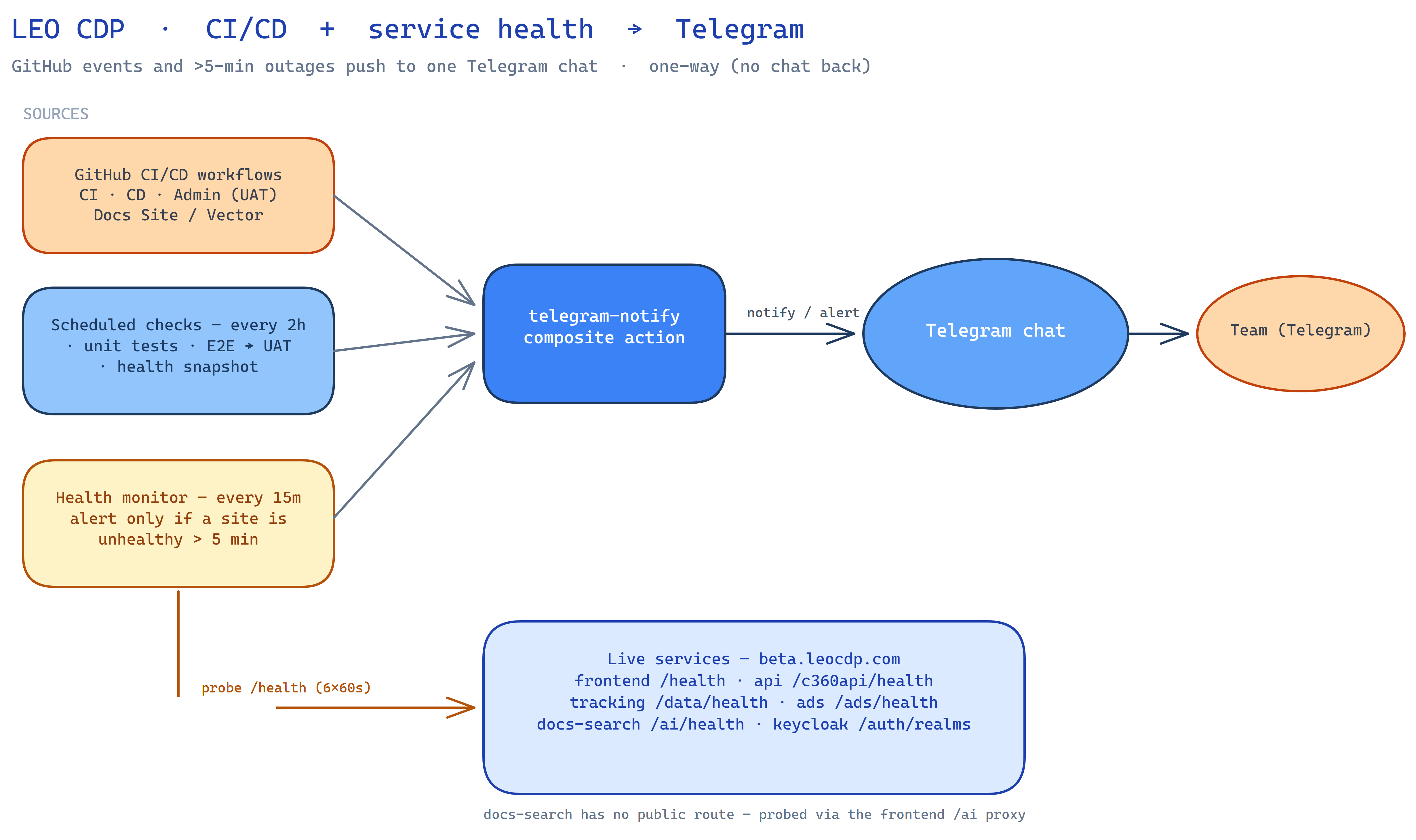
Source: cicd-telegram-chatbot.excalidraw
Goals
- Notify all CI/CD events to Telegram — every start and finish of the platform workflows lands in a Telegram chat.
- Scheduled tests every 2 hours — unit tests + E2E against UAT, reported to the same chat.
- Health alerting — probe all public services; if any stays unhealthy for more than 5 minutes, alert Telegram naming exactly which are down.
Components
| Component | Path | Role |
|---|---|---|
| Telegram notify action | .github/actions/telegram-notify/action.yml | Composite action; the single place that calls the Telegram Bot API. No-ops with a warning when secrets are missing (never fails a job). |
| CI/CD notifier | .github/workflows/telegram-cicd-notify.yml | workflow_run fan-in over all CI/CD workflows (requested + completed) → Telegram. |
| Scheduled checks | .github/workflows/scheduled-checks.yml | cron: 0 */2 * * *: unit tests + E2E → UAT + a health snapshot, one summary → Telegram. |
| Health monitor | .github/workflows/health-monitor.yml | cron: */15: probes all services; alerts Telegram only when a URL is unhealthy > 5 min. |
1. Composite action — telegram-notify
One reusable step used by all three workflows. Inputs: bot-token, chat-id,
message. It URL-encodes the text, truncates to Telegram’s 4096-char limit, and
posts to sendMessage. Missing token/chat id → warning + skip, so PRs from forks
(which lack secrets) don’t turn red.
2. CI/CD notifier — telegram-cicd-notify.yml
Triggered by workflow_run on the workflows named in its list. The names must
match each workflow’s name: field, not its filename — currently:
CI · CD · Admin (UAT) · Docs Site · Docs Vector Refresh
Fires on requested (start) and completed (finish); the finish message shows
the conclusion (success / failure / cancelled) with an icon. To cover a new
workflow, add its name: to the list — no edit needed in the workflow itself.
Scheduled checks and Health monitor are deliberately not in the list —
they post their own messages, so adding them would double-message.
3. Scheduled checks — scheduled-checks.yml
Single job, so the whole run collapses to one Telegram summary:
- Unit tests — runs the same runner set CI gates on (
customer360-promotions,customer360-api,customer360-event-api,identity_resolution,segmentation,docs-vector-search). Each runner self-provisions its venv. - E2E → UAT — mirrors CI’s E2E leg against
https://beta.leocdp.com/c360api; skips cleanly when the Keycloak secrets aren’t set. - Health snapshot —
curleach service URL once; non-200 = fail.
The job fails (red run) if anything failed, and posts pass/fail per item to
Telegram. Also runnable on demand (workflow_dispatch).
4. Health monitor — health-monitor.yml
Runs every 15 minutes and alerts only on sustained downtime, so a transient blip never pages anyone.
- Round 0 — probe every URL once; collect the non-200 set.
- Confirmation — re-probe only that set every 60s for 6 rounds (~6 min elapsed). A URL that returns 200 in any round is dropped as a blip.
- Alert — whatever is still down after the >5-min window is sent to Telegram, each URL with its current status code. All-healthy runs send nothing.
No cross-run state is needed — the “>5 min” is measured inside one run by the 6-round window. During an ongoing outage each 15-min cycle re-alerts (keeps it visible); add a dedup marker later if that’s too noisy.
Telegram message format
Every message leads with a status icon — Telegram can’t colour text, so the emoji
is the colour cue. The icon is set by the composite action’s status input:
| Status | Icon | When |
|---|---|---|
start | 🔵 | a workflow started |
success | ✅ | a workflow passed / all checks green |
failure | ❌ | a workflow failed, or a check / service is down |
warning | ⚠️ | cancelled / skipped / other non-success |
info | ℹ️ | default (anything else) |
Any state that is not start or success carries a Reason: line — and,
for the scheduled checks and health monitor, the per-item ✅/❌ breakdown — so the
message says why, not just that something is off:
- CI/CD notifier —
Reason: concluded 'failure' (push on main) — open the run… - Scheduled checks —
Reason: failed leg(s): unit health — see details below, then per-suite/URL ✅/❌. - Health monitor — the ❌ list of URLs still failing after the >5-min window.
Health-check URLs
Default set (all public services fronted by Caddy on beta.leocdp.com, each
verified 200):
| Service | URL |
|---|---|
| customer360-frontend (UI) | https://beta.leocdp.com/health |
| customer360-api | https://beta.leocdp.com/c360api/health |
| customer360-event-api | https://beta.leocdp.com/data/health |
| customer360-promotions | https://beta.leocdp.com/ads/health |
docs-vector-search (via frontend /ai proxy) | https://beta.leocdp.com/ai/health |
| Keycloak (SSO realm) | https://beta.leocdp.com/auth/realms/customer360 |
Override with the repo variable HEALTH_CHECK_URLS (space/newline-separated) —
both the scheduled checks and the health monitor read it.
docs-vector-search has no public route of its own (private
docsbox, reached via SSH/tunnel). The customer360-frontend proxies it at/ai/*, so…/ai/healthforwards to the service’s/health— returns200when it’s up and502when it’s unreachable, which is exactly what a health probe wants.
Deliberately excluded (would false-alarm a plain 200 probe):
- Ops dashboards (Dagster
:3000, Portainer:9443, Netdata:19999, pgAdmin:5050, Jaeger/jaeger) — on the raw LB IP behind SSO / self-signed TLS, so they return 302/redirect or fail cert validation. Monitor these via Portainer / Netdata themselves, not an HTTP 200 probe.
Configuration
GitHub repo secrets
| Secret | Used by | Purpose |
|---|---|---|
TELEGRAM_BOT_TOKEN | all three workflows | Bot token from @BotFather |
TELEGRAM_CHAT_ID | all three workflows | Destination chat/channel id(s) — one, or many separated by comma / semicolon / whitespace / newline; the message is sent to each |
KEYCLOAK_CLIENT_SECRET, KC_TEST_USER_PASSWORD | scheduled checks | Enable the E2E leg (already provisioned for CI) |
GitHub repo variables (optional)
| Variable | Default | Purpose |
|---|---|---|
HEALTH_CHECK_URLS | the URLs above | Space/newline-separated health endpoints |
E2E_*, E2E_ALLOW_DATA_WRITES | same as CI | E2E knobs |
Setup
- Create the bot: message @BotFather → get
TELEGRAM_BOT_TOKEN. - Find the chat id: send the bot a message, open
https://api.telegram.org/bot<TOKEN>/getUpdates, readchat.id. - Add repo secrets
TELEGRAM_BOT_TOKEN+TELEGRAM_CHAT_ID— the three workflows start notifying on their next run.
Design notes (kept intentionally simple)
- One curl, one place. The composite action is the only Telegram caller; all workflows reuse it.
- Fan-in over editing every workflow.
workflow_runcatches all CI/CD workflows centrally — no per-workflow notify steps to maintain. - Sustained-downtime alerting without a datastore. The >5-min rule is a 6-round in-run confirmation window, not cross-run state — nothing to persist.
- Plain-text messages. No MarkdownV2 escaping — robust over pretty.
- Health probes are HTTP-only. For per-container health,
admin-uat.sh(db-status) and the Portainer/Netdata dashboards already exist.