Customer 360 — Deployments
Infrastructure-as-code + deploy scripts for the Customer 360 platform on
GreenNode / VNG Cloud (zone HCM03-1C). Each subfolder is a self-contained
deployment with per-env overlays/<env>.tfvars, Terraform workspaces, and a
deploy.sh-style wrapper.
| Folder | What it provisions |
|---|---|
postgres | Managed PostgreSQL vDB (customer360 + db_keycloak), run-sql.sh schema/seed bootstrap |
server | vServers (VMs): api + backend + docs + agent boxes (uat); adds dedicated sso + frontend + ads (+ docs) boxes (prod). Also holds deploy-event-api.sh, which deploys customer360-event-api — it reads this folder’s Terraform outputs |
cache | Redis — uat: container on the api box; prod: managed MemStore |
sso | Keycloak (SSO/OIDC) — uat: container on the api box; prod: dedicated vServer |
frontend | customer360-frontend (admin UI) — uat: container on the api box; prod: dedicated vServer |
customer360-event-api | c360 Event API (tracking ingestion → S3) — a KEDA-scaled Deployment on the VKS cluster (no VM); deployed by server/deploy-event-api.sh |
customer360-promotions | c360 Promotions (schema leo_ads) — a Deployment on the VKS cluster (no VM); holds its own k8s/ manifests |
docs-vector-search | AI docs Q&A — local-model RAG (paraphrase-multilingual embed + bge rerank + Qwen 0.5B), vectors in pgvector on the vDB (schema rag). Its own dedicated docs box; deploy: server/deploy-docs-search.sh |
monitoring | Portainer (direct HTTPS) + Netdata (behind oauth2-proxy / Keycloak SSO) dashboards + Jaeger (OpenTelemetry request-trace UI at /jaeger) + pgAdmin (Postgres admin UI, direct on the LB with its own login) — on the api box |
load_balancer | L4 NLB fronting api / dagster / keycloak / frontend / ads / monitoring |
proxy | Caddy reverse proxy — TLS termination (auto Let’s Encrypt) + single-host path routing. Live at https://beta.leocdp.com (fronts frontend /, api /c360api, keycloak /auth, ads /ads, jaeger /jaeger); runbook |
vks | VKS (managed Kubernetes) worker node group — the capacity customer360-event-api and customer360-promotions run on. The cluster itself is console-created. |
storage | Object storage (vStorage / S3) |
Scope: this table maps to the UAT overlay. The prod overlay differs (dedicated boxes, managed MemStore, own VPC
10.101.0.0/16) — see the PROD deployment view and the UAT → PROD differences table below.
One-shot deploy — deploy-all.sh
deploy-all.sh is a single orchestrator that runs every module’s
deploy script in the correct dependency order for one environment. Each module keeps
its own script (they are the source of truth); this is a thin, re-runnable wrapper on top.
./deploy-all.sh uat                 # apply everything, in order (default action)
./deploy-all.sh uat --list          # print the ordered steps and exit (no changes)
./deploy-all.sh uat --dry-run        # show the exact commands that would run
./deploy-all.sh uat --with seed     # also load the CIR demo data
./deploy-all.sh uat plan            # terraform plan for the IaC steps only
./deploy-all.sh uat destroy         # tear everything down (REVERSE order)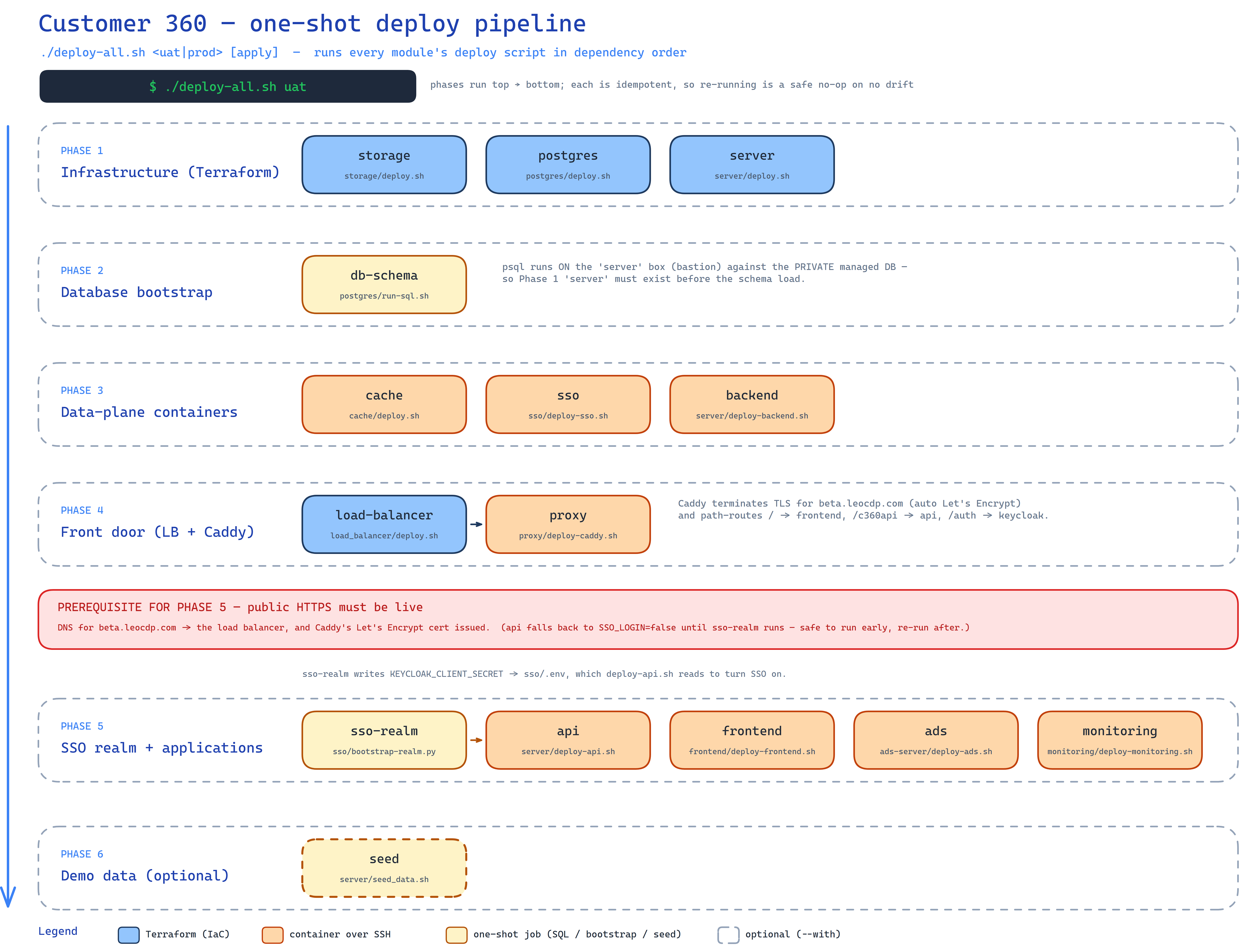
📐 Editable sources: deploy-process.excalidraw
(open at excalidraw.com or the Obsidian Excalidraw plugin) ·
deploy-process.svg (vector source of the image above).
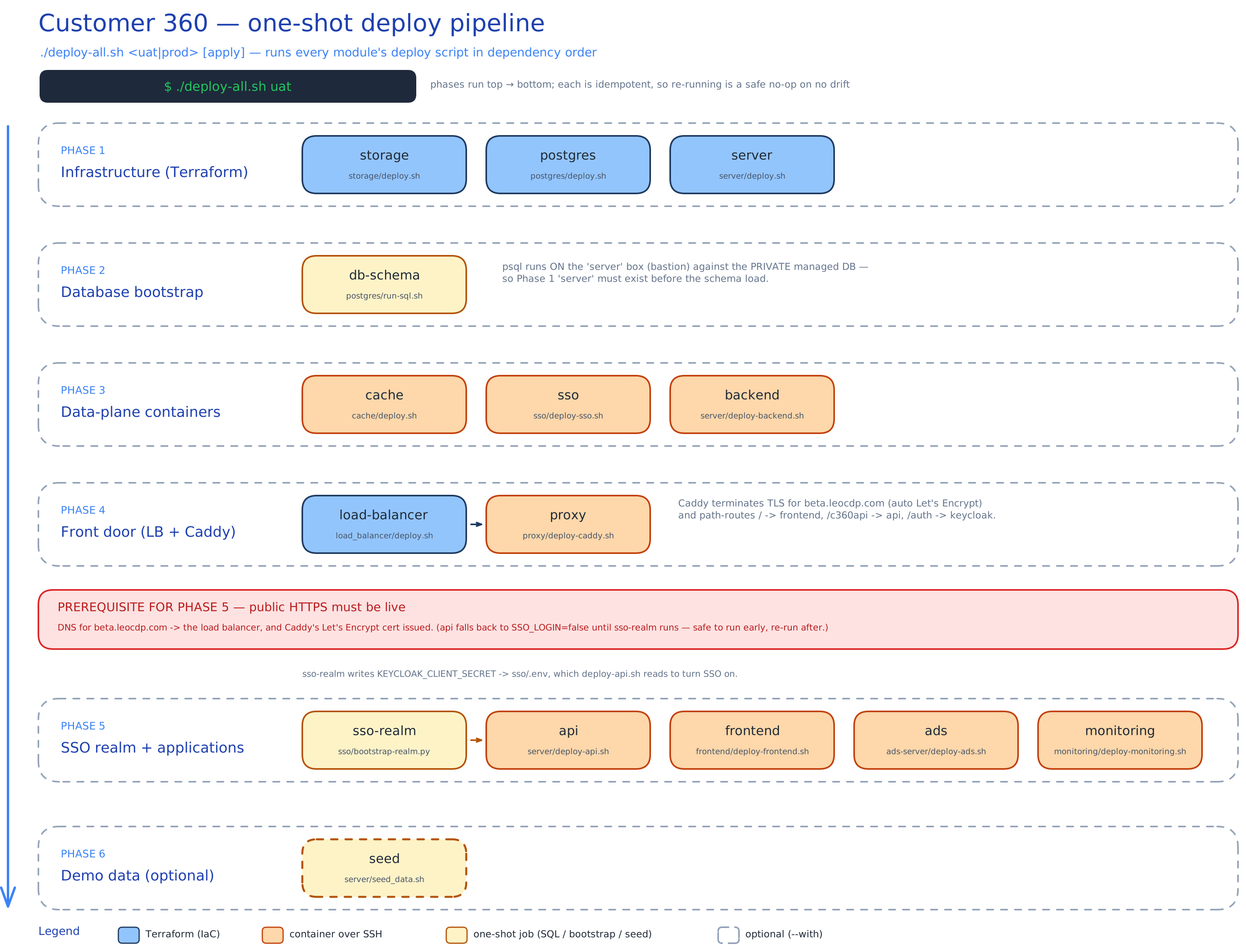
Ordered steps
Phases run top → bottom; every step is idempotent/converging, so re-running is a safe no-op when there is no drift.
| # | Phase | Step | Runs | Depends on |
|---|---|---|---|---|
| 1 | Infra (Terraform) | storage | storage/deploy.sh | — (independent) |
| 2 | Infra (Terraform) | postgres | postgres/deploy.sh | — |
| 3 | Infra (Terraform) | server | server/deploy.sh | — |
| 3b | Infra (Terraform) | vks | vks/deploy.sh | VKS cluster (console-created); gives the cluster its worker nodes |
| 4 | DB bootstrap | db-schema | postgres/run-sql.sh | server (bastion) + postgres |
| 5 | Data-plane | cache | cache/deploy.sh | server |
| 6 | Data-plane | sso | sso/deploy-sso.sh | server + db-schema (db_keycloak) |
| 7 | Data-plane | backend | customer360-backend/deploy-backend-vks.sh (VKS) | server + db-schema |
| 8 | Front door | load-balancer | load_balancer/deploy.sh | server |
| 9 | Front door | proxy (Caddy) | proxy/deploy-caddy.sh | load-balancer (:80/:443 → box) + DNS |
| 10 | SSO + apps | sso-realm | sso/bootstrap-realm.py | sso + public HTTPS (writes KEYCLOAK_CLIENT_SECRET → sso/.env) |
| 11 | SSO + apps | api | server/deploy-api.sh | db-schema, cache, backend, sso-realm (SSO optional) |
| 12 | SSO + apps | frontend | frontend/deploy-frontend.sh | server |
| 13 | SSO + apps | promotions | customer360-promotions/deploy-promotions.sh | VKS cluster + db-schema (bootstraps leo_ads) + cache; needs KUBECONFIG + GHCR_PULL_TOKEN |
| 14 | SSO + apps | event-api | server/deploy-event-api.sh | VKS cluster + storage + cache (Redis required); needs KUBECONFIG + GHCR_PULL_TOKEN. (tracking still accepted as a legacy alias.) |
| 15 | SSO + apps | docs-search | server/deploy-docs-search.sh | server (dedicated docs box) + postgres (pgvector rag schema) |
| 16 | SSO + apps | monitoring | monitoring/deploy-monitoring.sh | server; SSO gate needs sso-realm + load-balancer |
| 17 | Demo data | seed (optional) | server/seed_data.sh | api/db-schema; opt-in via --with seed |
Flags
| Flag | Effect |
|---|---|
--list | Print the ordered steps (with phases) and exit. |
--from <step> | Start at <step>, skip everything before it (resume after a fix). |
--only <a,b,c> | Run only these steps, keeping order. |
--skip <a,b,c> | Run everything except these steps. |
--with <a,b,c> | Also run the optional steps (e.g. seed). |
--keep-going | Don’t stop on the first failure; report at the end. |
--dry-run | Print the commands that would run; execute nothing. |
-y, --yes | Don’t prompt for confirmation before executing. |
First bring-up & the HTTPS prerequisite
Steps 9–14 that need the public HTTPS entry point (Caddy’s cert, the API’s SSO mode,
the monitoring oauth2 gate) require that DNS for caddy_domain (beta.leocdp.com) points
at the load balancer and Caddy has issued its Let’s Encrypt certificate. On a first
bring-up before DNS is live:
./deploy-all.sh uat --skip proxy,sso-realm,monitoring   # infra + apps (api starts in local-JWT mode)
# → point DNS: beta.leocdp.com (A) → the LB public IP, wait for it to resolve
./deploy-all.sh uat --from proxy                        # Caddy → realm → re-deploy api (SSO on) → monitoring
deploy-api.sh falls back to SSO_LOGIN=false (dev local-JWT) until the realm exists, so
running api early is safe — re-run it after sso-realm to switch SSO on. Secrets/creds
live in each module’s own .env / terraform.tfvars (see each module’s README).
Shared master-profile S3 bucket
The API and identity-resolution projection use MASTER_PROFILE_S3_BUCKET,
which is set to c360-master-profiles in each
storage/overlays/<env>.tfvars. Those overlays also set
s3_auto_create_buckets = true; the API and Dagster backend deployment
scripts read those values and idempotently create/check the bucket before their
containers start. (customer360-event-api does not — it never reads
MASTER_PROFILE_S3_BUCKET; it auto-creates only its own per-source buckets.) The bootstrap runs inside each deployed image
using its configured vStorage credentials, so it works for both UAT and
production. The backend deployment also runs
identity_resolution/scripts/rebuild_master_profile_event_projections.py
once when this bucket is empty, so existing master profiles are backfilled
instead of waiting for a new CIR staging event.
Continuous Delivery (CD)
deploy-all.sh above is the manual / one-shot path. The target CD model builds each
service’s image once in CI, publishes it to the GitHub Container Registry (GHCR), and then has
each environment pull that same immutable image by tag — instead of rebuilding on the box.
uat is the default dev environment and tracks main; a version-tagged release ships prod.
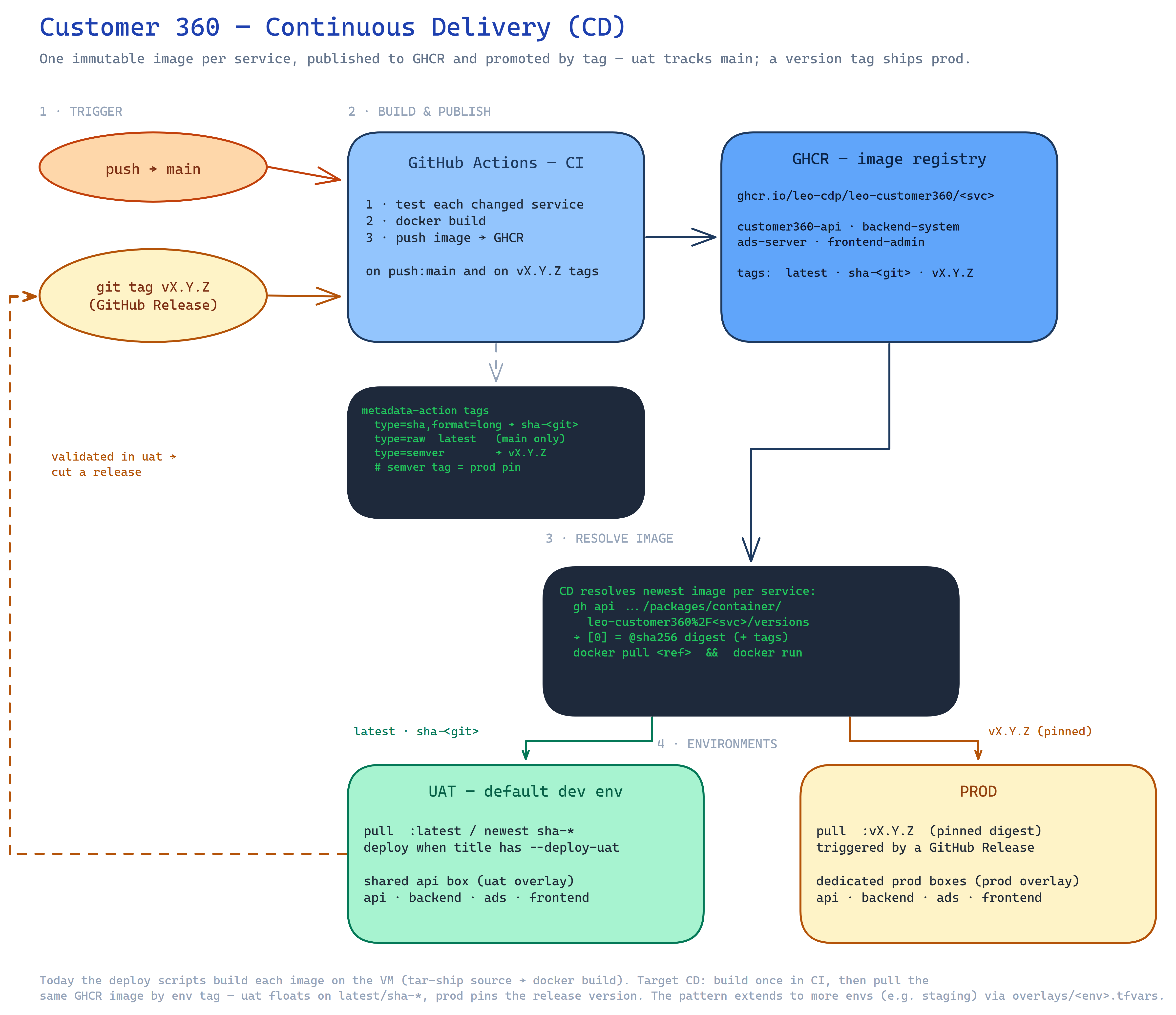
📐 Editable sources: cd-process.excalidraw
(open at excalidraw.com or the Obsidian Excalidraw plugin) ·
cd-process.svg (vector source of the image above).
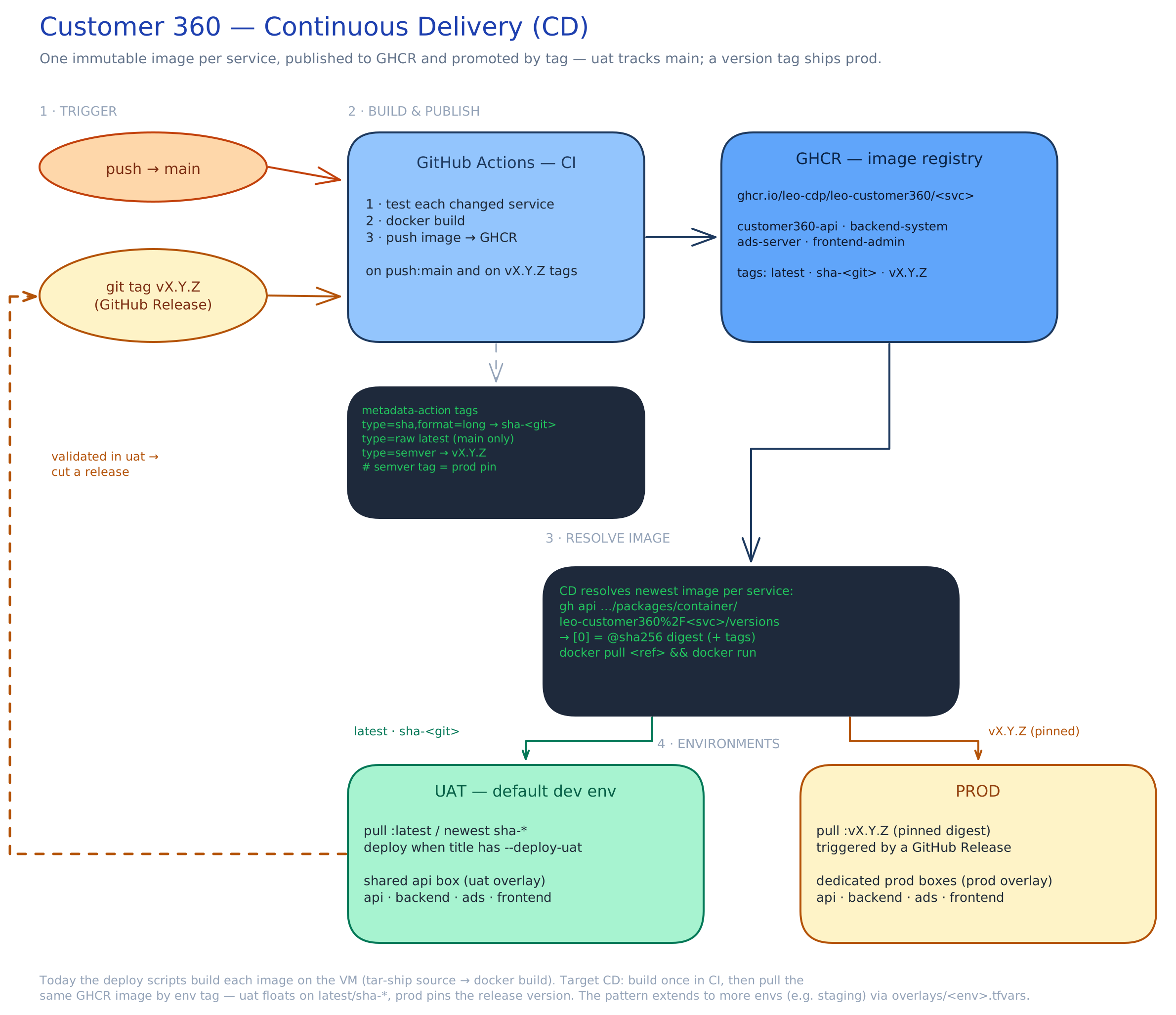
Status: the app deploy scripts now pull the CI-built image from GHCR by default (
server/deploy-api.sh,customer360-promotions/deploy-promotions.sh,frontend/deploy-frontend.sh→docker pull+docker run, via the sharedlib/ghcr.sh). SetBUILD_LOCAL=1to fall back to shipping source and building on the VM. TheCDworkflow runs these automatically after CI succeeds (maincommit whose title contains--deploy-uat→ uat; avX.Y.Ztag → prod).
Customer 360 DAO image dependency
The API and Dagster images install the checked-out customer360-dao source
before installing their service requirements. Their CI and Compose builds use
the repository root as the Docker build context, while the Dockerfile remains
under the service directory. The BUILD_LOCAL=1 fallback follows the same rule:
server/deploy-api.shshipscustomer360-api/andcustomer360-dao/, then builds withcustomer360-api/Dockerfilefrom/opt/c360.
This avoids requiring an unpublished package on the VM or in CI. Once a DAO
release is published to the configured Python package index, the bare
leo-customer360-dao requirement remains satisfied by the pre-installed local
distribution. Do not change these builds back to service-only contexts unless
the Dockerfiles are also changed to obtain the package from a trusted package
index.
1 · What CI publishes to GHCR
.github/workflows/ci.yml tests each changed service, builds its
image, and pushes it to:
ghcr.io/leo-cdp/leo-customer360/<service>
for <service> ∈ customer360-api · customer360-backend · customer360-promotions · customer360-frontend
· customer360-event-api · docs-vector-search · postgres · redis (each has its own Dockerfile; a change
under that folder builds it — docs-vector-search’s source lives under tools/docs-vector-search,
so its build context/file are overridden in ci.yml).
Tags come from docker/metadata-action:
| Tag | From | When |
|---|---|---|
sha-<git-sha> | type=sha,format=long | every build — immutable, traceable to a commit |
latest | type=raw,value=latest | default branch (main) only |
vX.Y.Z | type=semver | on a release / v* tag — the pinned image prod deploys |
✅ CI triggers on branch pushes and
v*tags, and pushes images onmainor a release tag (push: … || startsWith(github.ref, 'refs/tags/v')). A tag build publishes all services at that version (branch builds only the changed ones).
2 · How a deploy resolves the image (the “latest SHA” lookup)
Rather than hard-code a tag, a deploy step asks GHCR for the newest version of each service’s
package. The GitHub Packages container versions API returns versions newest-first, so [0]
is the last push:
# newest image for one service — its digest + tags
gh api -H "Accept: application/vnd.github+json" \
  "/orgs/LEO-CDP/packages/container/leo-customer360%2Fcustomer360-api/versions?per_page=1" \
  --jq '.[0] | {digest: .name, tags: .metadata.container.tags}'
# → { "digest": "sha256:…", "tags": ["sha-<git>", "latest"] }.[0].nameis the immutable digest → deployghcr.io/…/<svc>@sha256:…for a fully pinned run..[0].metadata.container.tagsare the human tags (sha-<git>,latest,vX.Y.Z).
The package name is <repo>/<service> URL-encoded — the / becomes %2F. Private packages
need a token with read:packages, and the VM runs docker login ghcr.io before pulling. (The
Registry v2 /tags/list endpoint does not guarantee chronological order — hence the Packages
API for “newest”.)
3 · Per-environment tag policy
Each env picks its tag the way the scripts already read config — a value from
overlays/<env>.tfvars (via the tfval helper), with a sensible default:
| Env | Image tag | Trigger | Boxes |
|---|---|---|---|
| uat (default dev) | latest / newest sha-* | a main commit whose title contains --deploy-uat | shared api box (uat overlay) |
| prod | vX.Y.Z (pinned digest) | a GitHub Release (version tag) | dedicated prod boxes (prod overlay) |
Promotion is a shift of the same artifact: validate the build in uat, then cut a release —
that version tag is exactly what prod pulls. The model extends to more envs (e.g. staging) by
adding another overlays/<env>.tfvars.
4 · Wiring it into the deploy scripts
To move a service from build-on-box to pull-from-GHCR, the remote block changes from a
docker build to a resolve-and-pull — everything else (env-file assembly, DB/Redis/SSO wiring,
--network host) stays the same:
REGISTRY="ghcr.io/leo-cdp/leo-customer360"
TAG="$(tfval image_tag "overlays/$ENV.tfvars")"; TAG="${TAG:-latest}"   # prod overlay pins vX.Y.Z
sudo docker login ghcr.io -u "$GHCR_USER" -p "$GHCR_TOKEN"    # if the package is private
sudo docker pull  "$REGISTRY/$SERVICE:$TAG"
sudo docker rm -f "$SERVICE" 2>/dev/null || true
sudo docker run -d --name "$SERVICE" --restart unless-stopped --network host \
  --env-file "/opt/c360/$SERVICE.env" "$REGISTRY/$SERVICE:$TAG"
5 · Remote Terraform state (required for CI/CD)
CD runs on GitHub-hosted runners, which have no local Terraform state, so the
server / postgres / cache modules use an S3 remote backend on VNG vStorage
(see each module’s backend.tf) — CI reads the same state operators use locally.
Credentials come from the environment, never the code.
One-time setup:
- Create the state bucket once (any S3 client, pointed at the vStorage endpoint):
AWS_ACCESS_KEY_ID=<k> AWS_SECRET_ACCESS_KEY=<s> \ aws --endpoint-url https://hcm04.vstorage.vngcloud.vn s3 mb s3://leocdp360-tfstate - Migrate each module’s existing local state into it (run locally; Terraform ≥ 1.6):
export AWS_ACCESS_KEY_ID=<vstorage key> AWS_SECRET_ACCESS_KEY=<vstorage secret> for m in server postgres cache; do terraform -chdir="deployments/$m" init -migrate-state -force-copy done - Add the vStorage S3 creds as GitHub Actions secrets so CD can read state —
VSTORAGE_ACCESS_KEY,VSTORAGE_SECRET_KEY(cd.ymlmaps them toAWS_ACCESS_KEY_ID/AWS_SECRET_ACCESS_KEY).
Bucket/endpoint/region live in each backend.tf (bucket leocdp360-tfstate, endpoint
hcm04.vstorage.vngcloud.vn, region us-east-1 — required by vStorage). Per-module
state lands at env/<workspace>/<module>/terraform.tfstate. The storage and
load_balancer modules can adopt the same backend later; CD only needs these three.
Local runs stay aligned with remote automatically. You never sync state down —
a remote backend means Terraform reads/writes it live on every command. deploy-all.sh
preflight sources lib/tfstate.sh, which (1) loads the vStorage S3
creds into AWS_* from storage/’s config and (2) terraform inits the remote-backend
modules, so a local ./deploy-all.sh uat … always uses the same state as CI — never a
stale local copy. Running a module script directly (not via deploy-all.sh) still needs
AWS_ACCESS_KEY_ID / AWS_SECRET_ACCESS_KEY exported, and a fresh checkout needs a one-time
terraform init per module (no -migrate-state). Note: vStorage has no state locking —
don’t run two applys against the same module/workspace at once.
6 · Rollback & release history
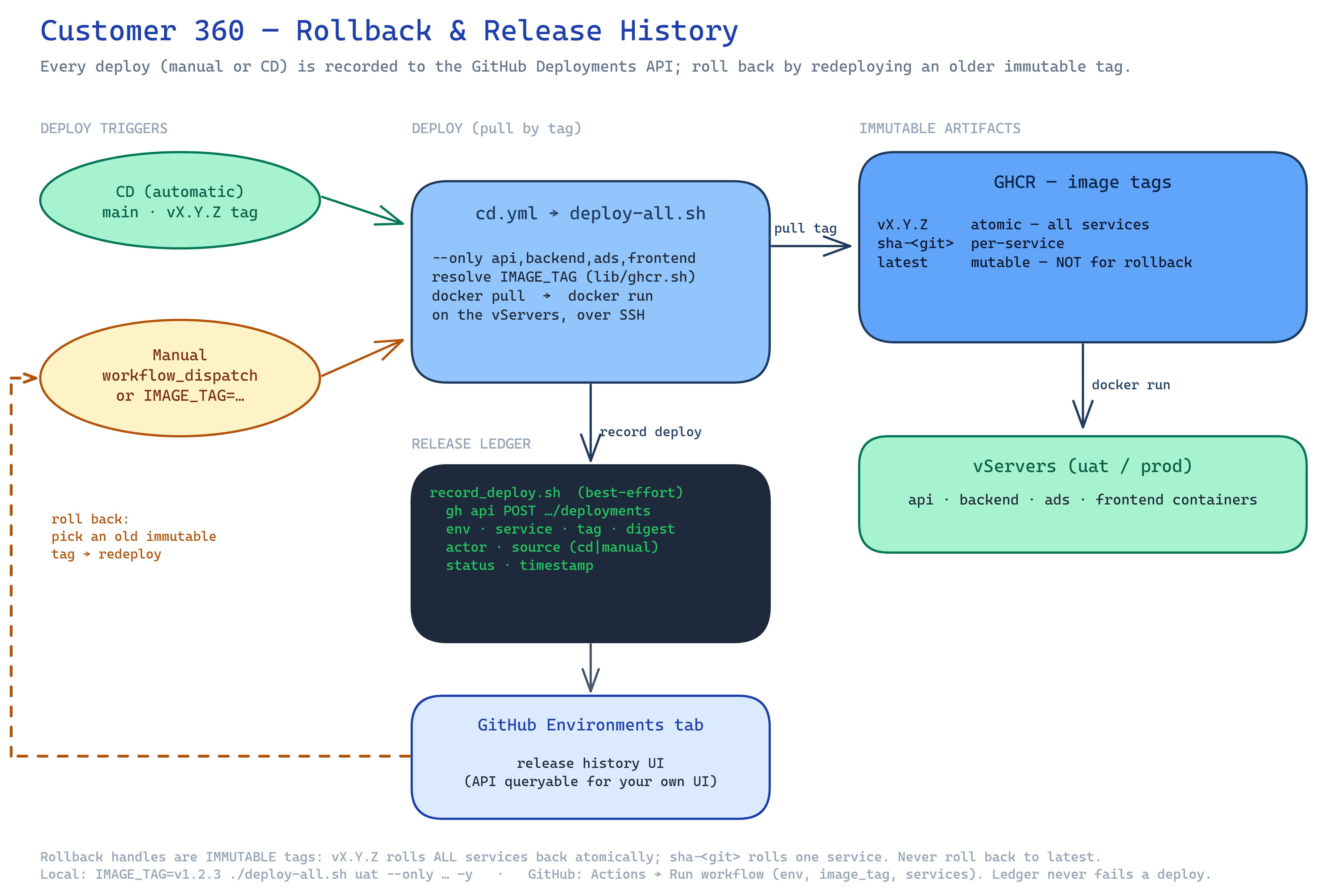
📐 Editable sources: rollback-release.excalidraw
(open at excalidraw.com or the Obsidian Excalidraw plugin) ·
rollback-release.svg (vector source of the image above).
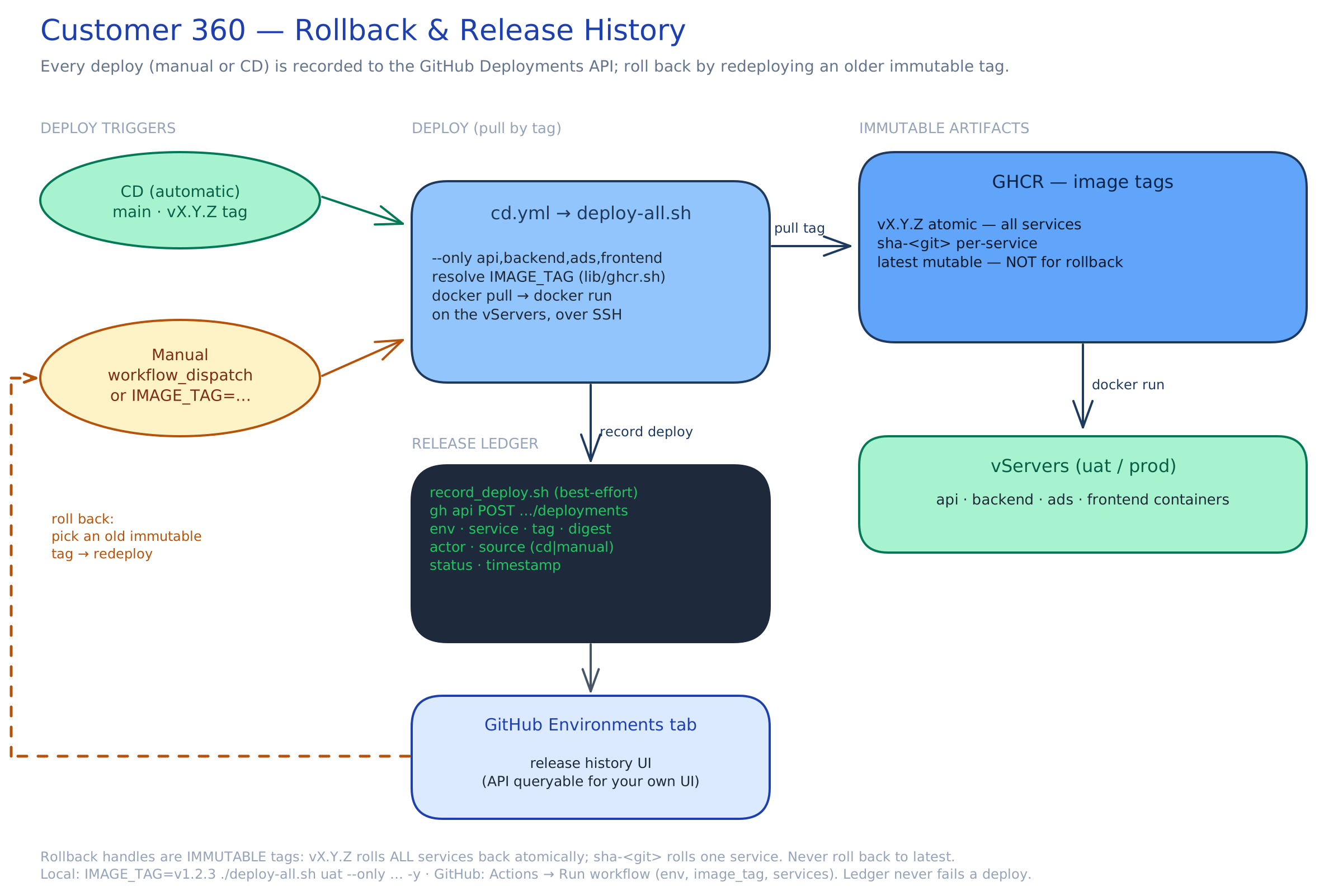
Images are pulled by tag, so a rollback is just deploying an older immutable tag.
Use sha-<git> (per-commit, per-service) or vX.Y.Z (a release — all services at one
version); never roll back to latest (mutable).
- Local:
IMAGE_TAGoverrides the taglib/ghcr.shresolves:IMAGE_TAG=v1.2.3 ./deploy-all.sh uat --only api,backend,promotions,frontend -y # atomic, all services IMAGE_TAG=sha-<oldgitsha> bash server/deploy-api.sh uat # one service - From GitHub (UI/API): the
CDworkflow has aworkflow_dispatchtrigger — Actions → Run workflow (orgh workflow run cd.yml -f environment=uat -f image_tag=v1.2.3 -f services=api,backend). Aprodrollback still passes through theprodenvironment’s approval gate.
Keep your GHCR package retention from pruning old tagged versions (
sha-*,v*) — those are your rollback targets. Prefer avX.Y.Zrelease as the atomic rollback unit.
Release ledger (all deploys — manual + CD). lib/record_deploy.sh records every deploy
to the GitHub Deployments API (env, service, image tag/digest, actor, cd|manual,
time, status) — it’s sourced by each app deploy script, so both manual runs and CD are
captured. View the history in the repo’s Environments tab; query the Deployments API for
a custom UI later. Auth: CD sets GH_TOKEN + permissions: deployments: write; locally it
uses your gh auth. It’s best-effort — a missing gh/token never fails a deploy. (Postgres
was ruled out for the ledger: the managed DB is on a private VPC IP, unreachable from the CI
runner / a laptop where deploys run.)
Monitor it two ways: the repo’s Environments tab (per-env history, zero-setup), or
release-log.sh which reads the same Deployments API into a table:
./release-log.sh                 # recent history, uat + prod
./release-log.sh uat 50          # uat, last 50
./release-log.sh --current       # latest SUCCESS per (env, service) = what's live now
The Environments tab’s single “Active” badge is per-environment; for per-service “what’s
live now”, use release-log.sh --current.
UAT deployment view
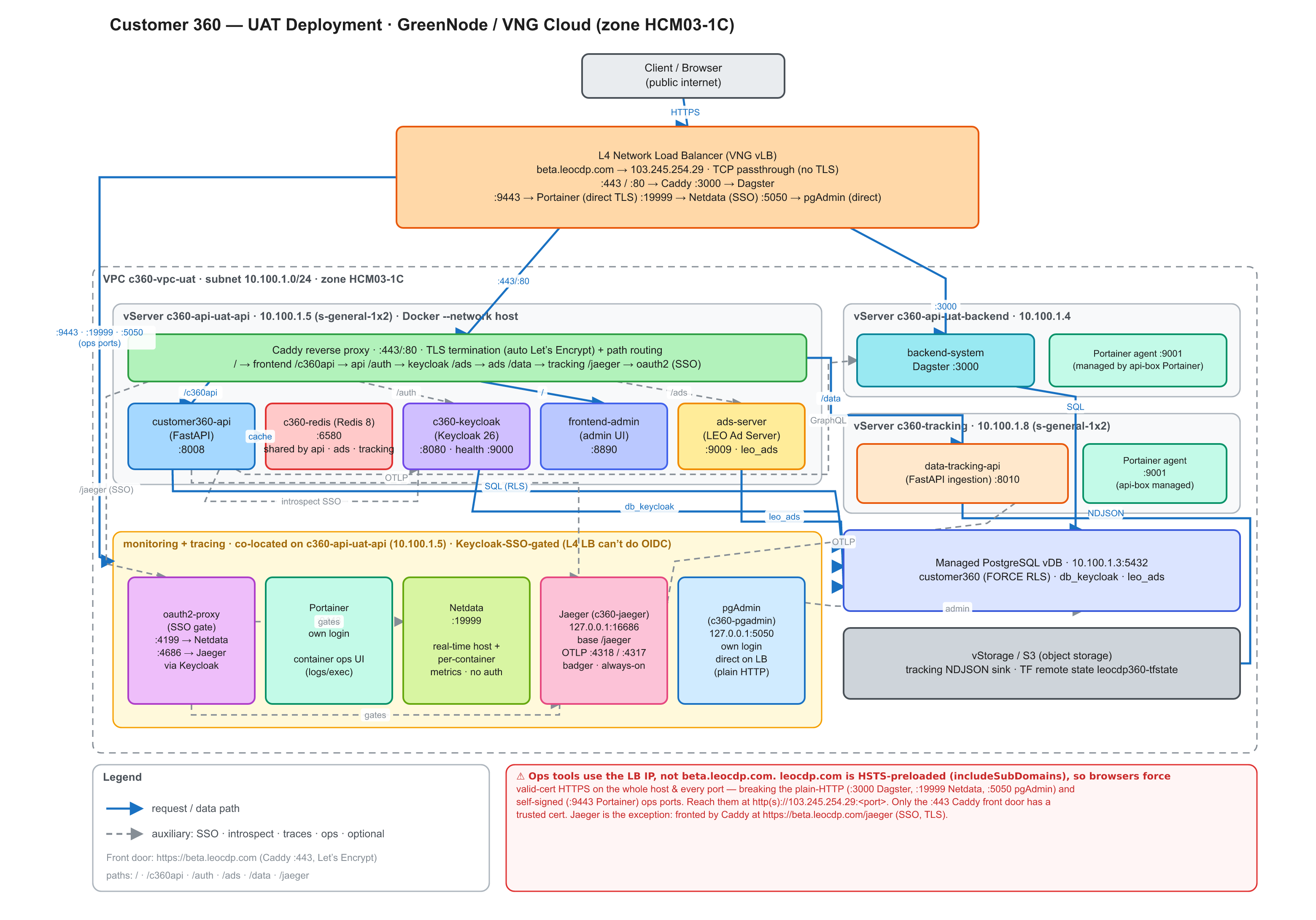
📐 Editable sources: deployment-view-uat.excalidraw
(open at excalidraw.com or the Obsidian Excalidraw plugin) ·
deployment-view-uat.svg (vector source of the image above).
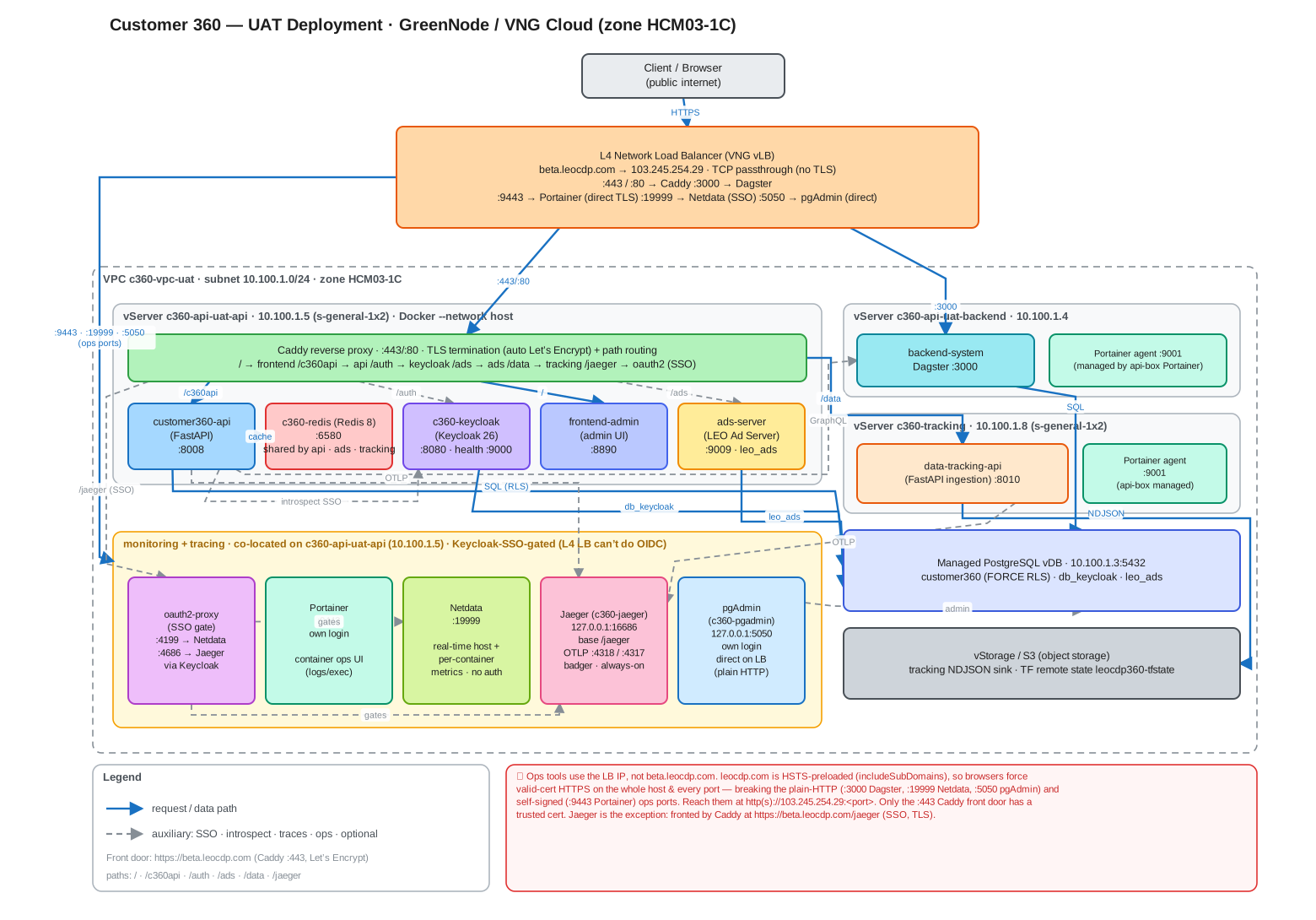
Same view as a Mermaid diagram (editable text)
flowchart TB
  client([Client / public internet])
  lb["L4 Network Load Balancer<br/>beta.leocdp.com → 103.245.254.29<br/>:443/:80 → Caddy · :3000 → dagster<br/>:9443 → portainer (direct TLS) · :19999 → netdata (SSO) · :5050 → pgadmin (direct, own login)"]
  client --> lb

  subgraph vpc["VPC c360-vpc-uat · subnet 10.100.1.0/24 · HCM03-1C"]
    direction TB
    subgraph apibox["vServer c360-api-uat-api · 10.100.1.5 (s-general-1x2)"]
      caddy["Caddy reverse proxy<br/>:443/:80 · TLS termination + path routing"]
      api["customer360-api (FastAPI)<br/>:8008"]
      redis["c360-redis (Redis 8)<br/>:6580"]
      kc["c360-keycloak (Keycloak 26)<br/>:8080 · health :9000"]
      fe["customer360-frontend (admin UI)<br/>:8890"]
    end
    subgraph vks["VKS Kubernetes cluster · namespace customer360"]
      eventapi["customer360-event-api<br/>:8010 · KEDA 1-3 pods"]
      ads["customer360-promotions (c360 Promotions)<br/>:9009 · leo_ads · HPA 1-2 pods"]
    end
    subgraph bebox["VKS node 10.100.1.11 (c360.pool=dagster)"]
      dagster["customer360-backend<br/>Dagster NodePort :30300"]
    end
    subgraph docsbox["vServer c360-api-uat-docs · 10.100.1.7 (s-general-1x2)"]
      docs["docs-vector-search (local-model RAG)<br/>:8001 · MiniLM embed + bge rerank + Qwen 0.5B<br/>(internal — SSH/tunnel, no public route yet)"]
    end
    pg[("Managed PostgreSQL vDB<br/>10.100.1.3:5432<br/>customer360 (RLS) · db_keycloak · leo_ads · rag (pgvector)")]
    subgraph mon["monitoring · on the api box"]
      oauth2["oauth2-proxy (SSO gate)<br/>:4199 → Netdata · :4686 → Jaeger · Keycloak"]
      portainer["Portainer<br/>:9443 · own login"]
      netdata["Netdata<br/>:19999"]
      jaeger["Jaeger UI<br/>127.0.0.1:16686 (base /jaeger) · OTLP :4318<br/>SSO via Caddy /jaeger · always-on"]
      pgadmin["pgAdmin<br/>127.0.0.1:5050 · own login"]
    end
  end

  lb -->|":443/:80"| caddy
  lb -->|":3000"| dagster
  caddy -->|"/"| fe
  caddy -->|"/c360api"| api
  caddy -.->|"/auth"| kc
  caddy -.->|"/ads"| ads
  api -->|cache| redis
  api -.->|introspect SSO| kc
  api -->|SQL| pg
  api -.->|GraphQL| dagster
  kc -->|db_keycloak| pg
  caddy -.->|"/data · /cdp-sdk"| eventapi
  eventapi -->|"tracking stream"| redis
  ads -->|leo_ads| pg
  ads -.->|"response cache"| redis
  dagster -->|SQL| pg
  docs -->|"pgvector · rag.doc_chunks"| pg
  lb -->|":9443 direct TLS"| portainer
  lb -.->|":19999 SSO"| oauth2
  lb -->|":5050 direct"| pgadmin
  caddy -.->|"/jaeger SSO"| oauth2
  oauth2 -->|gates| netdata
  oauth2 -->|gates| jaeger
Components (UAT)
| Component | Runs on | Port | Notes |
|---|---|---|---|
| L4 NLB | VNG vLB | 80 / 3000 / 5050 / 8080 / 8890 / 9009 / 9443 / 19999 | public 103.245.254.29; TCP passthrough (no TLS) |
| customer360-api | api box 10.100.1.5 | 8008 | FastAPI, --network host; Redis cache; SSO via Keycloak introspection (SSO_LOGIN=true) |
| c360-redis | api box 10.100.1.5 | 6580 | fail-open response cache; maxmemory 256mb allkeys-lru |
| c360-keycloak | api box 10.100.1.5 | 8080 | Keycloak 26 start-dev; health on mgmt :9000; realm customer360 |
| customer360-frontend | api box 10.100.1.5 | 8890 | FastAPI admin UI; browser calls the API/Keycloak via the LB |
| customer360-promotions | VKS pods (Service LoadBalancer) | 9009 | c360 Promotions (FastAPI); own schema leo_ads (no RLS); HPA 1-2 pods on CPU; Redis reached at the api box’s private IP |
| oauth2-proxy | api box 10.100.1.5 | 4199 (Netdata) · 4686 (Jaeger) | Keycloak SSO gate in front of the no-native-auth dashboards (the L4 LB can’t do OIDC); one proxy container per gated dashboard |
| Portainer | api box 10.100.1.5 | 9443 | container ops UI (logs/exec/restart); direct HTTPS on the LB — its own login |
| Netdata | api box 10.100.1.5 | 19999 | real-time host + per-container metrics; no native auth → oauth2-proxy SSO |
| Jaeger | api box 10.100.1.5 | 16686 (UI) · 4318/4317 (OTLP) | OpenTelemetry request-trace UI (c360-jaeger); always-on (SSO+TLS); badger storage, mem-capped; UI loopback (base path /jaeger) → oauth2-proxy :4686 → Caddy /jaeger on :443 (Keycloak SSO, TLS) |
| pgAdmin | api box 10.100.1.5 | 5050 | Postgres admin/monitoring UI (c360-pgadmin); its own login, exposed directly on the LB (LB :5050 → pgAdmin :5050); plain HTTP (cleartext login — see the LB note); pgadmin_data volume, mem-capped |
| Dagster | VKS cluster (node 10.100.1.11, label c360.pool=dagster) | 30300 (NodePort → 3000) | customer360-backend: dagster dev Deployment (webserver + daemon + code locations); public UI via LB :3000 → node :30300; see customer360-backend/README.md. The old backend vServer 10.100.1.4 was retired |
| Portainer agent | docs 10.100.1.7 + agent box | 9001 | c360-portainer-agent; lets the api-box Portainer manage these boxes too (private VPC, reached from 10.100.1.5); registered as Portainer environments |
| customer360-event-api | VKS cluster (not a VM) | 8010 | FastAPI event ingestion as a Kubernetes Deployment — 3 pods minimum, autoscaled on ingest requests/sec by KEDA (uat to 12, prod to 20), fronted by a Service of type LoadBalancer on :8010; publishes dynamic batches to the shared Redis Streams consumer group and writes NDJSON asynchronously to vStorage/S3; rate-limit + session state remains fail-open, but Redis is required for durable enqueue; OTLP request traces → api-box Jaeger; exposed at /data via Caddy |
| docs-vector-search | docs box 10.100.1.7 | 8001 | AI docs Q&A — local-model RAG: paraphrase-multilingual-MiniLM-L12-v2 embed (384-dim, VN+EN) + bge-reranker-base rerank + Qwen2.5-0.5B GGUF generate; vectors in pgvector on the vDB (schema rag, table doc_chunks); its OWN s-general-2x4 box; not behind the LB directly (reached via SSH/tunnel), but customer360-frontend proxies it at /ai/* — so https://beta.leocdp.com/ai/health (→ docs-search /health) is its public health check, alongside /ai/ask + /ai/search; deploy server/deploy-docs-search.sh (pull GHCR image → start dedicated no-auth Redis for rate limiting on the same host network → enrich on box → serve) |
| PostgreSQL | managed vDB 10.100.1.3 | 5432 | customer360 (FORCE RLS) + db_keycloak + leo_ads + rag (pgvector, docs-vector-search) |
Public endpoints — beta.leocdp.com
The domain (beta.leocdp.com, A record → the LB public IP 103.245.254.29) is live,
fronted by Caddy (deployments/proxy), which terminates TLS (Let’s Encrypt) and path-routes
the browser-facing apps on :443. The ops dashboards stay on their raw LB ports and are reached
via the LB IP (see the HSTS note below).
| Service | URL | Served by |
|---|---|---|
| customer360-frontend (UI) | https://beta.leocdp.com/ | Caddy / → frontend :8890 |
| customer360-api | https://beta.leocdp.com/c360api (base …/c360api/api/v1) | Caddy /c360api/* → api :8008 (root_path=/c360api) |
| Keycloak | https://beta.leocdp.com/auth | Caddy /auth/* → keycloak :8080 |
customer360-promotions (+ /ads/docs) | https://beta.leocdp.com/ads | Caddy /ads/* → VKS Service EXTERNAL-IP :9009 (root_path=/ads, forwarded unstripped) |
docs-vector-search (via frontend /ai proxy) | https://beta.leocdp.com/ai/health (also /ai/ask, /ai/search) | Caddy / → frontend :8890; frontend /ai/* → docs-search :8001. /ai/health returns 200 when docs-search is up, 502 when it’s unreachable — the public health check for the otherwise-private docs box. |
| customer360-event-api (ingest) | https://beta.leocdp.com/data (POST …/data/api/v1/tracking/logs; health …/data/health) | Caddy /data/* → VKS Service EXTERNAL-IP :8010 |
| c360 web SDK iframe | https://beta.leocdp.com/cdp-sdk/html/cdp-event-proxy.html | Caddy /cdp-sdk/* → VKS Service EXTERNAL-IP :8010; parent origin from proxy/overlays/<env>.tfvars |
| Portainer (own login) | https://103.245.254.29:9443 | LB direct → Portainer :9443 (self-signed TLS) |
| Netdata (SSO) | http://103.245.254.29:19999 | LB → oauth2-proxy :4199 → Netdata (Keycloak login) |
| pgAdmin (own login) | http://103.245.254.29:5050 | LB direct → pgAdmin :5050 (its own login as admin@leocdp.com; plain HTTP — cleartext) |
| Dagster | http://103.245.254.29:3000 | LB direct → dagster :3000 |
| Jaeger (trace UI, SSO) | https://beta.leocdp.com/jaeger | Caddy :443 (TLS) → oauth2-proxy :4686 → Jaeger (Keycloak login as c360admin); always-on (jaeger_enabled=true) — see the monitoring runbook |
⚠️ Ops tools use the LB IP, not the
beta.leocdp.comhostname. The parent domainleocdp.comis HSTS-preloaded (includeSubDomains), so browsers force HTTPS-with-valid-cert on the entirebeta.leocdp.comhost, on every port — breaking the plain-HTTP (:3000,:19999,:5050) and self-signed (:9443) ops ports (anhttp://beta…:3000gets auto-upgraded tohttpsand fails). The IP is not HSTS-pinned, so usehttp://103.245.254.29:<port>(or an SSH tunnel tolocalhost). Only the:443Caddy front door has a trusted cert.The cutover was applied via
proxy/cutover-beta.leocdp.com.patch(ordered deploy: the proxy runbook). To move to a different domain, edit one value and runset-domain.sh(below).
Tracking feature — bring-up (customer360-event-api)
The web-tracking ingestion service (customer360-event-api) runs on the GreenNode VKS
Kubernetes cluster as a KEDA-autoscaled Deployment — 1-3 pods on UAT —
fronted by a Service of type LoadBalancer on :8010. It is deliberately minimal and uses
only what the app needs: vStorage/S3 (the durable NDJSON sink); the api-box Redis as the
Redis Streams queue (required — see the notes); and it exports OpenTelemetry request traces
over OTLP to the api-box Jaeger (reusing the existing Jaeger — no new one). It is exposed
publicly at https://beta.leocdp.com/data via Caddy.
As-built runbook:
docs/vks-event-api-migration-runbook.md— current state, canary/rollback/teardown procedures, and the migration’s gotchas.Migrated from a vServer. It used to run as N docker replicas behind a local nginx LB on a dedicated
trackingbox (private10.100.1.8). Kubernetes now owns replication and scaling, so that box is gone fromserver/overlays/*.tfvars. Manifests + details:customer360-event-api/.
Bring it up on UAT in order (each step is idempotent):
# 1) INFRA — open the cross-VPC ports the PODS need, from the VKS worker-node CIDR
#    (6580 api-box-Redis←pods · 4318 api-box-Jaeger←pods). Look the CIDR up in the VKS
#    console (cluster → node group) and uncomment those extra_ingress rules first.
cd deployments/server && ./deploy.sh uat apply

# 2) APP — deploy to VKS (3 pods + HPA). Needs a kubeconfig for the cluster and a GHCR token.
export KUBECONFIG=./kubeconfig-vks-uat.yaml   # from https://vks.console.greennode.ai
export GHCR_TOKEN=<token with package:read>   # the image is private
./deploy-event-api.sh uat                     # prints the Service EXTERNAL-IP when it finishes

# 3) FRONT DOOR — point Caddy at the Service, then refresh the beta.leocdp.com/data route.
#    Set data_upstream = "<EXTERNAL-IP>:8010" in proxy/overlays/uat.tfvars (same ip:8010 shape).
cd ../proxy && ./deploy-caddy.sh uat
Endpoint once live
- Ingestion:
POST https://beta.leocdp.com/data/api/v1/tracking/logs(Caddy/data→ tracking:8010) - Health (GET):
https://beta.leocdp.com/data/health - Web SDK iframe:
https://beta.leocdp.com/cdp-sdk/html/cdp-event-proxy.html(Caddy/cdp-sdk→ tracking:8010) - Traces:
customer360-event-apiappears in the Jaeger UI athttps://beta.leocdp.com/jaeger(Keycloak SSO)
Notes
- Redis is required for the default
TRACKING_QUEUE_BACKEND=redis_streamdurable handoff. Rate limiting and session metadata fail open when Redis is degraded, but ingestion returns a retryable503instead of acknowledging an event that cannot be queued. The pods reuse the existing api-box Redis (no dedicated instance);deploy-event-api.shresolves it from../cache. This is the migration’s main risk: the pods reach it from the VKS worker-node subnet, not the old10.100.1.8, so6580must be opened to that CIDR inserver/overlays/<env>.tfvars(extra_ingress). The deploy script ends with a/healthprobe from inside a pod that reports whether S3 and Redis were actually reachable. - Jaeger tracing reuses the existing api-box Jaeger — the app is OTEL-instrumented and exports
OTLP to the monitoring box’s
:4318(on/off viaotel_enabledinserver/overlays/<env>.tfvarsorOTEL_ENABLED). Same CIDR caveat as Redis. - Scaling is Kubernetes’ job now, driven by KEDA on real request rate: a
ScaledObjectqueriessum(rate(tracking_ingestion_requests_total[1m]))from a small bundled Prometheus and keeps roughly N requests/sec per pod. A second trigger watches the Redis Stream consumer-group lag, so a slow S3 sink scales the tier out even when request rate looks calm, plus aPodDisruptionBudget(minAvailable: 2) holding ingest up through node drains. The per-env profile is committed — UAT 1-3 pods @ ~50 req/s per pod, PROD 3-20 @ ~100 — incustomer360-event-api/overlays/<env>/, so a capacity change is a reviewable diff. KEDA must be installed in the cluster once; the deploy script checks and tells you how. Details:customer360-event-api/README.md. - Caddy is unchanged in shape. The
Serviceis typeLoadBalanceron:8010, sodata_upstreamstaysip:8010— only the address changes, to the ServiceEXTERNAL-IP. - No dedicated LB listener —
/datarides the existing:443Caddy passthrough. - Ops visibility is via
kubectl(or the VKS console), not Portainer: there is no vServer for a Portainer agent to run on, sotrackingwas dropped fromportainer_agent_server_keys.
Changing the public domain
The domain has a single source of truth — caddy_domain in
proxy/overlays/<env>.tfvars. set-domain.sh
reads it and propagates a change to every env overlay that embeds it — the functional values
in sso/frontend/monitoring plus the comment-only mentions in customer360-promotions/load_balancer —
preserving the https:// scheme and the /auth · /c360api · /ads suffixes:
./set-domain.sh --dry-run cdp.example.com uat   # preview every line that would change
./set-domain.sh cdp.example.com uat             # rewrite the overlays (config only, no deploy)
It edits config only — then point DNS at the LB IP and redeploy in order (the script
prints the exact commands; full detail in the
proxy runbook).
Docs and the point-in-time proxy/cutover-*.patch are left untouched.
Data flows
- Client → LB → Caddy → apps — the NLB passes
:443/:80through to Caddy on the api box, which terminates TLS and path-routesbeta.leocdp.com:/→frontend :8890,/c360api→api :8008,/auth→keycloak :8080,/ads→ads :9009. Ops tools stay on raw LB ports (:3000→dagster,:9443→Portainer,:19999→oauth2-proxy→Netdata). - Browser → customer360-frontend — loads the UI (
:8890); its JS then calls the API + Keycloak from the browser via the LB. - api ⇄ keycloak (SSO) — the API validates Bearer tokens by OIDC introspection against realm
customer360(token needs atenant_idclaim + the client in its audience). - customer360-promotions → postgres — its own
leo_adsschema (no RLS) in the same managed DB; also uses the co-located Redis (127.0.0.1:6580). - monitoring — Portainer is exposed directly (
LB :9443 → Portainer :9443, L4 TLS passthrough) and uses its own login. Netdata has no native auth, sooauth2-proxygates it via Keycloak:LB :19999 → oauth2-proxy :4199 → [Keycloak login] → Netdata :19999. Both read the Docker socket for container discovery; no DB/Redis. pgAdmin (Postgres admin UI) is exposed directly with its own login, like Portainer:LB :5050 → pgAdmin :5050. Unlike Portainer’s self-signed HTTPS, pgAdmin is plain HTTP, so the login is cleartext over the TLS-less L4 LB (a deliberate uat tradeoff; harden by gating with oauth2-proxy or fronting with Caddy TLS). It connects to Postgres only for the server connections you add in its UI; its config persists in thepgadmin_datavolume. - api → redis —
127.0.0.1:6580(co-located,--network host). - api → postgres — private
10.100.1.3:5432, databasecustomer360(tenant-scoped via RLS). - api → dagster — GraphQL at the VKS node
10.100.1.11:30300(DAGSTER_HOST/DAGSTER_PORTGitHub Environment variables). - keycloak → postgres — database
db_keycloakon the same managed instance.
⚠️ The browser-facing apps are now HTTPS via Caddy (
beta.leocdp.com, auto Let’s Encrypt), but the ops dashboards still ride raw HTTP/self-signed ports and the Keycloak admin console is publicly reachable — fine for testing, not production. For prod, move the ops tools behind the domain (subdomains) too and lock down admin access.
PROD deployment view
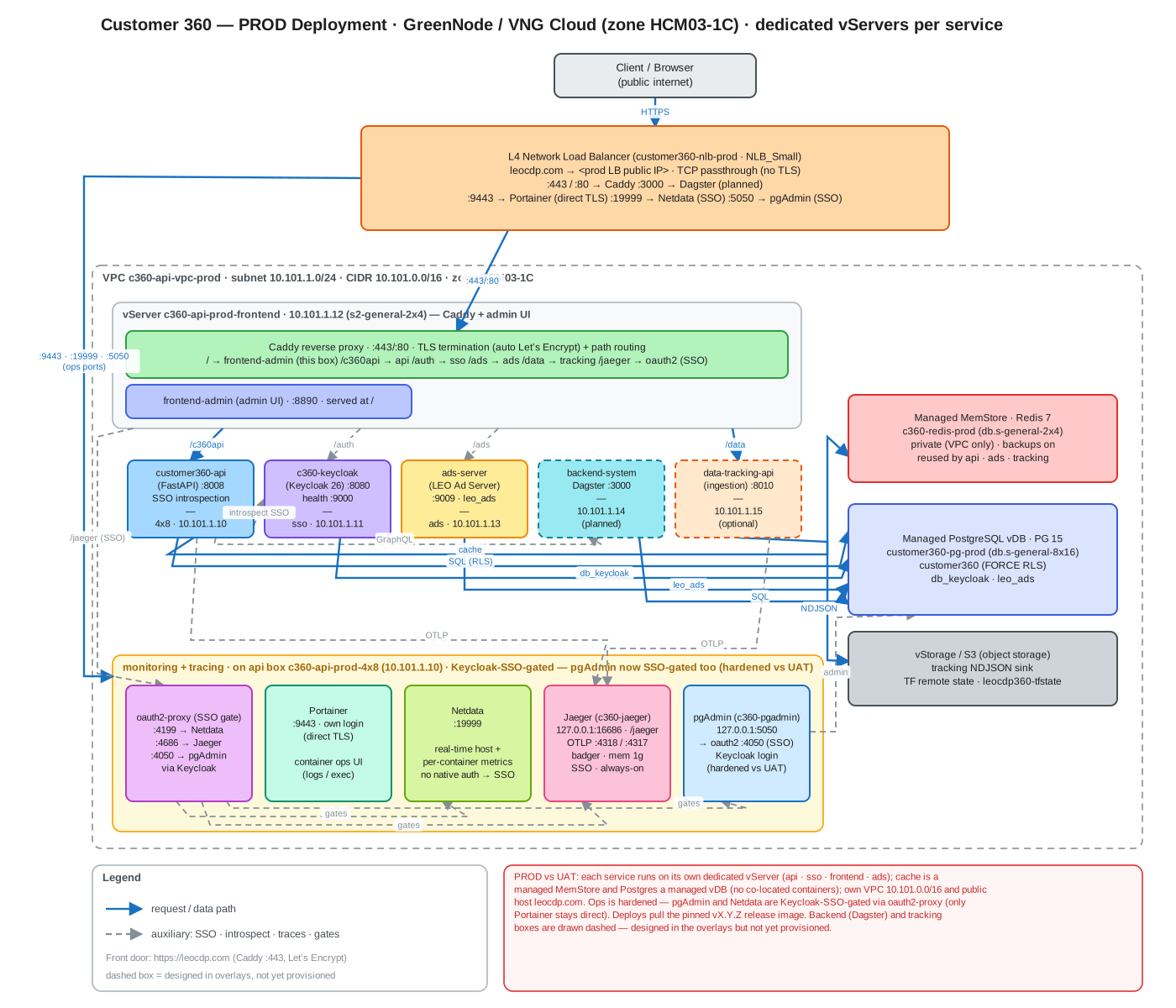
The prod overlay differs from UAT: each service runs on its own dedicated vServer
(api · sso · frontend · ads · docs), cache is a managed MemStore and Postgres a managed vDB
(no co-located containers), it has its own VPC (10.101.0.0/16) and public host
(c360.leocdp.com), deploys pull the pinned vX.Y.Z release image, and ops is hardened —
pgAdmin and Netdata are both Keycloak-SSO-gated via oauth2-proxy (only Portainer stays
direct). The backend (Dagster) and tracking boxes are drawn dashed — designed in the
overlays but not yet provisioned.
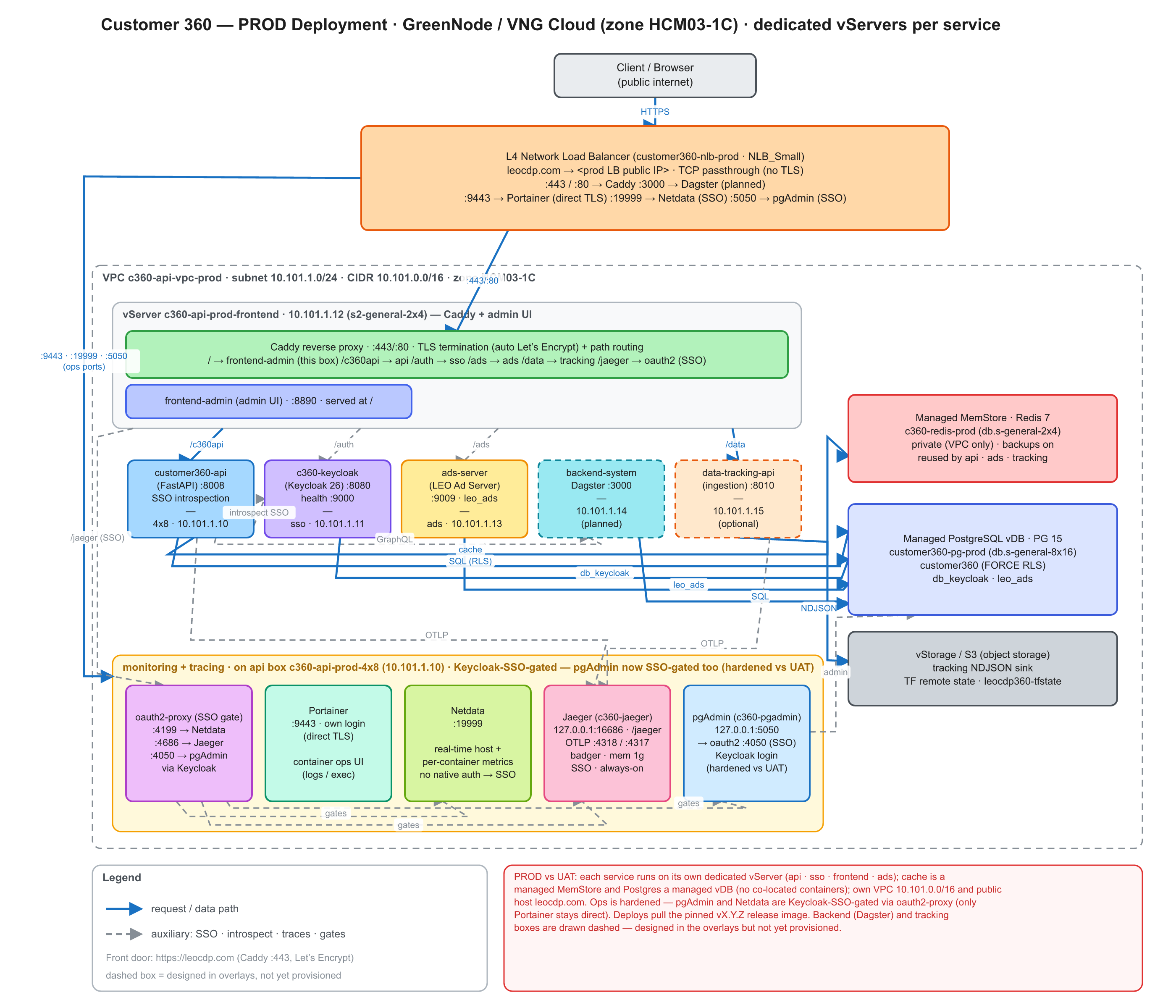
📐 Editable sources: deployment-view-prod.excalidraw
(open at excalidraw.com or the Obsidian Excalidraw plugin) ·
deployment-view-prod.svg (vector source of the image above).
UAT → PROD differences
| Aspect | UAT | PROD |
|---|---|---|
| VPC / subnet | c360-vpc-uat · 10.100.1.0/24 | c360-api-vpc-prod · 10.101.1.0/24 (CIDR 10.101.0.0/16) |
| Public host | beta.leocdp.com | c360.leocdp.com |
| Load balancer | (uat NLB) | customer360-nlb-prod (NLB_Small) |
| customer360-api | api box 10.100.1.5 | dedicated c360-api-prod-4x8 · 10.101.1.10 (s2-general-4x8) |
| Keycloak (SSO) | container on the api box | dedicated c360-api-prod-sso · 10.101.1.11 (2x4) |
| customer360-frontend + Caddy | on the api box | dedicated c360-api-prod-frontend · 10.101.1.12 (2x4) |
| customer360-promotions | container on the api box | dedicated c360-api-prod-ads · 10.101.1.13 (4x8) |
| docs-vector-search | dedicated c360-api-uat-docs · 10.100.1.7 (s-general-2x4, 2 vCPU/4 GB) | dedicated c360-api-prod-docs (s2-general-2x4, 2 vCPU/4 GB) |
| Redis / cache | container on the api box | managed MemStore c360-redis-prod (Redis 7, db 2x4), private |
| PostgreSQL | managed vDB 10.100.1.3 | managed vDB customer360-pg-prod (PG 15, db 8x16) |
| Image tag | latest / newest sha-* (tracks main) | pinned vX.Y.Z (a GitHub Release) |
| pgAdmin | direct on the LB (plain HTTP, own login) | Keycloak-SSO-gated via oauth2-proxy :4050 |
| Netdata / Jaeger | SSO via oauth2-proxy | SSO via oauth2-proxy (same) |
| backend (Dagster) · tracking | provisioned | designed in overlays, not yet provisioned (dashed) |
Scope: this view reflects the prod overlays (
*/overlays/prod.tfvars). Private IPs follow the planned10.101.1.xassignment (proxy/overlays/prod.tfvarsupstreams); the LB public IP is assigned at provisioning time. Verify againstterraform outputonce prod is live.