Customer 360 — Scaling the Dagster Backend (Orchestrator + Worker Pools)
Historical note (2026-10-19): Dagster now runs on the VKS cluster (
deployments/customer360-backend/); the backend vServer described below was retired. Kept as the original analysis.
Status: research / decision-support · Date: 2026-09-03 · Scope:
customer360-backend/(Dagster) on VKS, UAT + PROD Platform: GreenNode / VNG Cloud VKS — seevks-target-architecture.svgCompanions:vks-migration-technical-analysis.md·vks-cost-analysis.mdSource of truth for today’s shape:../../customer360-backend/deployment.md·../../k8s/base/dagster.yaml
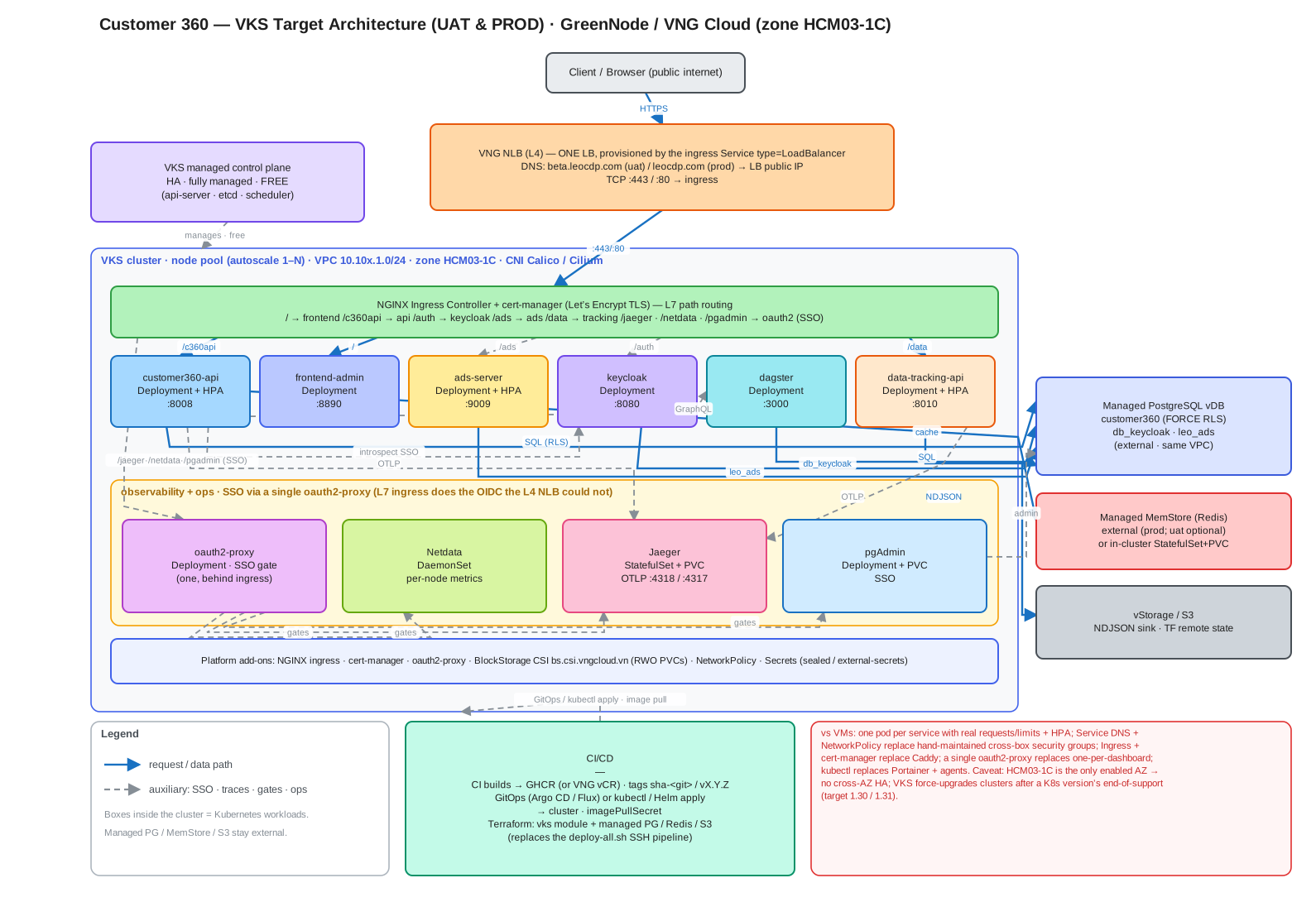
This document turns the conceptual target below into a concrete Dagster production
topology, explains why the current single-pod dagster dev cannot be scaled as-is,
and gives the component-by-component changes, manifests, capacity/cost footprint, and a
phased rollout.
# Conceptual deployment (the ask)
dagster-webserver: { replicas: 2 }
dagster-daemon:    { replicas: 1 }
workers:
  ingestion: { replicas: 5,  cpu: 2, memory: 4Gi }
  ai:        { replicas: 10, cpu: 4, memory: 8Gi }
  compute:   { replicas: 5,  cpu: 4, memory: 16Gi }
1. TL;DR
- The conceptual model is the standard Dagster production topology, but three of its
pieces don’t exist yet and one hard prerequisite is missing:
- Storage must move SQLite → PostgreSQL first. You cannot run 2 webserver replicas
and a separate daemon against the current SQLite file on a
ReadWriteOncePVC. Multiple processes need shared run/event/schedule storage. This is blocker #0. dagster devmust be split into adagster-webserverDeployment (N replicas, stateless) and adagster-daemonDeployment (exactly 1 replica — no leader election).- The “workers” become a run launcher + executor with concurrency queues, not a magic
new kind of pod. The fixed pools
ingestion / ai / computemap cleanly to either Celery worker Deployments per queue (fixed replicas — matches the ask 1:1) or ephemeral per-run/per-step K8s Jobs (elastic — the modern default). See §6, the core decision.
- Storage must move SQLite → PostgreSQL first. You cannot run 2 webserver replicas
and a separate daemon against the current SQLite file on a
- Compute logs must move to S3/MinIO (already in the stack). Local-PVC logs break the moment there is more than one webserver replica.
- The daemon is the singleton. Two daemons = duplicate schedule/sensor ticks = duplicate runs. The webserver is stateless and scales freely; the daemon does not.
- The pools are provisioning ahead of real load. Today only
identity_resolution,segmentation, andanalyticsdo real work; the other six code locations are runnable placeholders. Theaipool at10 × 4 vCPU/8Gi = 40 vCPUis aspirational capacity — right-size it to actual queue depth and roll it out in phases (§9). - Footprint is large: the three pools alone request ≈ 70 vCPU / 180 Gi if always-on (vs. today’s single ~1 vCPU / 2.5 Gi pod). Prefer scale-to-floor + KEDA or ephemeral run pods so you pay for depth, not for idle replicas (§8, §10).
2. Current state (baseline)
From k8s/base/dagster.yaml and
customer360-backend/deployment.md:
| Aspect | Today |
|---|---|
| Process model | one dagster dev -w workspace.yaml pod = webserver + daemon + in-process gRPC subprocess per code location |
| Replicas | 1, strategy: Recreate (single-writer volume) |
| Code locations | 9 loaded in-process from workspace.yaml (7 gRPC subprocs on the small overlay) |
| Run/event/schedule storage | SQLite under DAGSTER_HOME on a 1Gi RWO PVC |
| Run launcher | DefaultRunLauncher — the whole run executes in a subprocess on the daemon/code-location pod |
| Executor | in-process / multiprocess — no isolation, no per-op scaling |
| Compute logs | local filesystem under the PVC |
| Resource envelope (local overlay) | requests 250m/512Mi, limits 1 vCPU / 2560Mi |
Implemented work vs. placeholders (from deployment.md):
| Code location | Status | Data engine |
|---|---|---|
identity_resolution | implemented — CIR batch-drain job + poll sensor | in-memory join |
segmentation | implemented — recompute job + poll sensor | Polars |
analytics | implemented — hourly tracking-log aggregation + schedule | Polars |
ai_agents_runners, campaign_activation, email_engine, notification_engine, data_synch | orchestration/placeholder jobs | — |
Why this cannot just get replicas: 2: SQLite has one writer, the PVC is ReadWriteOnce,
and dagster dev is explicitly a development launcher that co-locates the webserver and
daemon. Bumping replicas would give two daemons fighting over one SQLite file → duplicate
sensor/schedule ticks, DB-lock errors, and split run history.
3. Target topology
The conceptual pieces map onto real Dagster components as follows:
| Conceptual | Real Dagster component | Cardinality rule |
|---|---|---|
dagster-webserver ×2 | dagster-webserver Deployment behind a Service | stateless → N replicas OK, front with HPA |
dagster-daemon ×1 | dagster-daemon Deployment | must be exactly 1 (runs schedules, sensors, run queue, run monitoring) |
workers: ingestion/ai/compute | run launcher + executor queues (Celery workers or K8s Jobs) | fixed replicas (Celery) or elastic per-run pods (K8s) |
| (implicit) | 9 code-location gRPC servers (dagster api grpc) | 1 Deployment per location, independent deploy/scale |
| (implicit) | PostgreSQL run/event/schedule storage | shared; the managed vDB already runs |
| (implicit) | S3/MinIO compute-log storage | shared; MinIO already in the stack |
The same topology runs in both environments — only the scale differs (webserver replicas
and the ingestion / ai / compute pool sizes). The daemon is a singleton in both. UAT runs a
right-sized overlay (1 / 2 / 1); PROD runs the conceptual target (5 / 10 / 5):
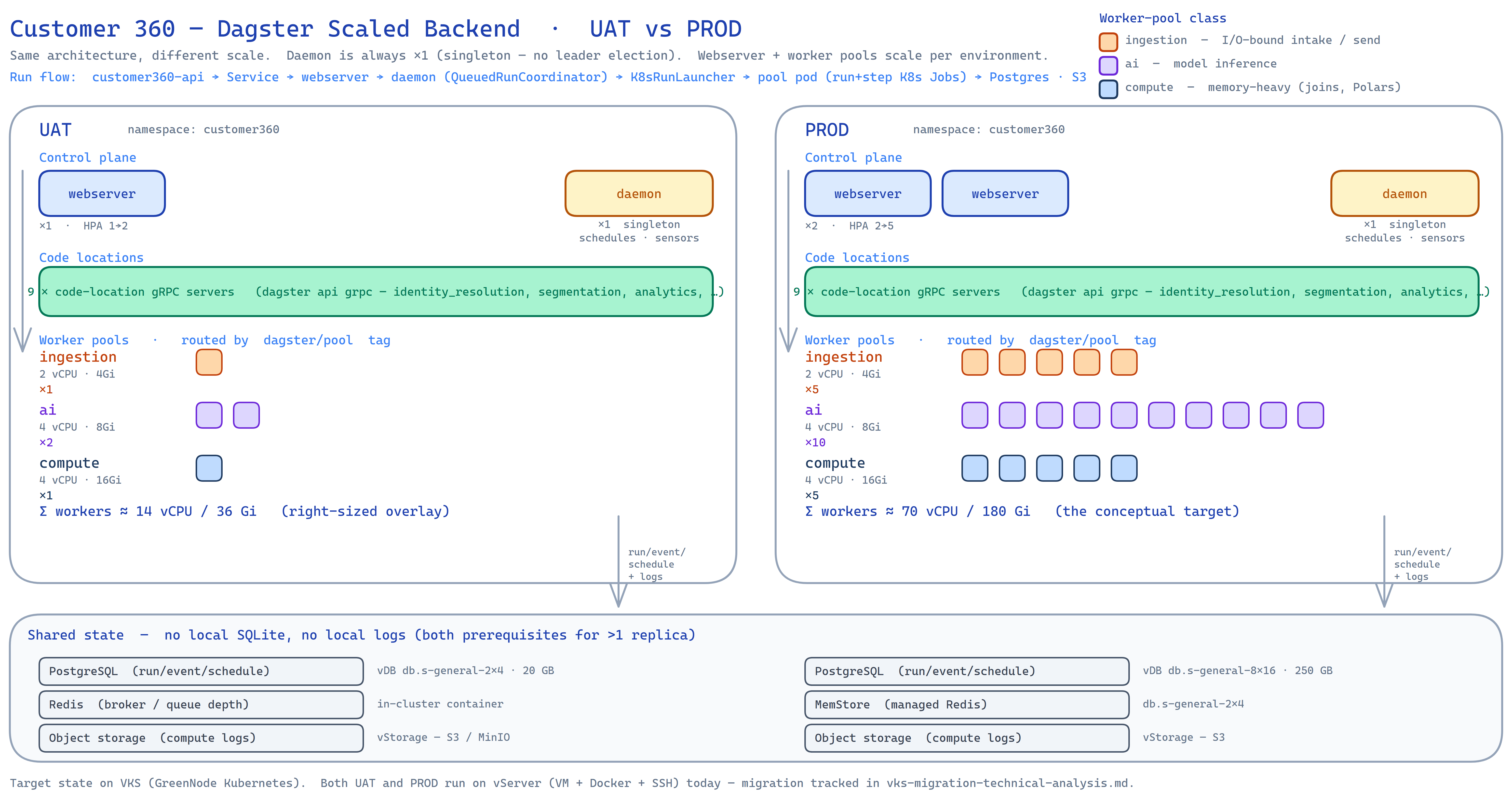
📐 Editable sources: dagster-scaling-topology.excalidraw
(open at excalidraw.com or the Obsidian Excalidraw plugin) ·
dagster-scaling-topology.svg (vector source of the image above).
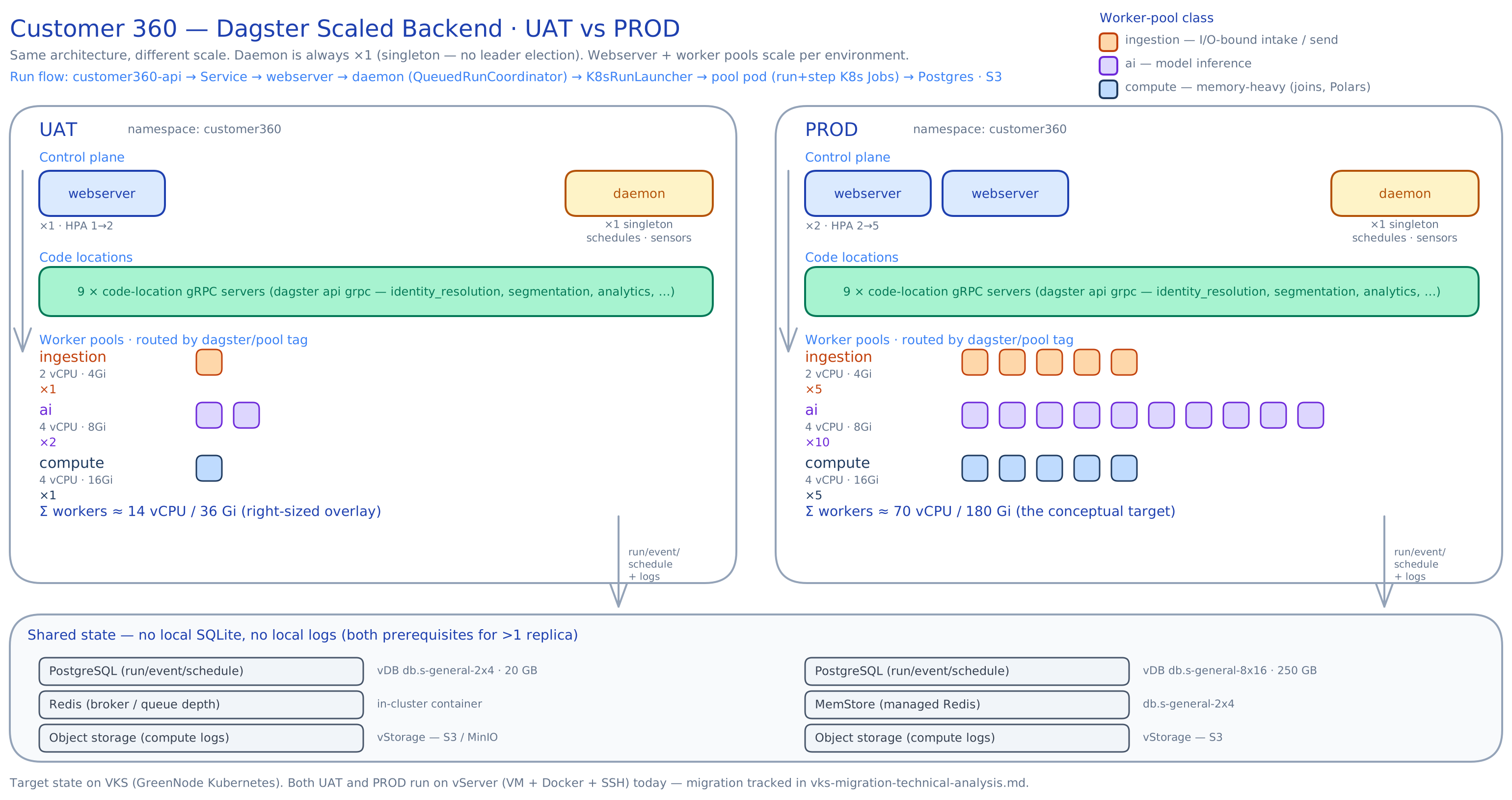
The worker pools are drawn as stacks of pod-squares, one square per replica, so PROD’s
5 / 10 / 5reads as visibly denser than UAT’s1 / 2 / 1— the whole point of the diagram is same architecture, different scale. Shared state (Postgres · object storage · Redis/MemStore) lives outside the cluster and is the hard prerequisite for running more than one replica (§4).
4. Prerequisite #0 — move storage to PostgreSQL (do this first)
Everything else depends on shared storage. Point the Dagster instance
($DAGSTER_HOME/dagster.yaml) at the managed Postgres the platform already runs.
# $DAGSTER_HOME/dagster.yaml  (baked into the image or mounted as a ConfigMap)
storage:
  postgres:
    postgres_db:
      username:   { env: DAGSTER_PG_USER }
      password:   { env: DAGSTER_PG_PASSWORD }
      hostname:   { env: DAGSTER_PG_HOST }
      db_name:    { env: DAGSTER_PG_DB }      # e.g. a dedicated `dagster` DB or schema
      port:       5432

# Compute logs off local disk → object storage (MinIO / vStorage S3)
compute_logs:
  module: dagster_aws.s3.compute_log_manager
  class: S3ComputeLogManager
  config:
    bucket:            { env: DAGSTER_LOGS_BUCKET }
    prefix: dagster-compute-logs
    endpoint_url:      { env: S3_ENDPOINT_URL }   # MinIO endpoint
    skip_empty_files:  true
Notes:
- Use a dedicated
dagsterdatabase (or at least schema) on the vDB — don’t co-mingle with thecustomer360app tables. Dagster creates/migrates its own tables (dagster instance migrate). - Add
psycopg2-binary+dagster-postgres+dagster-awsto the image (psycopg2 is already installed). - Once storage is Postgres-backed and logs are S3-backed, the
dagster-homePVC is no longer shared state — it becomes disposable per pod (or removed entirely).
5. Split dagster dev → webserver (N) + daemon (1)
dagster dev is a dev convenience. In production run two commands as two Deployments, both
pointed at the same workspace.yaml (now referencing gRPC servers, §7) and the same
Postgres instance.
# webserver — stateless, scale freely
apiVersion: apps/v1
kind: Deployment
metadata: { name: dagster-webserver, labels: { app: dagster, role: webserver } }
spec:
  replicas: 2
  selector: { matchLabels: { app: dagster, role: webserver } }
  template:
    metadata: { labels: { app: dagster, role: webserver } }
    spec:
      containers:
        - name: webserver
          image: customer360-dagster:<tag>
          command: ["dagster-webserver", "-w", "workspace.yaml", "-h", "0.0.0.0", "-p", "3000"]
          ports: [{ containerPort: 3000, name: http }]
          envFrom:
            - configMapRef: { name: c360-config }
            - secretRef:    { name: c360-secrets }
          readinessProbe: { httpGet: { path: /server_info, port: 3000 }, initialDelaySeconds: 15, periodSeconds: 10 }
          resources: { requests: { cpu: 250m, memory: 512Mi }, limits: { cpu: "1", memory: 1Gi } }
---
# daemon — the SINGLETON. schedules, sensors, run queue, run monitoring.
apiVersion: apps/v1
kind: Deployment
metadata: { name: dagster-daemon, labels: { app: dagster, role: daemon } }
spec:
  replicas: 1                 # NEVER >1 — no leader election; duplicates ticks/runs
  strategy: { type: Recreate }
  selector: { matchLabels: { app: dagster, role: daemon } }
  template:
    metadata: { labels: { app: dagster, role: daemon } }
    spec:
      containers:
        - name: daemon
          image: customer360-dagster:<tag>
          command: ["dagster-daemon", "run", "-w", "workspace.yaml"]
          envFrom:
            - configMapRef: { name: c360-config }
            - secretRef:    { name: c360-secrets }
          resources: { requests: { cpu: 250m, memory: 512Mi }, limits: { cpu: "1", memory: 1Gi } }
The existing Service (port 3000) now selects role: webserver only. Front it with an HPA on
CPU/QPS (§8). The daemon has no Service (it opens no inbound port).
6. The core decision — how “workers” actually execute
The conceptual workers block is execution capacity. Dagster offers two production shapes;
pick per operability vs. elasticity. Both require the QueuedRunCoordinator (§6.3) to honor
per-pool concurrency caps.
6.1 Option A — Celery worker pools (fixed replicas — matches the ask 1:1)
celery_k8s_job_executor with a broker (Redis, already in the stack). Each pool is a long-lived
Celery worker Deployment subscribed to a named queue; steps are routed by tag. replicas is
a real, literal thing here.
# one Deployment per pool; shown: the `ai` pool
apiVersion: apps/v1
kind: Deployment
metadata: { name: dagster-worker-ai, labels: { app: dagster, role: worker, pool: ai } }
spec:
  replicas: 10
  selector: { matchLabels: { pool: ai } }
  template:
    metadata: { labels: { app: dagster, role: worker, pool: ai } }
    spec:
      nodeSelector: { c360.pool: ai }          # land on the ai node pool
      containers:
        - name: worker
          image: customer360-dagster:<tag>
          command: ["dagster-celery", "worker", "start", "-q", "ai", "-A", "dagster_celery_k8s.app"]
          envFrom: [{ configMapRef: { name: c360-config } }, { secretRef: { name: c360-secrets } }]
          resources: { requests: { cpu: "4", memory: 8Gi }, limits: { cpu: "4", memory: 8Gi } }
Repeat for ingestion (replicas 5, 2 vCPU/4Gi, -q ingestion) and compute
(replicas 5, 4 vCPU/16Gi, -q compute). Jobs choose a queue via tag (§7.1).
- Pros: fixed, predictable pools; the ask maps literally; warm workers (no per-run pod cold start).
- Cons: you run (and pay for)
5+10+5 = 20always-on pods even when idle; extra moving parts (broker + result backend). Mitigate idle cost with KEDA scaling each worker Deployment on broker queue length (floor 1, ceiling = the numbers above).
6.2 Option B — K8s-native ephemeral runs (elastic — modern default) — recommended
K8sRunLauncher + k8s_job_executor: each run becomes a K8s Job, each op/step becomes a
K8s Job. Pods are created on demand and torn down; the cluster autoscaler grows/shrinks the node
pools. There are no fixed worker replicas — the ingestion/ai/compute numbers become
node-pool + concurrency ceilings instead of standing pods.
-
Translate the ask like this:
Pool ”replicas × size” (the ask) K8s-native interpretation ingestion 5 × 2 vCPU/4Gi node pool ingestion, autoscale 0→~5 nodes; queue concurrency 5ai 10 × 4 vCPU/8Gi node pool ai, autoscale 0→~10 nodes; queue concurrency 10compute 5 × 4 vCPU/16Gi node pool compute, autoscale 0→~5 nodes; queue concurrency 5 -
Pros: pay for depth not idles (scale-to-zero between runs), full per-run isolation, no broker.
-
Cons: per-run pod scheduling latency (seconds); more K8s Job churn to observe.
Recommendation: start with Option B (K8s-native) — it fits the batch/scheduled nature of
these jobs (hourly analytics, poll-driven CIR/segmentation) and avoids paying for 20 idle pods.
Adopt Option A (Celery) only for a pool that needs warm, low-latency execution (e.g. an
online-ish ai scoring path) once such a workload actually exists.
6.3 Required either way — QueuedRunCoordinator
Gives global + per-tag concurrency limits (so ai truly caps at 10, compute at 5), priority,
and backpressure. Lives in the same dagster.yaml as §4:
run_coordinator:
  module: dagster.core.run_coordinator
  class: QueuedRunCoordinator
  config:
    max_concurrent_runs: 25            # 5 + 10 + 5 global ceiling
    tag_concurrency_limits:
      - { key: "dagster/pool", value: "ingestion", limit: 5 }
      - { key: "dagster/pool", value: "ai",        limit: 10 }
      - { key: "dagster/pool", value: "compute",   limit: 5 }

# Option B launcher (K8s-native)
run_launcher:
  module: dagster_k8s
  class: K8sRunLauncher
  config:
    job_namespace: customer360
    image_pull_policy: IfNotPresent
    env_config_maps: [c360-config]
    env_secrets: [c360-secrets]
7. Code locations become gRPC “user code” Deployments
Instead of dagster dev spawning nine in-process gRPC subprocesses, run one gRPC server per
code location (dagster api grpc). The webserver and daemon reference them over the network,
so code deploys, scaling, and dependency sets are independent per location.
# production workspace.yaml — references servers instead of python_file
load_from:
  - grpc_server: { host: dagster-code-identity-resolution, port: 4000, location_name: identity_resolution }
  - grpc_server: { host: dagster-code-segmentation,        port: 4000, location_name: segmentation }
  - grpc_server: { host: dagster-code-analytics,           port: 4000, location_name: analytics }
  # …6 more
# one Deployment + Service per location; shown: analytics
apiVersion: apps/v1
kind: Deployment
metadata: { name: dagster-code-analytics, labels: { app: dagster, role: code, location: analytics } }
spec:
replicas: 1
template:
metadata: { labels: { app: dagster, role: code, location: analytics } }
spec:
containers:
- name: grpc
image: customer360-dagster:<tag> # or a per-location image later
command: ["dagster", "api", "grpc", "-m", "analytics.dagster_defs", "-h", "0.0.0.0", "-p", "4000"]
ports: [{ containerPort: 4000 }]
envFrom: [{ configMapRef: { name: c360-config } }, { secretRef: { name: c360-secrets } }]
resources: { requests: { cpu: 100m, memory: 256Mi }, limits: { cpu: 500m, memory: 512Mi } }Incremental option: you may keep the current single
python_fileworkspace and only split webserver/daemon + Postgres + queues first (§4–6), deferring the gRPC-per-location split until a location needs its own release cadence.deployment.md’s “Future split-image architecture” section already frames this as a later decision — the gRPC split is the runtime half of it.
7.1 Routing the 9 code locations to the 3 pools
Tag each job with dagster/pool and the executor’s resource config so it lands on the right
pool with the right requests/limits. Profiles below drive the mapping:
| Code location | Workload profile | Pool | Why |
|---|---|---|---|
data_synch | I/O-bound ingest / sync | ingestion | network + object-store I/O, modest CPU |
event_loader | Kafka/NDJSON intake | ingestion | streaming intake, I/O-bound |
campaign_activation | orchestration / fan-out | ingestion | I/O + coordination, light CPU |
email_engine | outbound send fan-out | ingestion | network fan-out, light |
notification_engine | push/SMS/in-app dispatch | ingestion | network fan-out, light |
ai_agents_runners | model/workflow orchestration | ai | CPU-heavy, model memory |
identity_resolution | large in-memory join / match | compute | memory-hungry joins |
segmentation | full-scan recompute (Polars) | compute | large scans, memory-hungry |
analytics | Polars aggregation over JSONL/Parquet | compute | memory-hungry columnar |
# per-job tagging (in each dagster_defs.py) — pool + K8s resources
analytics_job = analytics_job.with_tags({
    "dagster/pool": "compute",
    "dagster-k8s/config": {
        "container_config": {"resources": {
            "requests": {"cpu": "4",  "memory": "16Gi"},
            "limits":   {"cpu": "4",  "memory": "16Gi"}}},
        "pod_spec_config": {"node_selector": {"c360.pool": "compute"}},
    },
})
Note:
identity_resolutionandsegmentationare memory-bound rather than CPU-bound, so they sit in compute (16Gi) despite modest vCPU.aiis sized for future model inference; theai_agents_runnerslocation owns the consolidated workflow orchestration — see §9.
8. Autoscaling
- Webserver → HPA on CPU (or QPS via the metrics adapter). Floor 2, ceiling ~5.
- Daemon → never autoscale; pinned at 1.
- Workers:
- Option A (Celery): KEDA
ScaledObjectper pool, trigger = broker (Redis) queue length; floor 1 (or 0 with cold-start tolerance), ceiling =5 / 10 / 5. - Option B (K8s-native): cluster autoscaler per node pool (
ingestion/ai/compute), min 0, max = the pool size; run-level backpressure comes from theQueuedRunCoordinatorcaps.
- Option A (Celery): KEDA
# HPA for the webserver
apiVersion: autoscaling/v2
kind: HorizontalPodAutoscaler
metadata: { name: dagster-webserver }
spec:
  scaleTargetRef: { apiVersion: apps/v1, kind: Deployment, name: dagster-webserver }
  minReplicas: 2
  maxReplicas: 5
  metrics:
    - type: Resource
      resource: { name: cpu, target: { type: Utilization, averageUtilization: 70 } }
9. Capacity & cost footprint
If pools are always-on (Option A, no KEDA floor reduction):
| Tier | Replicas | Per-pod | Pool requests |
|---|---|---|---|
| ingestion | 5 | 2 vCPU / 4Gi | 10 vCPU / 20Gi |
| ai | 10 | 4 vCPU / 8Gi | 40 vCPU / 80Gi |
| compute | 5 | 4 vCPU / 16Gi | 20 vCPU / 80Gi |
| workers subtotal | 20 | — | 70 vCPU / 180Gi |
| webserver | 2 | 0.5 vCPU / 1Gi | 1 vCPU / 2Gi |
| daemon | 1 | 0.5 vCPU / 1Gi | 0.5 vCPU / 1Gi |
| code locations (gRPC) | 9 | 0.25 vCPU / 0.5Gi | ~2.3 vCPU / 4.5Gi |
| control-plane subtotal | 12 | — | ~3.8 vCPU / ~7.5Gi |
| TOTAL | 32 | — | ≈ 74 vCPU / ≈ 188 Gi |
- That is ~70× the CPU and ~75× the memory of today’s single ~1 vCPU / 2.5Gi pod. On VKS you pay
per worker-node VM (control plane is free — see
vks-cost-analysis.md), so 74 vCPU / 188Gi is roughly a node pool of ~10×s2-general-8x16(8 vCPU/16Gi) or fewer larger flavors. Price it against the published vServer flavor rates in the cost doc before committing. - This is why Option B (ephemeral) or KEDA-to-floor is recommended: the
aipool alone reserves 40 vCPU for jobs that are placeholders today. Standing capacity of that size is only justified once realai_agents_runnersload exists and you’ve measured queue depth. - Right-sizing rule: set pool ceilings from measured peak concurrent runs per queue over a
representative window, not from the conceptual numbers. Treat
5/10/5as not-to-exceed ceilings, not as a floor to provision on day one.
10. Phased rollout
- Phase 0 — storage (no topology change). ✅ Implemented, adaptive & fail-open. The instance
config is rendered at container start by
entrypoint.sh→scripts/render_dagster_instance.py, which probes the backends and writes$DAGSTER_HOME/dagster.yaml: shared PostgreSQL run/event/schedule storage (dedicateddagsterDB, created best-effort) if the DB is reachable, else local SQLite; S3/MinIO compute logs (S3ComputeLogManager, path-style) if the bucket answers, else local logs. Every probe is wrapped, so a Postgres/S3 outage degrades durability, never availability — the orchestrator always boots on local, UAT and PROD (Docker on vServer today), with or without those backends. No baked config, no init container, no PVC, no deploy-time psql step. Still onedagster devcontainer. Reversible. Existing-data cutover: the old SQLite run history is operational metadata (business data lives in the customer360 DB + S3) and the VM’sDAGSTER_HOMEis ephemeral —deploy-backend.shauto-backs it up before redeploy, and a best-effort importer (customer360-backend/scripts/migrate_dagster_sqlite_to_postgres.py)- runbook in
deployment.mdcover migrating it into Postgres if needed.
- runbook in
- Phase 1 — split the control plane. Replace the
dagster devDeployment withdagster-webserver ×2+dagster-daemon ×1; add the webserver HPA. Storage from Phase 0 makes this safe. Verify no duplicate sensor/schedule ticks. - Phase 2 — queued execution. Add
QueuedRunCoordinator+K8sRunLauncher+k8s_job_executor; tag the three implemented jobs (analytics→compute,segmentation→compute,identity_resolution→compute) with pool + resources. Create thecomputenode pool first. - Phase 3 — code-location gRPC split. Move
workspace.yamltogrpc_serverentries; stand up one gRPC Deployment per location. Enables independent deploy/scale (and later, per-location images). - Phase 4 — scale the pools to real demand. Create
ingestionandainode pools; wire pool ceilings; add KEDA (or cluster-autoscaler) scaling driven by measured queue depth. Introduce Celery pools (Option A) only where warm, low-latency execution is required.
Each phase is independently deployable and reversible; only Phase 0 is a hard prerequisite for all others.
11. Risks & gotchas
| # | Risk | Mitigation |
|---|---|---|
| 1 | Two daemons (autoscaled or during a rollout) → duplicate ticks/runs | daemon replicas: 1 + strategy: Recreate; never HPA it |
| 2 | Webserver replicas over SQLite/local logs → lock errors, missing logs on the “other” pod | Phase 0 first: Postgres storage + S3 compute logs are non-negotiable before replicas > 1 |
| 3 | Postgres connection exhaustion — webserver + daemon + every run/step pod open connections | size the vDB max_connections; consider PgBouncer; cap max_concurrent_runs |
| 4 | Always-on pools burn budget while placeholders do nothing | Option B ephemeral or KEDA floor; treat 5/10/5 as ceilings (§9) |
| 5 | Job lands on the wrong pool / OOMs | enforce dagster/pool tag + dagster-k8s/config resources + nodeSelector on every job (§7.1) |
| 6 | Per-run pod cold-start latency (Option B) surprises schedule-sensitive jobs | pre-warmed node pool min-size, or Celery (Option A) for that pool |
| 7 | dagster instance migrate not run after upgrades → schema drift | add a migrate init-container/Job to the webserver rollout |
| 8 | Losing run history on the old PVC during Phase 0 | export/verify after migrate; the SQLite PVC can be retired only once Postgres is authoritative |
| 9 | CI still builds one customer360-dagster image | fine for gRPC-per-location (same image, different -m module); split images later only if a location needs it (deployment.md §Future) |
12. Open decisions
- Option A (Celery, fixed pools) vs. Option B (K8s-native, ephemeral) — recommendation is B to
start; confirm whether any
aipath needs warm workers. - Dedicated
dagsterdatabase vs. schema on the managed vDB — recommend a dedicated DB for clean migrations and blast-radius isolation. - Pool ceilings — adopt
5/10/5as-is, or right-size from measured queue depth (recommended: startcomputeonly, growingestion/aiwhen real jobs land). - UAT vs. PROD sizing — UAT almost certainly does not need
10 ×theaipool; define a smaller UAT overlay (e.g.1/2/1) and reserve the full numbers for PROD. - Broker choice for Option A, if adopted — reuse the existing Redis, or a dedicated broker.
13. Node-pool sizing & per-environment overlays
Deployment context: both UAT and PROD run on vServer (VM + Docker + SSH) today. This scaled topology is the VKS target — the pool/HPA/ephemeral-pod model needs an orchestrator. §13.1–13.3 size the VKS target; §13.4 covers scaling on vServer first if the VKS migration (companion
vks-migration-technical-analysis.md) isn’t done yet. Rates:s2-generalbills linearly at 283,800 VND per (1 vCPU + 2 GB) block, flavors up to8x16published; FX ≈ 26,000 VND/USD — all fromvks-cost-analysis.md.
13.1 The CPU:RAM ratio gotcha (the finding that drives node choice)
VKS s2-general flavors are a fixed 1 vCPU : 2 GB ratio. Compare the pools:
| Pool | Pod request | CPU:RAM | Fits a 1:2 general node? |
|---|---|---|---|
| ingestion | 2 vCPU / 4 Gi | 1:2 | ✅ clean — equals s2-general-2x4 |
| ai | 4 vCPU / 8 Gi | 1:2 | ✅ clean — equals s2-general-4x8 |
| compute | 4 vCPU / 16 Gi | 1:4 | ❌ memory tax — see below |
The
computepool pays a memory tax on general flavorsA
4 vCPU / 16 Gipod on a 1:2 flavor forces you to provision 8 vCPU to get 16 GB — half the CPU is stranded. Each compute pod therefore bills as 8 blocks, not 4. Fixes: (a) putcomputeon a memory-optimized (1:4) node pool if the account offers one — confirm the flavor/price in the console, it is not in the published rate card; or (b) accept the tax; or (c) if the real jobs turn out CPU-heavier than 1:4, re-request them closer to 1:2 and the tax disappears.
13.2 Node-pool design (VKS target)
Assume ~0.5 vCPU / 1 Gi per node for kubelet + system + DaemonSets ⇒ usable ≈ 7.5 vCPU / 15 Gi
on an s2-general-8x16. Give each pool its own node pool (label c360.pool=<pool>, taint so
only Dagster workers land there) so pools scale and bin-pack independently:
| Pool | Recommended node flavor | Pods/node | PROD nodes (5/10/5) | UAT nodes (1/2/1) |
|---|---|---|---|---|
| ingestion | s2-general-8x16 | 3 | 2 (autoscale 0→2) | 1 |
| ai | s2-general-8x16 | 1¹ | 10 (0→10) | 1 (holds 2) |
| compute | memory-optimized 8x32 (1:4)² | 2 | 3 (0→3) | 1 |
¹ A 4 vCPU / 8 Gi ai pod is too big to pack 2-per-node on 8x16 (2×8 Gi + reserve > 15 Gi), so you
get 1 pod/node and strand ~3.5 vCPU. A 16x32-class general flavor (if enabled) packs 2 ai
pods/node and halves the node count to 5 — verify availability in HCM03-1C.
² On general 8x16 a compute pod won’t even fit (16 Gi > 15 Gi usable). It needs a node with
≥ ~18 Gi usable — a memory-optimized 8x32 holds 2 compute pods with no stranded CPU.
13.3 Cost envelope (always-on, PROD)
Billing is linear in provisioned blocks (1 block = 1 vCPU + 2 GB = 283,800 VND/mo). Blocks/pod =
max(vCPU, RAM_GiB / 2):
| Pool | Pods | Blocks/pod | Blocks | Note |
|---|---|---|---|---|
| ingestion | 5 | 2 | 10 | 1:2, no waste |
| ai | 10 | 4 | 40 | 1:2, no waste |
| compute | 5 | 8 | 40 | memory tax (4 vCPU billed as 8 blocks) |
| Pools total (general flavors) | 20 | — | 90 | ≈ 25.5M VND/mo ≈ $982 |
| compute on memory-optimized 1:4 | 5 | 4 | 20 | tax removed → pools total 70 blocks ≈ 19.9M ≈ $764 |
- Control plane (2 webserver + 1 daemon + 9 gRPC code locations) adds only ~3–4 blocks and rides the shared/system node pool, not the worker pools.
- UAT always-on (
1/2/1) ≈ 18 blocks ≈ 5.1M VND/mo ≈ 76). Even the “right-sized” overlay is expensive if it never scales down. - This is the argument for Option B (ephemeral runs) or a KEDA floor of 0–1 (§6, §8): these figures are the ceiling you pay only at sustained peak concurrency. Batch/scheduled jobs (hourly analytics, poll-driven CIR/segmentation) sit idle most of the hour — pay for depth, not for 20 idle pods.
- Managed PostgreSQL + MemStore are separate and already budgeted in the cost doc (>50% of the PROD
bill); the Dagster storage just needs a
dagsterDB on the existing vDB (§4), not new managed infra.
13.4 If you scale on vServer first (before VKS)
On raw vServer there are no node pools, HPA, or ephemeral run pods. The pools become fixed Docker containers pinned to sized VMs — i.e. Option A (Celery workers) from §6.1, since the K8s-native launcher isn’t available. Map each pool to whole VMs at the published flavors:
| Pool (PROD) | Container size | Fits per VM | vServer VMs |
|---|---|---|---|
| ingestion ×5 | 2 vCPU / 4 Gi | 3 × s2-general-8x16 | 2 |
| ai ×10 | 4 vCPU / 8 Gi | 1 × s2-general-4x8 each (or 2 × 8x16) | 5× 8x16 |
| compute ×5 | 4 vCPU / 16 Gi | 1 × (needs ≥ 8x16 for RAM) | 5 |
- Same linear cost as §13.3 (VMs and VKS nodes bill identically) minus the elasticity — vServer containers can’t scale to zero, so you pay the always-on figure with no relief. This is a concrete reason to do the VKS migration before, or together with, the Dagster scale-out.
- Interim reality check: today a single 1 vCPU / 2 GB backend VM runs the whole
dagster devpod. The first meaningful step on vServer is simply a bigger backend VM (e.g.s2-general-4x8) running Postgres-backed storage + split webserver/daemon (Phases 0–1), before standing up any worker VMs.
13.5 Per-environment overlay (kustomize patch)
Keep one base and two overlays; the only deltas are replica counts, the nodeSelector, and the
QueuedRunCoordinator caps. PROD overlay (UAT is the same shape with 1 / 2 / 1 and webserver: 1):
# k8s/overlays/vks-prod/patch-dagster-scale.yaml
- op: replace
  path: /spec/replicas            # dagster-webserver
  value: 2
# worker pools (Celery Option A) — one Deployment per pool
- { name: dagster-worker-ingestion, replicas: 5,  nodeSelector: { c360.pool: ingestion } }
- { name: dagster-worker-ai,        replicas: 10, nodeSelector: { c360.pool: ai } }
- { name: dagster-worker-compute,   replicas: 5,  nodeSelector: { c360.pool: compute } }
# $DAGSTER_HOME/dagster.yaml — per-env concurrency caps (see §6.3)
run_coordinator:
config:
max_concurrent_runs: 25 # PROD 5+10+5 · UAT: 4
tag_concurrency_limits:
- { key: "dagster/pool", value: "ingestion", limit: 5 } # UAT: 1
- { key: "dagster/pool", value: "ai", limit: 10 } # UAT: 2
- { key: "dagster/pool", value: "compute", limit: 5 } # UAT: 1Node labels/taints to create once per env:
kubectl label node <n> c360.pool=ingestion|ai|computeand a matchingNoScheduletaint, so only pods carrying thedagster/pooltag + toleration land on worker nodes and the general/system pool stays clear for the control plane.
Appendix — component → command cheat-sheet
| Component | Command |
|---|---|
| webserver | dagster-webserver -w workspace.yaml -h 0.0.0.0 -p 3000 |
| daemon | dagster-daemon run -w workspace.yaml |
| code location (gRPC) | dagster api grpc -m <location>.dagster_defs -h 0.0.0.0 -p 4000 |
| Celery worker (Option A) | dagster-celery worker start -q <pool> -A dagster_celery_k8s.app |
| DB migrate (each upgrade) | dagster instance migrate |
| (today, dev only) | dagster dev -w workspace.yaml -h 0.0.0.0 -p 3000 |