Customer360 on Kubernetes
Run the entire Customer360 stack — Postgres, Redis, Kafka, Keycloak, MinIO,
the API, the unified Dagster backend, and the admin frontend —
on a local Kubernetes cluster, then reuse the same manifests to deploy the app
tier on GreenNode VKS against the managed data tier from ../terraform.
Kustomize (base + components + overlays), mirroring the terraform/
environment pattern.
Prerequisites
- Docker, kind, kubectl on PATH.
- Windows: run the scripts from Git Bash or WSL (they are
.sh).
Quick start (local)
cd k8s
cp overlays/local/secret.env.example overlays/local/secret.env   # edit if you like (dev values are fine)
./scripts/up.sh
up.sh creates the kind cluster, builds + loads the images, applies
overlays/local, waits, and prints the URLs:
| Service | URL | Notes |
|---|---|---|
| API (FastAPI) | http://localhost:18008/docs | health /health |
| Frontend admin | http://localhost:18890 | |
| Keycloak | http://localhost:18080 | admin console |
| Dagster | http://localhost:13000 | UI + GraphQL |
| MinIO | http://localhost:19000 / :19001 | S3 API / console |
Tear down (destroys local data): ./scripts/down.sh.
Layout
k8s/
├── kind/cluster.yaml            # kind node with host port-maps for the NodePorts
├── scripts/{up,down,build-load}.sh
├── base/                        # app tier (env-agnostic)
│   ├── api, frontend, dagster, keycloak (+ db-init Job), config, namespace
│   └── kustomization.yaml
├── components/
│   └── in-cluster-data/         # postgres, redis, kafka, minio (+seed) — opt-in
└── overlays/
    ├── local/                   # base + in-cluster-data + NodePorts + :local images
    └── vks/                     # base + managed endpoints + Ingress + registry images
Diagrams
How Kustomize builds each environment
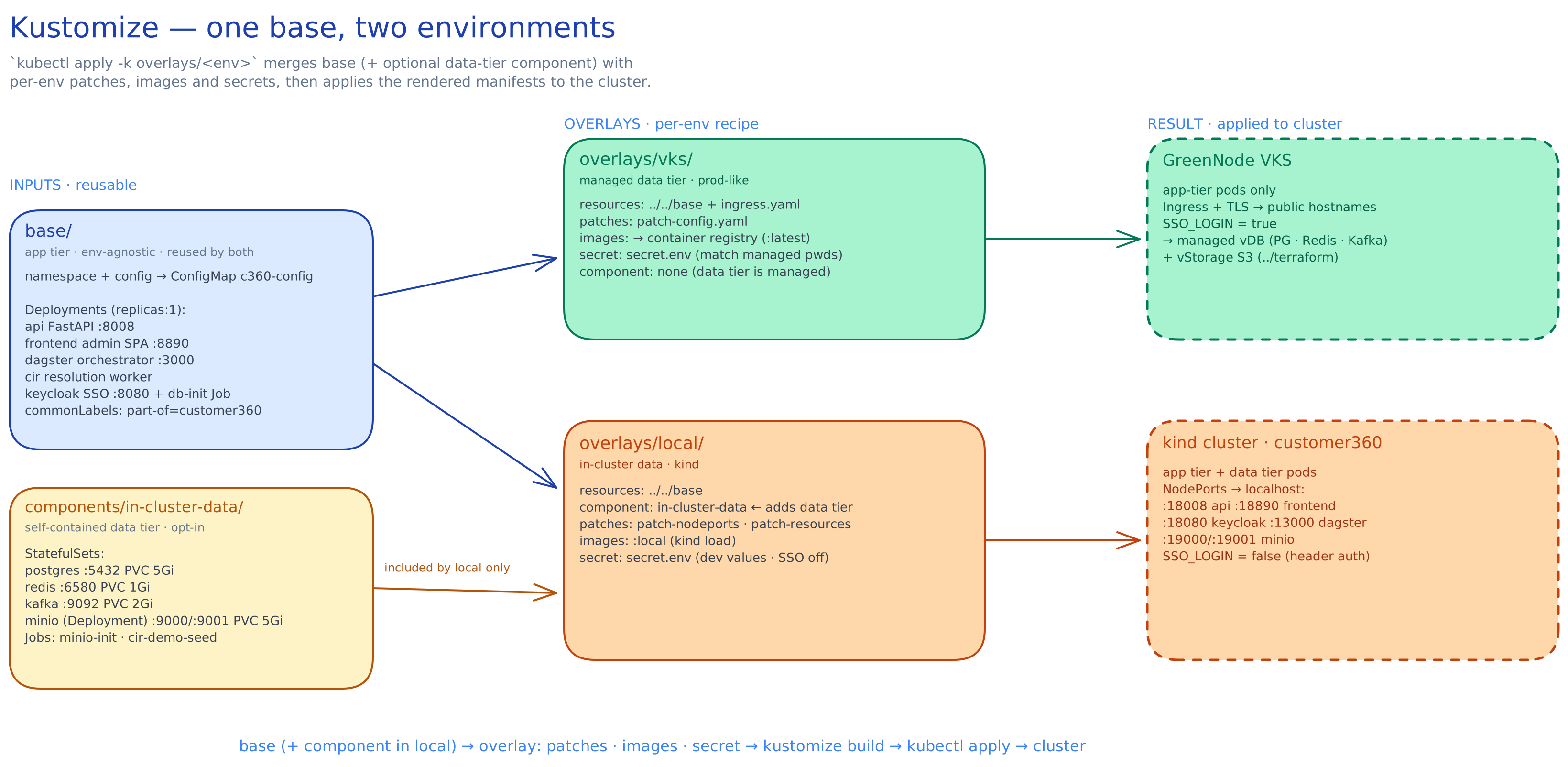
base/ (the env-agnostic app tier) is reused by both overlays. overlays/local
additionally pulls in the in-cluster-data component and patches in NodePorts +
:local images; overlays/vks omits that component, adds an Ingress, and repoints
the images at a registry. kubectl apply -k overlays/<env> merges base (+ patches +
images + secret) and applies the rendered manifests to the target cluster.
(Source: docs/kustomize-flow.excalidraw — drop it into excalidraw.com to edit.)
Runtime (pod) view — local overlay
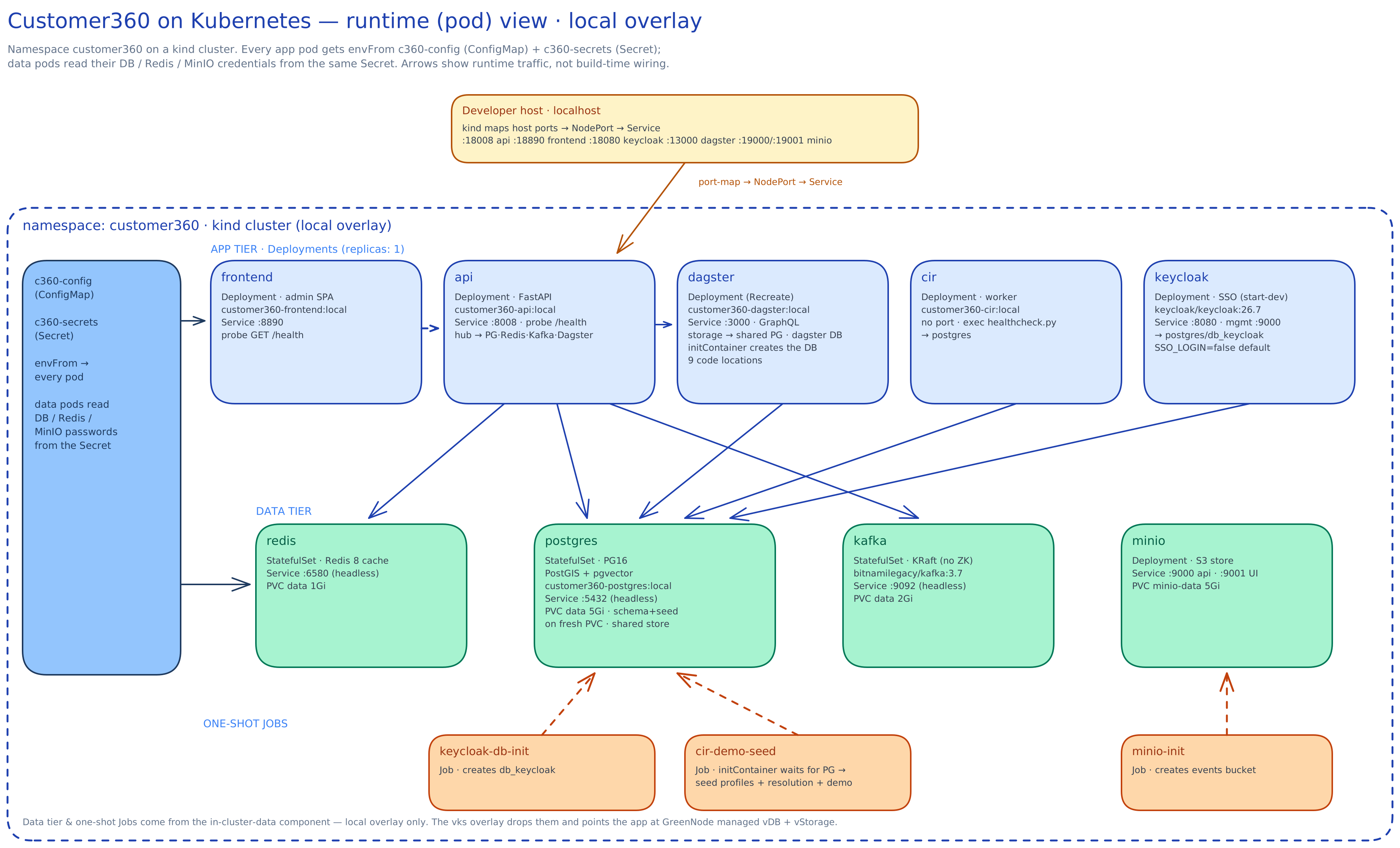
Inside the customer360 namespace, the app tier (Deployments, replicas: 1)
sits above the data tier (StatefulSets + MinIO). api is the hub — it reaches
Postgres, Redis, Kafka and Dagster’s GraphQL; Dagster owns the identity-resolution
and other backend task runs. dagster and keycloak share Postgres as the
system of record. c360-config + c360-secrets are
injected into every pod via envFrom. The host reaches Services through kind’s
port-map → NodePort chain, and three one-shot Jobs create db_keycloak, the
MinIO bucket, and the demo data. The data tier and Jobs exist only in the local
overlay — vks drops them and points the app at the managed vDB + vStorage.
(Source: docs/pod-view.excalidraw.)
local vs vks
overlays/local | overlays/vks | |
|---|---|---|
| Data tier | in-cluster (component) | GreenNode managed vDB + vStorage (../terraform) |
| Images | :local, kind loaded | pushed to a container registry |
| Access | NodePorts → localhost | Ingress + TLS |
| Auth | SSO_LOGIN=false (header auth) | SSO_LOGIN=true |
| Secrets | dev values | match the managed services |
Init & seed behavior
- DB schema + core seed are baked into
customer360-postgres:localand run only on a fresh PVC (empty data dir). To re-init:down.sh(or delete thedata-postgres-0PVC) and bring up again. keycloak-db-initJob creates thedb_keycloakdatabase (idempotent).minio-initJob creates the events bucket.cir-demo-seedJob uses the unified Dagster image to load demo profiles → identity resolution → full demo data.- Auth is off by default (
SSO_LOGIN=false) so the API acceptsX-Tenant-Id/X-User-Idheaders — Keycloak still runs, but there is no automatedleocdprealm/client seed; create it manually if you set SSO on.
Common ops
kubectl -n customer360 get pods
kubectl -n customer360 logs -f deploy/api          # or dagster / frontend
kubectl -n customer360 rollout restart deploy/api
kubectl apply -k overlays/local                    # re-apply after edits
Deploy to GreenNode VKS
- Provision the managed data tier with
../terraform(vDB + vStorage). - Build the app images and push to your registry; set them in
overlays/vks/kustomization.yaml(images:→newName/newTag). - Fill
overlays/vks/patch-config.yaml(managed DB/Redis/Kafka hosts, S3 endpoint, public URLs) andoverlays/vks/secret.env(matching the terraform passwords + vStorage S3 key). - Set your
ingressClassName, hostnames and TLS inoverlays/vks/ingress.yaml. kubectl apply -k overlays/vksagainst your VKS kubeconfig.
The vks overlay omits the in-cluster data component, so Postgres/Redis/Kafka/
MinIO are not deployed — the app points at the managed services instead.
Notes / gotchas
- The Dagster image is built from a new
customer360-backend/Dockerfile(there was no compose service for it) runningdagster devwith the 7 workspace code locations;DAGSTER_HOMEis on a PVC. FRONTEND_API_HOSTNAMEand the Keycloak hostname are browser-facing — they must be host/public URLs, not in-cluster service names (already handled per overlay).- Managed Redis on vDB does not use port 6580 (that’s the local image’s
port) — set the real managed port in
overlays/vks/patch-config.yaml. secret.envfiles are gitignored; only*.exampleare committed.