Agentic campaign workflow
This document describes the campaign behavior that is implemented in the repository today. The campaign is a workflow-owned execution record. It is not a template-owned email campaign.
Product and architecture overview
Marketing teams define a campaign audience, design a versioned customer journey, obtain the required human approvals, and then explicitly start the journey. The execution engine applies the saved graph to active profiles in the selected segment. Each profile may take a different branch, receive different channel actions, or reach an audience-sync action.
flowchart LR
    MARKETER[Marketer] -->|select audience + design journey| UI[Campaign editor]
    UI -->|save campaign and workflow version atomically| API[Campaign workflow API]
    REVIEWER[Human reviewer] -->|approve workflow / campaign| API
    ADMIN[Tenant admin] -->|explicit Start| ACTAPI[Campaign activation API]
    ACTAPI -->|tenant/admin + readiness checks| ACT[campaign_activation_job]
    ACT -->|set Running + execution_id| DB[(PostgreSQL)]
    ACT -->|submit child run| RUN[campaign_workflow_job]
    RUN -->|load pinned graph + active profiles| DB
    RUN --> ENGINE[Per-profile FlowEngine]
    ENGINE -->|consented messages| CHANNELS[Email / notification / push]
    ENGINE -->|tag mutation + action ledger| DB
    ENGINE -->|reached nodes only| ADS[data_synch_job]
    ADS -->|suppression + hashing + provider upload| ADPLATFORMS[Meta / Google Ads / TikTok]
    RUN -->|status + counts + audit| DB
    DB -->|refresh / state history| UI
Three state dimensions must not be conflated:
- Campaign approval answers whether the campaign plan is approved.
- Workflow-version approval answers whether the exact pinned graph is approved.
- Operational execution status answers whether that campaign execution is queued/running, completed, or failed.
The campaign is executable only when both approval dimensions are Approved,
the segment is active and computed, and the workflow root uses the same
segment. Approval never sends messages. Starting the campaign is a separate,
explicit tenant-admin action.
State transitions
stateDiagram-v2
    state "Campaign approval_status" as CampaignApproval {
        state "Draft" as CampaignDraft
        state "InReview" as CampaignInReview
        state "Approved" as CampaignApproved
        state "Rejected" as CampaignRejected
        [*] --> CampaignDraft
        CampaignDraft --> CampaignInReview: submit for review
        CampaignInReview --> CampaignApproved: admin approves
        CampaignInReview --> CampaignRejected: admin rejects
        CampaignRejected --> CampaignInReview: edit and resubmit
        CampaignApproved --> CampaignInReview: governed edit and resubmit
    }
    state "Pinned crm_flow_version.approval_status" as VersionApproval {
        state "Approved" as UserAuthoredApproved
        state "InReview" as WorkflowInReview
        state "Approved" as WorkflowApproved
        state "Rejected" as WorkflowRejected
        [*] --> UserAuthoredApproved: user-authored version
        [*] --> WorkflowInReview: agent-authored version
        WorkflowInReview --> WorkflowApproved: different human approves
        WorkflowInReview --> WorkflowRejected: human rejects
        WorkflowRejected --> WorkflowInReview: save revised version
    }
    state "crm_campaign.status / workflow_execution_id" as Execution {
        state "Ready (gates passed)" as ExecutionReady
        state "Running" as ExecutionRunning
        state "Completed" as ExecutionCompleted
        state "Failed" as ExecutionFailed
        [*] --> ExecutionReady
        ExecutionReady --> ExecutionRunning: Start, persist execution_id, submit child run
        ExecutionRunning --> ExecutionCompleted: profile journeys finish without errors
        ExecutionRunning --> ExecutionFailed: submission, workflow, or profile error
        ExecutionFailed --> ExecutionRunning: retry with the same execution_id
        ExecutionCompleted --> ExecutionRunning: explicit replay with a new execution_id
    }
Ready is a conceptual state, not a persisted crm_campaign.status value.
Both approval states and audience readiness must be satisfied before entering
operational Running.
| Transition | Guard / side effect | Where to inspect |
|---|---|---|
| Draft → InReview | Submit campaign after required fields and workflow are saved | Campaign approval state and history |
| InReview → Approved / Rejected | Tenant-admin review; agent workflow proposals also need an independent human workflow-version review | Campaign and workflow history |
| Ready → Running | Activation validates tenant, approvals, segment, and pinned workflow; creates or reuses workflow_execution_id; submits child Dagster run | Activation Dagster run, campaign state, WORKFLOW_ACTIVATED audit |
| Running → Completed | Profile pass ends with zero journey errors; messages may still have been skipped and audience-sync child jobs may still be processing | Campaign status, workflow run summary, action and audience-sync ledgers |
| Running → Failed | Submission failure, workflow exception, or one or more profile journey errors | Campaign status, WORKFLOW_*_FAILED audit, failed action rows, Dagster logs |
| Failed → Running | Retry reuses the same execution ID; completed actions are not repeated, failed actions may retry | Same execution’s action-ledger rows and attempt counts |
| Completed → Running | Explicit tenant-admin replay, guarded by the observed execution ID; allocates a new execution ID | New execution rows and WORKFLOW_RESTARTED audit |
The activation API only exposes a completed-campaign replay. A failed campaign is retried with Start, preserving the same execution ID. A replay traverses current segment membership and current branch conditions, so it is a new pass, not a resume checkpoint, and successful messages may be sent again.
Business use cases
- Consent-aware onboarding: enroll an approved segment, send a welcome message, branch on engagement, then add a profile tag for later analysis.
- Engagement-based retention: branch using engagement or churn scores, send different content on each path, and end a path at a goal or exit node.
- Event-informed follow-up: query already-ingested linked events during a wait-for-event window and choose the happened/timeout branch. This is a batch-time check, not a future event subscription.
- Paid-media audience refresh: when at least one profile reaches a sync node, submit a campaign-scoped audience sync. The child job exports the selected segment subject to its own eligibility and suppression checks.
- Controlled replay: after reviewing status, audience, provider setup, and consent, an admin may replay a completed campaign. The replay is retained as a distinct execution and may create duplicate deliveries.
These use cases describe current graph capabilities; the platform does not currently provide real-time journey enrollment or durable scheduled waits.
Main campaign lifecycle
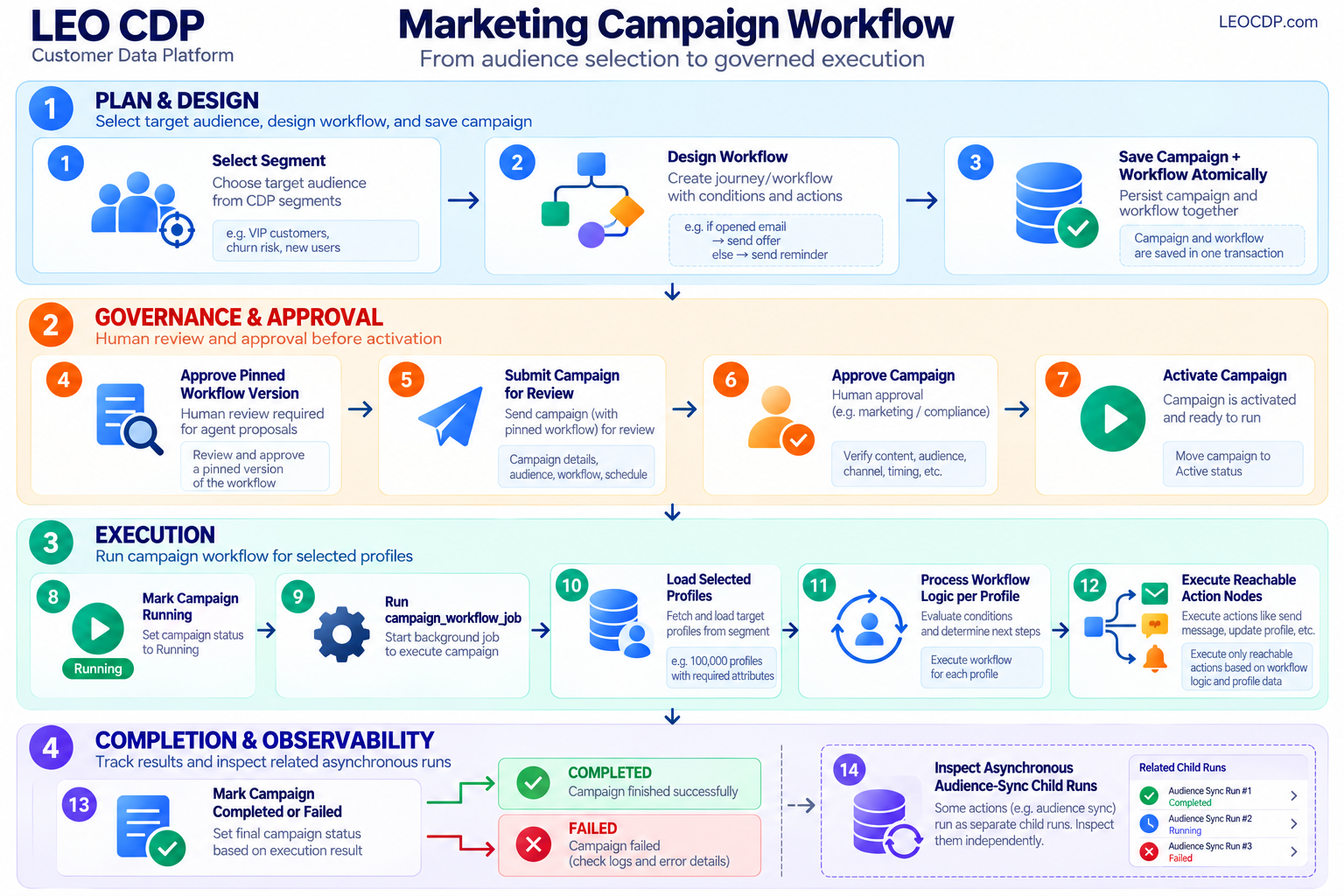
The only executable campaign path is:
Select segment
  -> design workflow
  -> save campaign + workflow atomically
  -> approve pinned workflow version (human review for agent proposals)
  -> submit campaign for review
  -> approve campaign
  -> activate campaign
  -> mark campaign Running
  -> run campaign_workflow_job
  -> load selected profiles
  -> process workflow logic per profile
  -> execute reachable action nodes
  -> mark campaign Completed or Failed
  -> inspect any asynchronous audience-sync child runs separately
Activation requires all five conditions:
- A selected
segment_id. - A pinned
workflow_id. - A pinned
workflow_version. crm_campaign.approval_status = 'Approved'.crm_flow_version.approval_status = 'Approved'.
The segment must belong to the tenant, be active, have computed membership
(status_code = 1), and have a segment_tag. Its ID must match the workflow
root’s config.segment_id. Activation is tenant-admin protected and rejects
campaigns already Running, or Completed without an explicit replay request.
crm_message_templates is an independent AI-agent messaging/template
system. crm_campaign has no template_id and no direct foreign key to
crm_message_templates.
Campaign metadata
The campaign editor persists these campaign fields:
| Field | Database field | Purpose |
|---|---|---|
| Campaign code | campaign_code | Tenant-scoped internal reference |
| Name | name | Required campaign name |
| Operational status | status | Draft, Active, Running, Paused, Completed, or Failed; activation sets Running and the runtime sets Completed/Failed |
| Channel | channel | email, notification, push, or audience_sync; existing legacy values are preserved when editing |
| Platform | platform | Provider/platform matching the selected channel |
| Language | lang | Planning and content locale |
| Description | description | Campaign description |
| Keywords | keywords | Search/planning keywords |
| Start date | start_date | Planned start |
| End date | end_date | Planned end |
| Budget | budget_amount | Campaign budget |
| Currency | currency | Budget currency |
| Objective | objective | Awareness, Leads, Conversions, App Install, or Visit Store |
| Strategy summary | strategy_summary | Human description of the intended journey |
| Planning constraints | planning_constraints | Hard constraints for the planning agent |
| Owner | user_id | Authenticated campaign owner |
| Audience | segment_id | Selected Customer 360 segment |
| Workflow | workflow_id | Persisted workflow identity |
| Workflow version | workflow_version | Immutable version pinned to the campaign |
| Approval state | approval_status | Draft, InReview, Approved, or Rejected |
| Approval actor/time | approved_by, approved_at | Human approval evidence |
| Agent plan | ai_plan | Generated planning result and agent output |
| Metadata | metadata | Additional campaign metadata |
The editor implementation is:
The editor does not expose a campaign template ID. The planning constraints
field is persisted as crm_campaign.planning_constraints; it is not silently
dropped from the form.
Channel and platform are campaign metadata, not substitutes for action-node
configuration. Notification platforms are sms, zalo_oa, whatsapp, and
mobile_native; audience platforms are meta_ads, google_ads, and
tiktok_ads. Start/end dates are planning metadata, not a runtime scheduler.
Workflow design contract
The workflow studio is embedded by the campaign editor and stores schema
version 2 workflow JSON. The node catalog is defined in
workflow-core.js.
Input and logic nodes
| Node | Persisted type | Behavior |
|---|---|---|
| Event trigger | trigger | Root node; records the audience and intended entry event |
| If / else | condition | Evaluates a profile field and chooses yes or no |
| Wait / Delay | wait | Advances virtual journey time |
| Wait for event | wait_event | Queries an already-available linked event in the virtual journey window, then selects happened/timeout |
| Goal / Exit | exit | Ends the profile journey as goal or exit |
Action nodes
| UI action | Persisted type | Node configuration | Runtime |
|---|---|---|---|
| Send email | email | subject, body | Sends the rendered subject/body to the profile’s email |
| Send notification | notification | provider, body | Sends through sms, zalo_oa, whatsapp, or mobile_native |
| Send web push | push | title, body | Sends the rendered title/body to the profile’s push tokens |
| Update profile / tag | update_profile | action, tag | Adds or removes a segmentation tag in cdp_master_profiles |
| Sync custom audience | run_data_synch_job | platform, audience_name | Requests a campaign-scoped export only if at least one profile reaches this node |
The current frontend studio, DAO engine, API, and canonical SQL support these node types. API and engine validation enforce the configuration and graph contract; SQL constraints are not a replacement for application validation. Both branches of conditions and event waits are required. Message fields must be non-empty strings, numeric values must be finite, and unsupported template variables are rejected. The campaign editor validates through its embedded studio API before sending a save request.
The notification provider is separate from the persisted node type. A
notification node with provider: "sms" targets the SMS connector; changing
the provider does not change the workflow node type.
Supported condition fields are real cdp_master_profiles fields:
engagement_scorechurn_probabilitylead_conversion_probabilityhistorical_clvpredictive_clvlatest_nps_scoreaverage_csatoverall_sentiment_scoreprofile_completeness_scoreidentity_confidence_scoresegmentation_tags
Numeric fields support ge, lt, and eq. Tag membership supports has and
hasnt. A null numeric value never matches and takes the condition’s no
branch. The editor, campaign API validator, DAO engine, profile query, and
browser profile adapter use this same field contract. status_code is not a
marketing condition: active profiles are selected before graph execution.
Message templates support the runtime variable {{first_name}}. Campaign
workflow messages do not use crm_message_templates.
Execution and simulation limits
The studio’s Check Flow button validates the graph and runs a local preview;
it never activates the campaign. The Simulation tab labels modeled
deliveries, engagement, conversions, and value as simulated, not real campaign
performance. Results cover only loaded sample profiles and use virtual time.
Actual execution and reporting remain in Campaign details. The existing
run() plugin method and onRunCampaign callback names remain compatible;
their result is still a local simulation, not a delivery receipt.
The backend is a segment-based batch executor, not a frozen-audience or durable, event-driven journey scheduler:
- At workflow start, the runner queries active profiles whose current segmentation tags contain the selected segment tag, in UUID keyset pages. It does not materialize an immutable membership snapshot or guarantee a single database snapshot across every page. The trigger event describes the journey but does not subscribe to or filter future customer events.
- Wait nodes advance virtual elapsed time without sleeping or scheduling a later task. Messages after a wait can therefore be sent during the same run.
- Event waits query linked raw events between the run start plus the current virtual offset and the end of the configured window. They do not suspend and resume when a future event arrives; an event not available at query time takes the timeout branch.
- Browser simulation uses estimated engagement/conversion outcomes, not actual provider receipts. Its selected-profile adapter preserves numeric condition fields, treats missing values as non-matches, and applies explicit consent when calculating message reachability.
UAT can verify segment-based batch execution, graph traversal, persistence, and logging-only actions. Real-time enrollment, durable delays, and future-event resumption are not implemented and must not be accepted as working scheduling features.
Save and review APIs
The campaign editor saves campaign metadata and the workflow in one transaction:
POST  /api/v1/campaigns/with-workflow
PATCH /api/v1/campaigns/{campaign_id}/with-workflow
GET   /api/v1/campaigns/{campaign_id}/workflow
Implementation:
The save transaction:
- validates tenant ownership and the selected segment;
- validates workflow structure and audience alignment;
- saves an immutable workflow version;
- pins
workflow_idandworkflow_versiononcrm_campaign; - commits campaign and workflow together.
Running campaigns cannot be edited through the workflow save API. Edits to approved campaigns go through campaign draft governance and require review again. An unchanged workflow payload retains its existing pinned version.
The saving user must exist in the active tenant. After resetting/reseeding the
database, sign out and sign in again: a previously issued token can contain a
deleted user ID. The update API validates this before saving any workflow
version and returns 401 for an invalid actor. Do not remove the workflow
creator/reviewer foreign keys to work around stale authentication; later draft
and audit checks require the same tenant user.
Agent-authored workflow versions start InReview. A human tenant admin
reviews them through:
POST /api/v1/workflows/{flow_id}/versions/{version}/reviewUser-created workflow versions are approved immediately by the persistence
rules. An agent proposal must be reviewed by a human other than the initiating
user. A workflow version cannot be published or executed until its approval
state is Approved; campaign execution uses the pinned version rather than
requiring it to be the flow’s published live version.
Approval and state-management UI
Keycloak platform_admin is root-equivalent in both frontend controls and
server authorization, including System Users root-role assignment. Roles are
read from top-level, realm, and client role arrays. This does not bypass tenant
scoping, valid local user membership, or the prohibition on reviewing one’s
own agent proposal. Other administrator roles retain their existing tenant
permissions and are not implicitly promoted to root.
The campaign details page separates campaign approval, pinned-workflow approval, and operational execution into three visible state summaries. Manage state opens an accessible modal containing only the next actions available for the loaded state and user role: submit, workflow approve/reject, campaign approve/reject, or start. Each option explains its effect. Approval does not automatically start execution.
Workflow reviews and campaign rejection accept an optional reason; campaign approval does not expose a comment because its API does not persist one. Controls are disabled during submission to prevent duplicate requests. Errors remain inside the modal and preserve review text. Refresh state reloads server state and retains the selected details tab; the server remains the authority for permissions and transitions, including workflow self-review rules.
The State history tab shows newest-first campaign audit/review events,
recorded state transitions, actor IDs, local timestamps, and review reasons.
Filters select all activity, recorded state changes, or approval decisions;
raw before/after values remain available in expandable audit details.
Runtime execution transitions are written to sys_audit_log and can appear in
campaign history. Activation transitions are recorded with activation state
changes; the workflow runner’s final summary audit is best-effort and does not
replace the campaign result if audit persistence fails. Workflow-version
review events are not campaign review rows and may not appear in this campaign
history feed. History has its own refresh/error state; the UI does not invent
missing events or treat current state as historical evidence.
Activation API
The details page’s performance tab loads
GET /api/v1/campaigns/{campaign_id}/report, using the authenticated tenant.
Optional start_date and end_date filters are inclusive and apply to both
the summary metrics and grouped daily rows. An existing campaign with no
performance data returns zero metrics and an empty daily series; missing or
other-tenant campaigns return 404. An inverted date range returns 422.
Deploy the matching API and DAO together; the frontend no longer masks a
missing report route with a lifetime analytics search fallback.
The activation endpoint is:
POST /api/v1/admin/campaigns/{campaign_id}/activate
POST /api/v1/admin/campaigns/{campaign_id}/activate {"restart": true}
The second form explicitly replays a completed campaign. Each replay creates a
new workflow_execution_id; there is no restart-count limit. The replay runs
the pinned workflow against the current selected segment. Previously successful
message actions can send again, so the state modal requires an explicit
duplicate-delivery acknowledgement. Verify providers, consent, segment contents,
and business approval before replaying. A failed execution uses its existing
execution ID for retry and does not replay actions already completed in that
execution.
The Manage state modal offers this replay only for completed, approved campaigns with an approved pinned workflow. It requires acknowledging that successful messages can be sent again. Running campaigns cannot be activated again. Failed executions use Start campaign to retry the same execution ID.
The API checks tenant-admin authorization, tenant ownership, human campaign
approval, active/computed audience, and the exact pinned workflow version’s
approval before submitting Dagster. It returns 409 for a campaign that is not
ready, already Running, or Completed without an explicit restart request,
and 404 for a missing or other-tenant campaign. The implementation is:
The API returns the activation Dagster run ID. It does not load profiles or send messages inside the HTTP request.
Campaign CRUD reads are not response-cached: Refresh must reflect asynchronous Dagster status updates immediately. The browser discards obsolete detail/report responses after a newer refresh or navigation. The workflow iframe is updated in place; refreshes while it initializes queue the latest saved workflow.
Dagster and backend execution
Dagster definitions are in
dagster_defs.py.
campaign_activation_job
activate_campaign_op calls
activate_campaign():
- Load and lock the campaign row in the tenant RLS context.
- Check campaign approval.
- Check workflow version approval.
- Check that the selected segment is active and computed.
- Set
crm_campaign.status = 'Running'. - Submit
campaign_workflow_job.
If Dagster submission fails, activation marks the campaign Failed rather
than leaving it permanently Running.
campaign_workflow_job
run_campaign_workflow_op calls
run_campaign_workflow():
- Load a
Runningcampaign, or aFailedcampaign during retry. - Verify the run’s
execution_idstill matches the campaign’s persistedworkflow_execution_id, preventing an obsolete child run from executing. - Load the pinned workflow with
crm_load_flow. - Validate the workflow with the DAO
FlowEngine. - Read active profiles whose
segmentation_tagscontain the selected segment’ssegment_tag, using keyset pagination. - Build a profile execution context for each profile.
- Evaluate triggers, conditions, waits, and event waits.
- Execute reachable email, notification, push, and profile-tag actions; collect reached audience-sync node IDs.
- Record provider outcomes and errors.
- Submit audience-sync jobs for reached targets only and mark the campaign
Failedif any profile errored, otherwiseCompleted. - Return
profiles,sent,skipped,applied,errors,execution_id, anddata_sync_run_ids, alongside campaign and tenant IDs.
Email, notification, and push connectors are resolved from active tenant
crm_connector_config rows first. If there is no active tenant EMAIL row, an
explicit EMAIL_DISPATCH_ADAPTER of smtp or mock supplies the email
fallback; an unset adapter leaves email unconfigured. SMS, chat, and push have
no environment fallback. Missing explicit channel consent is skipped:
communication_preferences.email_opt_in == truecommunication_preferences.sms_opt_in == truecommunication_preferences.push_opt_in == true
Email requires email consent and an email address. SMS, Zalo OA, and WhatsApp notifications require SMS consent and a phone number. Mobile-native notifications and web push require push consent and push tokens. Missing consent/contact skips the action before calling a gateway.
Send notification providers
The Send notification node stores a provider configuration:
| Provider | Connector | Recipient data |
|---|---|---|
sms | connector_type = 'SMS' | phone_number |
zalo_oa | connector_type = 'CHAT', provider ZALO | phone_number |
whatsapp | connector_type = 'CHAT', provider WHATSAPP | phone_number |
mobile_native | connector_type = 'PUSH' | push_tokens |
zalo_oa and whatsapp use the configured connector webhook_url. The
mobile_native provider uses the configured mobile notification API (for
example OneSignal) and the profile’s native subscription tokens. Provider
credentials remain in connector credentials JSONB; the workflow never
stores provider secrets.
Existing notification workflows without provider remain valid and default to
the sms provider in the DAO/backend. The studio’s current notification
configuration includes an explicit provider.
Missing providers and logging-only UAT
| Configuration | Behavior | Evidence |
|---|---|---|
No active tenant EMAIL connector, with no explicit EMAIL_DISPATCH_ADAPTER fallback | Log the node and return skipped; make no network call | Action ledger Skipped; summary sent is not incremented |
No active tenant EMAIL connector, with EMAIL_DISPATCH_ADAPTER=smtp | Use the configured SMTP_* environment fallback (local DEV uses Mailpit) | Action ledger records SMTP provider and outcome |
| No active SMS/CHAT/PUSH connector | Log the node/channel and return skipped; make no network call | Action ledger Skipped; summary sent is not incremented |
| No active ADS connector for a submitted audience export | Complete a logging-only dry run; do not call an adapter | dry_run = true, uploaded_count = 0, reason = provider_not_configured; reason also stored in audit metadata |
Explicitly configured message connector with provider mock | Simulate a successful send without a network call | Mock provider ID and action ledger Sent |
| Configured provider fails or has invalid settings | Report failure explicitly; do not disguise it as a dry run | Failed action/run and error evidence |
Leave connectors absent for logging-only UAT; a configured real connector can
send real messages. Missing-provider logging excludes raw recipient/message
content. Provider-call exception logs contain the channel, node, and error type;
the action ledger retains detailed errors for restricted troubleshooting.
SMTP reads the API-managed password from credentials.password, with
smtp_password retained for legacy compatibility.
Audience-sync scope and completion
After the profile pass, the runner submits one data_synch_job per unique
platform/audience-name pair reached by at least one profile. Unvisited branches
and empty segments submit no exports.
The child job reloads the whole selected campaign segment, not just profiles that took the branch. It filters inactive profiles, invalid identifiers, and active global/campaign suppression entries, then normalizes and SHA-256 hashes identifiers before upload. It does not infer a provider-specific advertising consent policy from message opt-in flags.
The campaign can be Completed while an audience child job is still running or
later fails. data_sync_run_ids are submission IDs, not proof of upload success.
Inspect the child Dagster run and crm_ad_sync_runs separately. See the
audience-sync service guide.
Workflow audience submissions include their execution ID in the sync audit key, so full replays preserve earlier audit rows. Existing external audience IDs are reused for the same target. A session advisory lock serializes concurrent jobs for the same tenant/campaign/platform/audience.
Database model
The canonical schema is
database-schema.sql.
Campaign workflow tables:
| Table | Role |
|---|---|
crm_campaign | Campaign metadata, owner, segment, workflow pin, approval state, planning fields |
cdp_segments | Selected audience definition and membership tag |
crm_flow | Workflow identity and lifecycle |
crm_flow_version | Immutable workflow JSON snapshot and governance state |
crm_flow_node | Shredded workflow nodes for queries |
crm_flow_edge | Parent/child workflow edges |
crm_campaign_workflow_action_runs | Per-execution/profile/node action idempotency and provider results |
crm_ad_sync_runs | Campaign-scoped audience-sync audit state |
cdp_master_profiles | Profiles loaded into workflow execution |
cdp_raw_profiles_stage | Raw events used by wait-for-event execution |
cdp_profile_links | Raw-to-master profile event linkage |
crm_connector_config | Tenant provider configuration |
crm_suppression_list | Global and campaign suppression rules |
crm_campaign_reviews | Campaign human approval history |
The canonical schema is the source of truth for fresh initialization and the workflow upgrade definitions. An existing database must receive the current:
- campaign
workflow_id,workflow_version,workflow_execution_id, andplanning_constraintscolumns, paired-null check, and tenant-scoped workflow-version foreign key; - workflow author/review columns, constraints, and immutable-snapshot triggers;
- eight-argument
crm_save_flowand current review/publish/load functions; - notification/audience-sync node-type constraint and node view;
- per-execution action-ledger key migration and audience-sync audit tables.
The execution-ledger migration retains existing action rows by assigning them to one legacy execution per campaign. Apply the schema before deploying the replay-capable API and Dagster code; old worker code cannot process the new execution identifier configuration.
Dropping the legacy five-argument crm_save_flow overload alone is not enough.
Do not drop/recreate a populated database merely to update workflow definitions.
The node-type constraint upgrade preserves immutable legacy projections with
NOT VALID while enforcing the current node catalog for new writes; it does not
convert old sms workflow snapshots into runnable notification nodes.
Stop old campaign workers before applying the execution-ledger migration; deploy the matching DAO, API, campaign activation, and data-sync code together. Install the current DAO checkout in API/backend environments and restart the applications and Dagster code locations after applying the schema. SQL verified inside a rolled-back transaction does not mean the deployment has been upgraded.
Idempotency and failure behavior
Per-profile email, notification, push, and profile-tag action idempotency is keyed by:
campaign_id + workflow_execution_id + master_profile_id + node_idThe runner uses a PostgreSQL advisory lock for that key to serialize competing
message attempts. A campaign-wide session lock also prevents overlapping
workflow workers from interleaving profile changes or completion status. Queued
restarts are checked against the execution ID observed at request time so an
obsolete request cannot start a second replay after the first finishes.
Rows already Sent, Applied, or Skipped are not retried within the same execution; failed
attempts increment the attempt count. Tag updates are recorded as Applied
with action/tag metadata, and are also retried only if their ledger row is not
already complete. Consequently, configuring a provider later does not replay
logging-only skips until an explicit completed-campaign replay creates a new
execution. A replay re-evaluates current branches and current segment
membership; it is a new pass, not a per-profile resume checkpoint.
This is not an exactly-once delivery guarantee: a process crash after provider acceptance but before ledger completion can leave an uncertain outcome.
A failed delivery stops downstream nodes for that profile, increments the
profile error count, and makes the campaign Failed; other profiles continue.
Previously committed actions are not undone. Per-profile errors are returned
in the workflow summary and may coexist with a successful Dagster op result;
inspect campaign status and errors, not only Dagster’s run color. Profile
actions and ledger updates commit as they execute, so a later failure does not
atomically roll back earlier side effects for that profile.
Workflow-level exceptions are raised to Dagster and mark a loaded campaign
Failed. Missing/completed campaigns are not changed to Failed merely because
another execution was attempted.
UAT checklist
- Apply the required schema definitions, install the matching DAO, and restart
the API/frontend and Dagster code locations. Confirm both
campaign_activation_jobandcampaign_workflow_jobare available; includedata_synch_jobwhen testing audience export. - Use a dedicated tenant and active, computed segment with test profiles. Leave outbound connectors absent. Give selected profiles explicit consent and contact data so tests reach the missing-provider gateway path; also include profiles without consent to test the earlier skip.
- Save and reload a workflow with both condition branches, messages, a tag action, and optionally an audience-sync node. Confirm the audience, node configuration, and pinned version survive reload.
- Verify incomplete branches, blank messages, non-finite numeric values, and unknown placeholders cannot be saved. Verify running campaigns cannot be edited and other-tenant campaign IDs cannot be loaded or activated.
- Submit and approve the campaign; for agent proposals, have a different human admin approve the pinned workflow first. Confirm activation is refused before these approvals and for already running campaigns. A completed campaign without the explicit restart flag must also be refused.
- Activate and inspect both activation and child workflow runs. Expect message
skips rather than sends, expected tags/branches, zero errors for the happy
path, and final campaign
Completed. Empty audiences should produce zero profiles and no sync submissions. - On a completed test campaign, use Restart campaign and confirm the duplicate-delivery acknowledgement. Verify a new execution ID and ledger rows are created while previous execution rows remain. Repeated restarts are allowed; use mock/test providers or a dedicated test audience because real providers may send messages again.
- Inspect reached audience-sync child runs separately: absent ADS configuration must yield a dry run and zero uploads. An unvisited sync branch must not submit a job. Remember that a reached branch exports the whole segment.
- With a test-only configured provider, exercise a delivery failure. Confirm the action and campaign fail, downstream nodes for that profile do not run, and other profiles are still processed. Inspect retry attempts and ledger skips without assuming exactly-once external delivery.
Regression coverage
- Campaign API contract tests: atomic save/load, running-edit guard, and all current studio recipes validated against the API and executed by the DAO.
- Activation API tests: tenant ownership, approval/pin checks, and running/completed guards.
- Backend workflow tests: logging-only actions, SMTP credentials, event lookup, branch-scoped sync submission, and per-profile failure isolation.
- Rollback-only PostgreSQL UAT tests:
real execution-ledger retry/replay, worker exclusion, repeated activation,
raw-event lookup, tag writes, and provider-free audience export audit rows.
Enable explicitly with
CAMPAIGN_PG_UAT=1; no schema or fixture data is committed. - DAO engine tests and PostgreSQL persistence tests: graph execution, validation, round trips, and governance.
- Frontend regression tests: profile/consent mapping, validation, simulation, and iframe-aware saving.
Run frontend regressions from the repository root:
node --test customer360-frontend/tests/workflow.test.jsDeployment-level activation E2E tests
require E2E_BASE_URL; real activation also requires the suite’s opt-in campaign
configuration. Unit tests and rolled-back SQL checks do not replace a live UAT
run.
Explicitly outside this campaign flow
- Direct campaign-to-
crm_message_templateslinks. - Campaign template IDs in the campaign editor.
- Segment-wide email or notification dispatch.
- Campaign activation through
email_engine_jobornotification_engine_job. - Frontend-only approval or publish decisions.
- Cross-tenant profile access.